
Notifications
Clear all
Computers & IT
143
Posts
55
Users
28
Reactions
26.4 K
Views

Can someone point me in the direction of the case he maid for that mini machine he brought out?
I got a lenovo, monitor is basically dead, I want to take it apart to improve the thermals and use it solely on external display but the laptop is so big i want to chop it down.
Posted : 28/07/2026 11:43 am

I bought the board and it boots perfectly fine. The hdmi didn't output a signal, like suspected in the video, but the type C adapter does support a display output. I have not been able to get it to work and I've tried many different adapters that seem like they are compatible through what the manual says. Does anyone know any troubleshooting that I would be able to try to get a display working?
This post was modified 3 months ago by cocopop18
Posted : 28/07/2026 9:05 pm

@bigshot You could glue little cylinders of various materials (I once used tiny sections of a plastic coat hanger as stand-off mounts/PCB pillars) straight to the acrylic, and then screw into them. Just make sure that whatever you make these mounts out of, they're a material soft enough for self-tapping screws. Or, just in case you have a soldering iron, you could melt holes through the acrylic that match the motherboard's mounting holes and go from there.
My worktable is a site of frequent detonations. Please knock so I don't start a Lithium fire when you startle me.
Posted : 28/07/2026 10:16 pm

Hi all,
I actually have an old cracked imac here. I separated the screen from the internals, but before I peel the glass away, I wanted to ask about any means of protection for the bare LCD panel. I find it hard to see it surviving very long without some kind of screen protection or covering. Any thoughts or ideas?
Posted : 30/07/2026 4:10 am

Hi, could i do this using a 5 year old macbook air? I mean the smaller build, not the one with the display?
Posted : 30/07/2026 11:06 am
@waspsaremean once again, acrylic to the rescue. You can get really thin sheets of the stuff (1/16 of an inch, I think?) that I think would work pretty well as a screen protector. You'd have to find a proper way of attaching it to the screen without glue, of course, but it could be done--perhaps with a custom frame around the LCD panel edge? Also be careful not to get too many fingerprints on it after peeling off the protective wrap; that sort of ruins the "clear screen protector" element.
My worktable is a site of frequent detonations. Please knock so I don't start a Lithium fire when you startle me.
Posted : 31/07/2026 11:24 am
marcdraco reacted
would anyone happen to know what this sound is?
Posted : 31/07/2026 4:19 pm

@waspsaremean once again, acrylic to the rescue. You can get really thin sheets of the stuff (1/16 of an inch, I think?) that I think would work pretty well as a screen protector. You'd have to find a proper way of attaching it to the screen without glue, of course, but it could be done--perhaps with a custom frame around the LCD panel edge? Also be careful not to get too many fingerprints on it after peeling off the protective wrap; that sort of ruins the "clear screen protector" element.
oh NOW he says something!
thar woidl have saved Mr Bank M Anger £300 plus shipping.
GD wired fans
Also @waspsaremean they’re not until
the fruit starts falling, then they are mean drunks!
Take everything I say with a pinch of salt, I might be wrong and it's a very *expensive* way to learn!
Posted : 31/07/2026 4:28 pm
@marcdraco Are you talking about your Framework laptop screen? 🙃 Because I thought the whole panel was broken, not just the screen protector.
My worktable is a site of frequent detonations. Please knock so I don't start a Lithium fire when you startle me.
Posted : 31/07/2026 6:48 pm

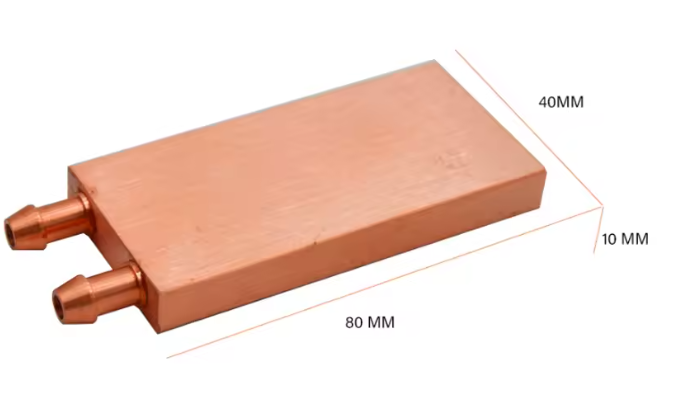
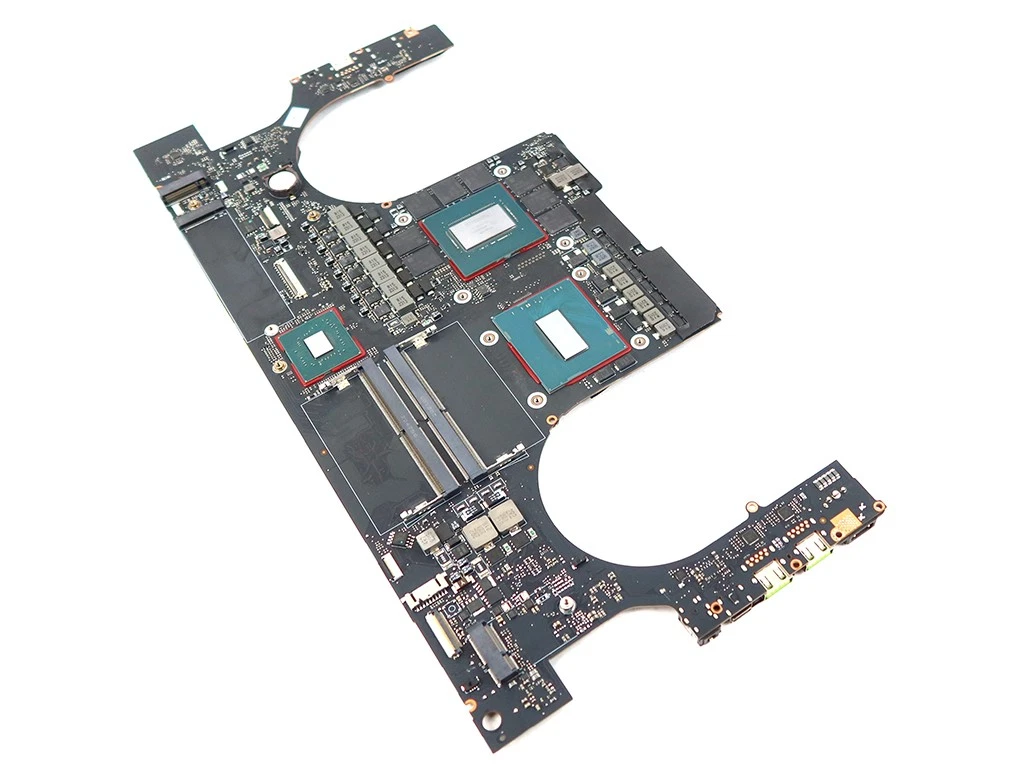
I was considering purchasing a motherboard with an rtx 4090 on it (available because of a failed vapor chamber) and I was looking for ideas to cool it on the cheap (less than ($150-200). Any thoughts? My initial idea was watercooling but I'm not sure if these cheap blocks on aliexpress would work, and I am trying to think of ideas to mount the things (probably a 3D printed case).
Posted : 31/07/2026 7:50 pm
@marcdraco You lost me half way through, man. Did you destroy a screen or something?
Posted : 01/08/2026 12:56 pm

@diyperks Hello, Matt, may I ask how long and did it take to find such a good deal? Also where did you find it ? I live in Slovakia and there are no such good deals here after searching for a long time.
Posted : 01/08/2026 5:30 pm

Dear community,
Apologies if I ask dumb questions, this is my first DIY project! The final minute of the laptop motherboard video really spoke to me, so I bought a motherboard (ASUS N56VM, used and advertised as working). I can turn it on using a separate button and an attached keyboard lights up. However, there is no HDMI output. My separate screen does “light up” and recognises that there is something going on but there is no actual image.
Does anyone have any idea on how to proceed? Might it need its internal screen to do anything? Should I install windows on an ssd and plug it in in the hopes that it works? All suggestions are welcome.
P.s. thank you to @DIYperks for making this video, I would have NEVER attempted anything like this without your channel. Learning a bunch!
Posted : 01/08/2026 8:41 pm
@marcdraco Are you talking about your Framework laptop screen? 🙃 Because I thought the whole panel was broken, not just the screen protector.
Yea. I needed a screen protector because I'm a clumsy oaf and too hot. 😉
Take everything I say with a pinch of salt, I might be wrong and it's a very *expensive* way to learn!
Posted : 02/08/2026 4:01 pm
@waspsaremean Yeah... Imp Inventor heard about it.
I'm so careful (usually) but it takes ONE slip..
Wasn't even a heavy desk fan, just some USB junk!
Take everything I say with a pinch of salt, I might be wrong and it's a very *expensive* way to learn!
Posted : 02/08/2026 4:02 pm
@waspsaremean Yeah... Imp Inventor heard about it.
I'm so careful (usually) but it takes ONE slip..
Wasn't even a heavy desk fan, just some USB junk!
Take everything I say with a pinch of salt, I might be wrong and it's a very *expensive* way to learn!
Posted : 02/08/2026 4:03 pm
@marcdraco Ahhh... 😀 Whoops.
My worktable is a site of frequent detonations. Please knock so I don't start a Lithium fire when you startle me.
Posted : 02/08/2026 9:50 pm
marcdraco reacted

@civilizayden that water block would take up a lotta space. use a flat heatsink from old servers, and drill custom holes to fit the board, use laptop fans to blow the air directly on the heatsink side, one heatsink for cpu and the other for gpu, check the gpu and cpu TDP to calculate the size of the heatsink required to cool.
Posted : 03/08/2026 4:14 am
marcdraco reacted
@basvos hopefully the ram is plugged in, the display should POST into BIOS even if there is no OS drive. do you have the integrated display to check whether it boots into BIOS? Hopefully this works:
To get a video signal during BIOS boot on an Asus N56VM motherboard without an internal display, you must bypass the motherboard's default display routing mechanism.
By default, the Intel HM76 PCH and BIOS firmware require an active internal panel connection (eDP/LVDS) to initialize the primary video pipeline during the Power-On Self-Test (POST). Without it, the system often halts video initialization entirely before sending a signal to the HDMI port.
🛠️ Hardware Workarounds to Force HDMI Output
- Use the VGA Port: Connect an analog VGA monitor to the laptop. Older Asus motherboards frequently fallback to the analog VGA port during POST if the internal display is missing, whereas the digital HDMI port requires a fully booted graphics driver to handle switchable multiplexing.
- Bridge the Lid Switch Sensor: Locate the magnetic Reed switch (hall effect sensor) on the motherboard—usually a small 3-pin or 4-pin IC near the power button or indicator LEDs. Shorting the sensor signal pin to ground fools the BIOS into believing the laptop lid is closed, forcing POST video output directly to an attached external monitor.
- Disconnect the Internal Display Cable Completely: Ensure the LVDS screen cable is completely unplugged from the motherboard connector. Leaving a damaged or partially connected cable can ground out the +3.3V or +19V backlight/logic power rails, triggering a short-circuit protection loop that kills all external video logic.
Posted : 03/08/2026 4:21 am
@muzammil17 Thanks! How would I calculate this, would a flat heatsink be able to cool a laptop 4090? And where do I find these old heat sinks you speak of? Also, don’t the VRAM chips and mosfets need heat sinks as well?
Posted : 03/08/2026 4:25 am
@civilizayden something like this, https://www.arrow.com/en/products/snk-p0062p/super-micro-computer-inc.html
Posted : 03/08/2026 4:30 am
found a lot 1u or low profile heatsink which might fit the laptop motherboards using a custom mount or custom holes, links:
https://www.titan-cd.com/en/product/TTC-NK52TZ.html
https://rapidaccu.com/heatsink/1u-heatsink/
https://akasa.co.uk/search.php?seed=AK-CC7111
https://www.titan-cd.com/en/product/TTC-CU7-Series.html
https://www.aliexpress.com/i/1005004467301536.html
https://www.arrow.com/en/products/snk-p0062p/super-micro-computer-inc.html
idk, if it will work, but worth a try. Edit: the aliexpress one looks promising.
This post was modified 3 months ago 3 times by Muzammil17
Posted : 03/08/2026 4:34 am
marcdraco reacted
@muzammil17 cool, thanks. Will give it a look in the morning at my computer.
edit: that aliexpress one does look promising, might order two. Custom enclosure it is. Also, what should I do about those other chips? Just put small heat sinks on them and a fan?
edit 2: my messages keep saying awaiting moderation so these may be getting sent in a different order relative to your messages.
edit 3: Just realized that AliExpress server cooler is 40x40mm and the 4090 laptop die is ~24.6 mm × 15.4 mm. Any ideas on how to disperse the heat, or will this just not work? It is a lot of heat in a small area.
This post was modified 3 months ago 6 times by civilizayden
Posted : 03/08/2026 4:35 am
@civilizayden The GPU VRAMs should be cooled with a separate heatsinks with a thermal pads in between, the server cooler has larger contact area, so it should easily fit the 24.6mm x 15.4 mm area and extract the heat a bit better, (correct me if i'm wrong). or is it cheaper to just buy the actual cooling unit which was made specifically for the laptop? you can look up dead ones of the same model, and extract the heatsink, you will have a donor laptop too for some components if they go bad.
Posted : 03/08/2026 10:02 am
@civilizayden can you share the exact model no. for the motherboard?, i was looking at the image you posted, i think you can only fit one of the cooler, as there doesn't seem to be much space to mount 2 of them.
Posted : 03/08/2026 10:06 am
Posted : 03/08/2026 10:10 am
@civilizayden you can use the above heatsink fins to make a custom heatsink, use a flat copper plate cut to size which covers both the CPU and GPU, and solder the fins on the perimeter of the copper plate, and use a low profile fan to blow air from the center to the fins and outside, make sure to use small copper strips to cool the inductors and the GPU VRMS. EDIT: OR just slap one of these heatsinks: https://www.aliexpress.com/item/1005005982538025.html
EDIT 2: just google searched the image, the motherboard seems to be the Razer Blade 16 2023, which had the vapor chamber issue, and the heatsink....damn that covers almost the whole motherboard lol, it looks easy to DIY, as it is a flat copper plate, with drilled holes, and two copper fins (which i shared the aliexpress link), it "should" be easy to DIY the Heatsink (depending on the skills and tools).
This post was modified 3 months ago 2 times by Muzammil17
Posted : 03/08/2026 10:13 am
@muzammil17 yeah, you got the model right. It’s actually the full laptop that I’m getting, reason it’s so cheap is cause of the failed vapor chamber. If there are any parts from the original cooling system that could be useful I’ll try to use them since I have them, but don’t know how much good they will be because of the failed vapor chamber. If I just put a big copper plate on it, won’t the chips get too hot before the heat is able to dissipate? I’m still new to this idea and to any sort of metalwork so that’s why I’m asking, trying to decide if I want to take on this project. Also, what should I do if the CPU and GPU dies aren’t on the same level? And where can I find copper inexpensively?
Edit: I really wish I had the time to wait for the new diyperks video where he’s probably gonna solve similar problems to this lol. Too bad I found a good deal
Edit 2: looks like I’m gonna be able to wait for that video, the laptop finally sold and that’s the best deal I’ve seen in a few months. I guess I’ll just have to keep looking.
This post was modified 3 months ago 2 times by civilizayden
Posted : 03/08/2026 3:32 pm

Hi DIY Perks community,
This is my first DIY project working with things this complex. I thought it'd be a good introduction to some more complicated electronics to learn some more. Also, I was looking at getting a steam machine but really didn't want to shell out what valve was asking for. Making a little gaming box from an old laptop seemed like a no brainer.
I purchased an MSI GS75 Stealth 9SG motherboard, with included fans and heat sinks. Confirmed working by the seller and confirmed thunderbolt 3 displayport output usb-c port. I was able to acquire a 180W power supply for the board. I thought the board having a daughter board for the power button would make things easier but the smaller ribbon-cable connector definitely made it challenging.
I was able to get the board to boot (fans spinning and getting warm to the touch) but I cannot get a video signal from either the usb-c or the HDMI ports.
Seems like I have a similar issue to @basvos. Does anyone have experience with MSI laptop boards that has some advice?
Thanks in advance for any assistance!
Posted : 03/08/2026 10:28 pm
Thank you for your suggestions! After consulting Reddit for this issue too I tried many different things, reseating RAM, trying to find the lid switch, switching outputs using the Fn keys.
I eventually harvested an old HDD with Linux Mint installed from a laptop and plugged it in. This worked! So if anyone has a similar issue it is worth trying to plug in a drive with a pre installed OS.
Posted : 04/08/2026 9:23 am
Muzammil17 reacted