
Notifications
Clear all

is it normal that the drain and source pins on the transistor make contact? if yes how does he check the polarity of the thin copper wires when soldering them to the actual audio cable?
Posted : 19/01/2026 5:11 pm

Its been a few weeks since I last posted anything here.
I thought I would provide an update. I could not figure out what was wrong with the other board unfortunately, I gave it an hour or so and I could not for the life of me figure out where the issue was. So I ended up de-soldering all of the components except for the resistors and DIP socket and just remaking it on a new board, which in hindsight was a great idea as it made the whole board much cleaner and it fixed my zero-noise issue.
Unfortunately I have a new issue now, however I think I can probably fix it this time. I think I need to just redo the connection between the capsule and the cord on the arm where the solder braid is.
By touching where it joins I can make it make some interesting noises, and I think there is probably something loose inside of it where I spliced the cable to the solder braid. I can hear my voice fine (sometimes) and a few times it has been pretty clear audio. For the enameled wire I just used wire from an old car relay I had for some reason, and since I am going to remake this part I ask the question: How thin is too thin? My wire measures around 0.1016mm (.004" with my 1" micrometer) and I am wondering if maybe Its a tad too small. I can easily source a slightly thicker wire if it is thought a good idea.
Also, I have attached a few pictures of the board, the wire, and the 'finished' microphone just in case you wanted to see it. I have also added an audio clip, where I first turn the gain select switch up higher and higher, then after I speak for a second I start pinching the connection I referred to above. As usual I am happy for any feedback you may have and am curious if you would agree with my thoughts on what to try next.
Thanks!
![20260102 155900[1]](https://forum.diyperks.com/wp-content/uploads/wpforo/attachments/2932/2334-202601021559001.jpg "20260102 155900[1]")

![20251224 173206[1]](https://forum.diyperks.com/wp-content/uploads/wpforo/attachments/2932/2335-202512241732061.jpg "20251224 173206[1]")
![20260102 153341[1]](https://forum.diyperks.com/wp-content/uploads/wpforo/attachments/2932/2337-202601021533411.jpg "20260102 153341[1]")
![20251221 183413[1]](https://forum.diyperks.com/wp-content/uploads/wpforo/attachments/2932/2336-202512211834131.jpg "20251221 183413[1]")
Posted : 20/01/2026 2:34 am
marcdraco reacted

is it normal that the drain and source pins on the transistor make contact? if yes how does he check the polarity of the thin copper wires when soldering them to the actual audio cable?
The drain and source aren't special on this particular part. It's as easier to think of them as a three terminal device with only the GATE having to go in the right place. The other two leads (which aren't shorted!) provide a route for the current to follow.
Take everything I say with a pinch of salt, I might be wrong and it's a very *expensive* way to learn!
Posted : 20/01/2026 6:10 pm
@guinea First of all, bravo dear boy. That puts mine to shame I can tell you!
I think there might be a tiny short in there but you can use any screened cable you can get in there. The diameter of the twisted pair isn't particularly problematic, thinner wires might look nicer but they're a nightmare to work with.
I'll let you in on a little secret - you don't *need* to screen the interconnect, but it's a good idea if you do. The three wires twisted together (and they can be normal cable) can run a metre or so without picking up a huge amount of RF (which is going to be mains hum and its harmonics).
I've done this with a variety of designs and it seems to work - at least it's good enough to test stuff and see that a voice is coming out and it's not distorted. You can deal with the mains hum (if present) afterwards!
Take everything I say with a pinch of salt, I might be wrong and it's a very *expensive* way to learn!
Posted : 20/01/2026 6:16 pm

I want to make this project on a copper clad board do you have the diagram to do this? and can you use a 600k pot for the gain
Posted : 23/01/2026 2:24 am
@autismdad There's the open source one I did (probably a couple of pages back now) the Perks Alpha which has a couple of minor improvements. A guy did one years ago that looked interesting but it's WAAAAY back.
Sorry, yes you can use a pot but you obviously are going to be cognisant of volume. Once you're comfortable with the gain you can put a fixed value in there. Probably a few hundred ohms.
This post was modified 9 months ago by marcdraco
Take everything I say with a pinch of salt, I might be wrong and it's a very *expensive* way to learn!
Posted : 23/01/2026 11:33 am
@marcdraco https://www.computersense.co.nz/forums/showthread.php?tid=209&pid=365 this link is broken
This post was modified 9 months ago by marcdraco
Posted : 28/01/2026 1:17 am
I've emailed them. Is it Oz's Gebers you were looking for?
Take everything I say with a pinch of salt, I might be wrong and it's a very *expensive* way to learn!
Posted : 28/01/2026 9:43 am

so as a general summary, what current versions are known to be atleast mostly working if someone where to attempt to produce one currently? , main concern for myself are ones that can use the "JLI-2555B" capsule, and if possible avoiding additional dac units bodged on.
whilst having little information this is one of the most interesting options i have seen for this project online https://www.pcbway.com/project/shareproject/Diy_high_quality_microphone_3e0fba85.html
Posted : 25/02/2026 6:22 pm
DAC?
I don't have Altium so I can't really comment.
V2 (the one I did) is 32-bit digital with a 16 bit USB out. That works with the JLI-2555. It depends what you want to do. That looks competent from what little I can see though.
Take everything I say with a pinch of salt, I might be wrong and it's a very *expensive* way to learn!
Posted : 25/02/2026 9:02 pm

@marcdraco Hey! Im currently researching on to build a diy mic, but i cant seem to find the V2 circuit anywhere. Also im scared of that 50hz "hum", what did you guys do? is it really a problem?.
Posted : 26/02/2026 4:28 pm
50Hz. Very serious potentially.
The V2 is complete save for some tweaks which I haven’t had budget to complete. Each run is quite expensive so I have to be careful not to try too much at once.
I think it’s superior to anything in the wild for home builders (not because it’s mine) simply because it wraps everything in the best parts generally available to the mass market.
The Italian one you saw. I suspect, uses it he 2902’s ADC which, while competent, is really intended for headset mics.
This was designed from the ground up to give the best bang for your buck beyond putting a great capsule and JFET in there. Also the JFETs we use need way more than 5V and it has to be rock solid.
USB derived power is 5V and noisier tha a bunch of drunken teenagers on Spring Break.
I found that, late in the game, by looking in the wrong place.
IF you want one I can fire you the design files. JLC PCB will even made it for you.
It has stereo I2S out at 32 but or mono at 16 bit. A limitation of the USB chip I’m afraid.
Take everything I say with a pinch of salt, I might be wrong and it's a very *expensive* way to learn!
Posted : 26/02/2026 6:52 pm
@marcdraco if you could please send me the relevant v2 files as well it would be appreciated, dependant on cost I should be able to give it a crack as have most of the standard components lying around already
Posted : 27/02/2026 6:25 pm
Hard to be exact (not meaning to be vague) but the cost can vary depending on the number you want - minimum of 2. It CAN be made at home but it’s not something I would attempt as those 0402 parts are little bigger than a fly’s eyball
Shipping and taxes are variable.
A couple of parts are optional and so on. Depends on your level of experience. The current one might need some changes to small resistors which are a bind.
Take everything I say with a pinch of salt, I might be wrong and it's a very *expensive* way to learn!
Posted : 27/02/2026 9:59 pm
@marcdraco thanks for the heads up on smt component size, 402 is the smallest im comfortable working with so should be good (aslong as theres no 201 or below we chilling)
Dont want to pester but any chance of getting the files and any pcb making specs to select on jlc/pcbway, as mainly do repairs / technician work so not to experienced with actual manufacturing specs for them, any and all information would be much appreciated
understand if your not comfortable sending the files tho
Posted : 27/02/2026 10:42 pm
A belated Happy Birthday to DIY Perks which was 14 yesterday.
@eman - sorry, that was my fault, I'm decorating and when I stripped some wallpaper the radiator fell off the wall. Which put me into "Oh dear - how did that happen and why are my feet wet" mode. Anyway, during the fix, the Aldi charger blew and took the main breaker with it and ---- guess who wished he'd bought that UPS now.
OOOO yeah.
Anyway, you seem to know your way around this stuff so he're a version (badly in need of clean up) which has a few of my minor tweaks from the original V2 that Matt and I have. I've added a better grounding strap point (needs ONE and only one) but I've left my own notes in there so you can see how I abuse myself. 😉
KiCAD will throw some weird errors - most of which can be safely ignored, even the red ones about edge clearances because they are due to tight tolerances in things like the USB-C socket. Those things are horrible to work with.
I would also STRONGLY caution you check the catalog numbers when you upload to JLC. Some might be off - and that's never good. I usually do all these fixes before we go public but Matt's been busy trying to bounce lasers off the moon or something - so it's been sat here waiting while I write the 2-volume (yes really!) book on how this all works. You won't need either. The first is semiconductor physics and the second covers basic electronic design up to and including the full Michelle 4 build (this is 3.5 as some bits are still need in my head - as you will see). BUT it does work and it blows away anything you could get for this money commercially due to power decoupling through two LDOs, decent INAs and a pretty decent digitiser. All available from JLC stock.
I'm tempted to use the earlier model of the USB-bridge. This one generates the internal timing from the USB signal. The earlier one use a Xtal which is more stable. The question is more about how long that chip will remain available.
The IC has multiple functions that we can't access because "trade secrets" and CMI isn't saying. I've dropped some of the operations because they aren't useful here.
Digital out is via I2S so the connections are quite critical. They are shorted by 0R resistors - which are deliberately placed in the way of header so no one forgets to remove them! 🙂
Marc
Take everything I say with a pinch of salt, I might be wrong and it's a very *expensive* way to learn!
Posted : 01/03/2026 11:43 am
@marcdraco Thanks for the reply, i've downloaded the zip and have taken a look inside it (no errors in KiCAD btw) and its official: the basic idea of electronics i have is not even close to understand how to get a working board out of these designs. But nevertheless i would take the risk if i knew what to send to the manufacturers because my circuit building skills are shamefull and im pretty scared of that 50hz noise. What is to expect from this design? are "inputs" and "outputs" of the board just as the original video board and can i just solder it or is there much more? Also has anyone any idea of where in EU is the best to manufacture it?
Posted : 01/03/2026 9:02 pm
Pricewise, the Chinese are your best bet. JLCPCB is my go to but there are others like PCBWay.
Inputs and outputs aren't clearly marked on the board as it's a pre-release V2. Normally you wouldn't need them because it's actually quite simple.
One thing that you absolutely MUST get right is the board type. It HAS to be 4-layer impedance controlled (the correct JLCPCB code is on the PCB layout page). If you get that wrong there's a good chance the USB end won't work. Period. No second chances (I made that mistake myself and man that was expensive).
OK, so the input section (there are two because the board, up to the digital output) supports two channels.
The inputs are non-polar and you just wire a JFET (Drain -> Source) to one of each with a one of those little clips or a bit of wire if you're like me (cheap!) 😉
The output is either I2S (to drive digital devices like an ADAU1701 as Matt used in some of his builds) or something similar. That's not for the feint of heart due to the signal integrity mattering but it's dooable with short leads and a little care.
The "left" channel are the two leads at the top and the spare channel is the bottom two. The bottom section doesn't come with the INA because that's optional and most people will just want to use the board for a mono, desk or vocal mic. It's also quite an expensive chip - the most expensive on the board even though it's only a little 8-lead fella.
There are four resistors in the top right - those are spares. I suggest you swap two of them out for 680R as the 2N4416 needs a bit more current. The 2K2s are fine with general purpose electret capsules - the ones that come with a FET inside and you don't need extravagant screening for those either.
But if the parts are as in the BOARD (the catalog numbers are sometimes off) it will work out of the box and forget about mains hum. Unless you park it on top of a transformer this thing is as near silent as makes no odds.
The errors I mentioned are in the ERC and DRC checkers. If you don't know what those are, don't worry. I've assessed each and ensured they don't cause any issues.
You might want to grab the JLCPCB/PCBWAY connectors from the KiCAD extensions. If you want me to do a quick sanity check, drop me your outputs (BOM, POS and Gerbil files (LOL) sorry. In a ZIP and I'll do that for you.
Marc
Take everything I say with a pinch of salt, I might be wrong and it's a very *expensive* way to learn!
Posted : 02/03/2026 11:08 am
PolarYetti reacted
think im on a similar page to wecan, no personal experience with in software pcb design or actual board spec'ing from supplier
personally think il have to wait until a basic gerber/drill zip, bom ect is ready for public as cant seem to make much sense of the files provided besides just opening the .pcb file and processor output circuit diagram
Posted : 03/03/2026 6:42 pm
Fair. This is a preliminary release although it’s “simply” a case of installing the correct “packaging” format for your board house and having that make up the files for you. WAY easier and less hassle than the KiCAD way.
There are a couple of tweaks - mostly because I forgot (!) that were not in the original but might be useful for QOL upgrades. Like a balanced line out (analogue) for each channel. That would be a separate module (cost issues) but need to be easily mountable on the existing base.
I did ask for people to chime in with what else they wanted but crickets.
It’ll get some v3/4 revisions in time but this basically achieved everything w set out to do and a bit more. Some other parts require someone more familiar with I2S real-time DSPs than I have.
I’m backed up writing (the lengthy) manuals right now.
This post was modified 8 months ago by marcdraco
Take everything I say with a pinch of salt, I might be wrong and it's a very *expensive* way to learn!
Posted : 03/03/2026 8:06 pm
i have tried to fammiliearise myself with ki-cad and the files previously provided
and i have realised that there is in fact gerber files ect hidden in the files, my bad. only difficulty im currently at is the impedance specification on jlc, jlc options are
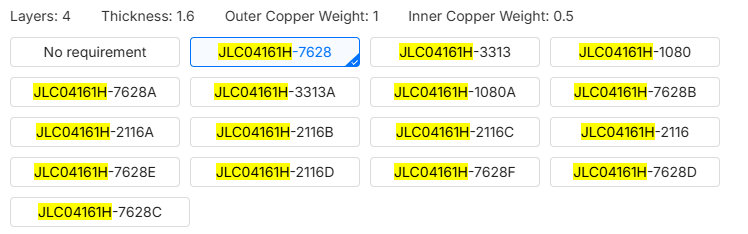
whereas the diagram specs

any suggestions or does this just rule out jlc as a manufacturer, (hoping not as they are significantly cheaper)
placement when ignoring the previous issue on jlc looks correct
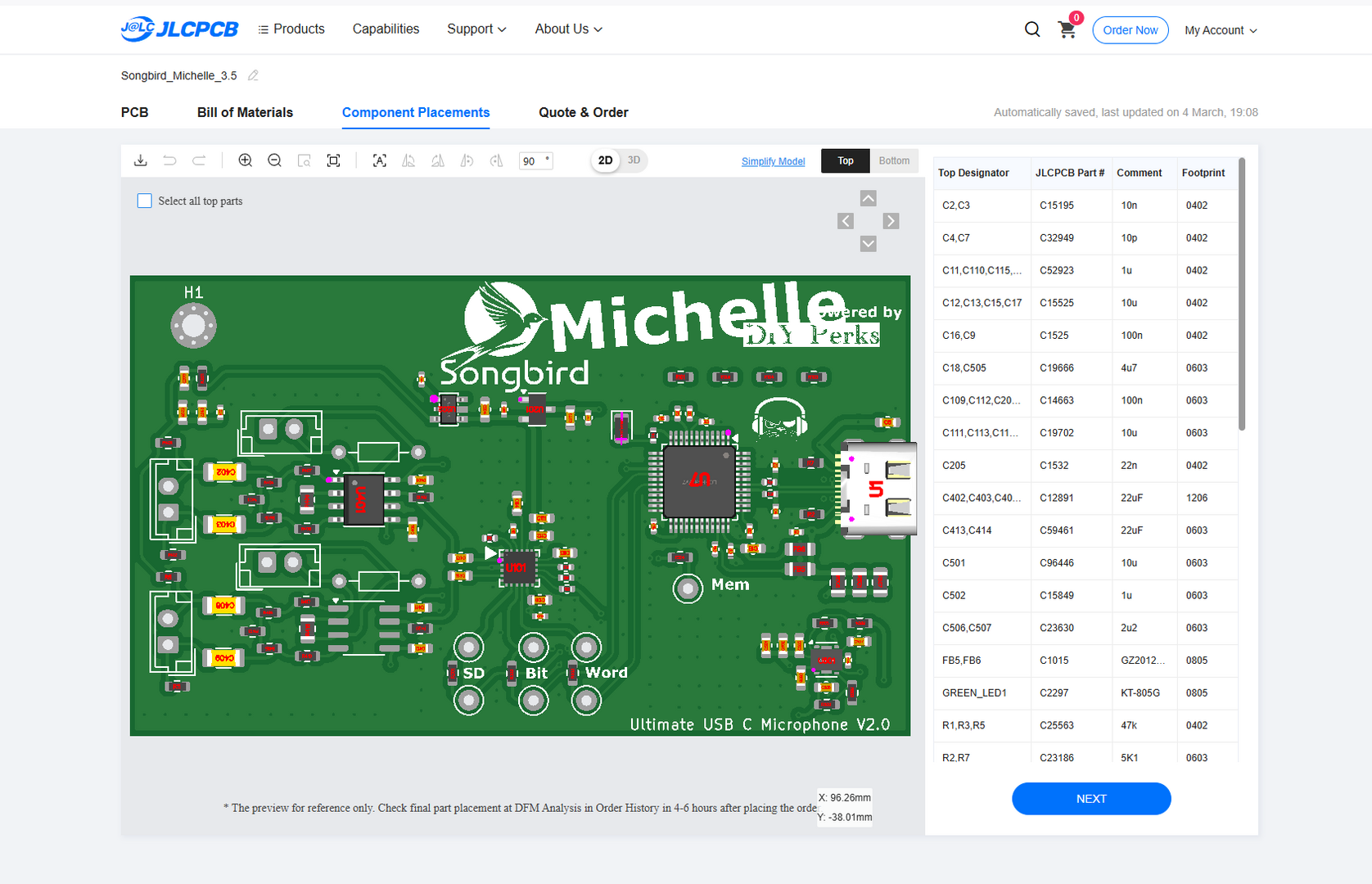
only issue jlc shows on the site is that the J (i assume j for Jack) connectors arnt shown in bom
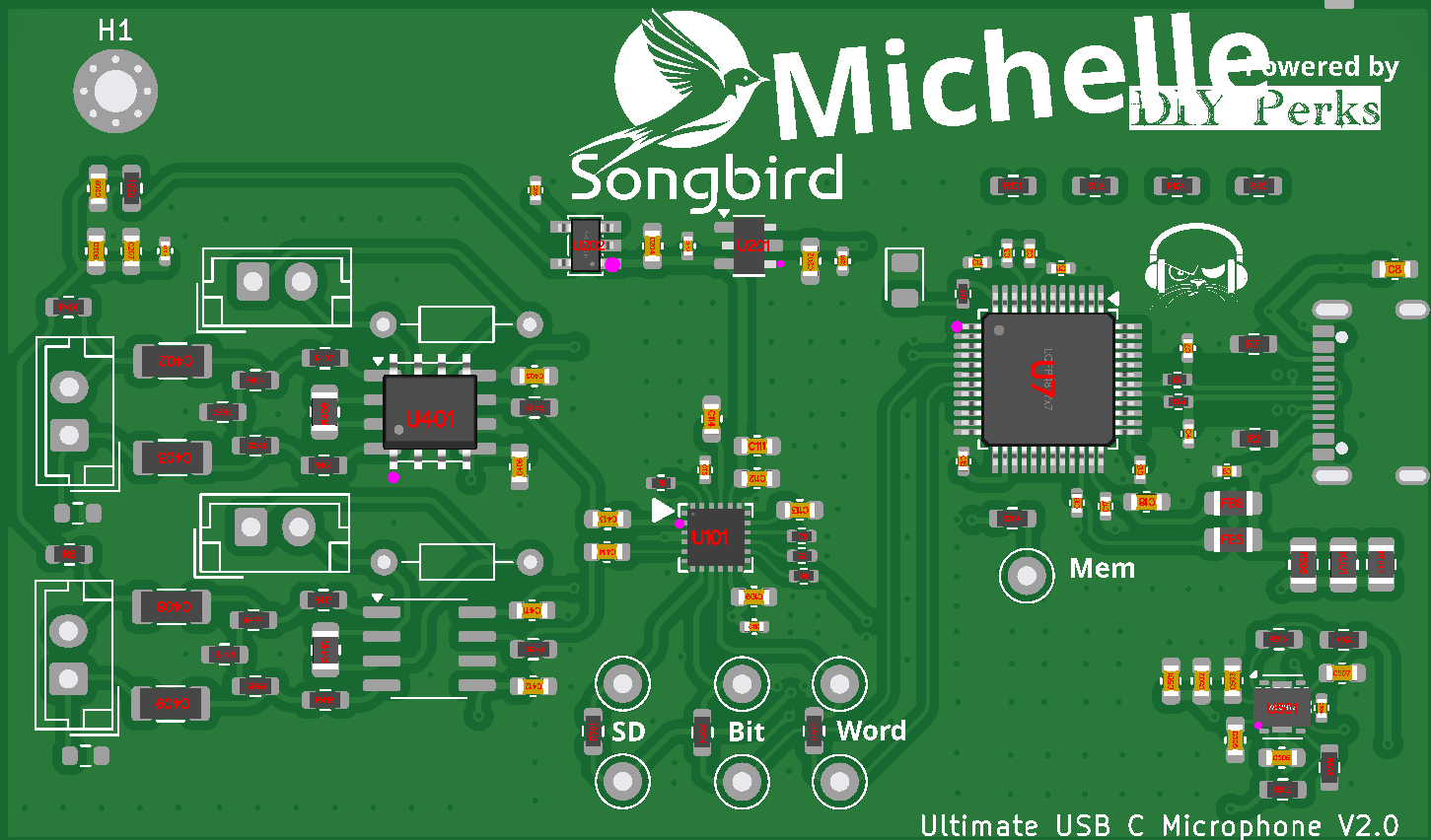
and that JLC cant read basic info such as 100r being 100ohm resistors.
if anyone has any suggestions it would be much appreciated
Posted : 04/03/2026 7:32 pm
…7628 is the correct one. It’s the only control impedance they do at the same price.
Jx, TPz and such are just test points and holes for jumpers.
you can safely ignore those. The important thing is the size and specs of the parts are the same. Wrong size won’t fit and wrong spec might go “pop” which is no fun.
If you hit any other issues, please just hit me up. It’d be nice to hear someone else’s build. My own is as good as silent as makes no odds but there are a couple of resistors that can be adjusted (replaced) to tweak if for different capsules.
Take everything I say with a pinch of salt, I might be wrong and it's a very *expensive* way to learn!
Posted : 04/03/2026 7:41 pm
thanks for the help so far with this, think ive mostly got it sussed out (didnt realise This would cost so much £60 for pcb, £40 for assembly but its a ballache to source the parts alone)
currently looking at likely making the original, only parts i dont have access to already are the JFET (likely replacing the gain controll knob with a large POT) then making the proper pcb version above when finances allow
think i saw earlier in the formn that your preffered transistor alternative is the LSK170B, would i need to modify this or the original circuit in order to use this or would it be fine
other alternatives im ideally looking at are the 2sk208-O, j111 or j112 as they are in stock on uk.farnell which i already order on so would safe on delivery, do you think these would work?
any help would be greatly appreciated
This post was modified 8 months ago by eman
Posted : 05/03/2026 8:06 pm
It shouldn't cost anywhere near that. I think they ran me about £30 a board with express delivery from China, maybe a little more. Are you using JLC? The European lads are far better quality but you pay for it!
2SK-208O should be fine. It works with pretty much any JFET but the issue is that JFETs are a bit strange (to put it mildly) since the manufacturing tolerances are so wide. The thing to consider (due to the noise on the USB issue that I've squashed using dual LDOs) means that the FET current is seriously restricted which does reduce the sensitivity somewhat.
The Quick and Dirty way around this is to experiment with the value of R401 and R402. As is there's a little bit of source resistance (a form of negative feedback) but you can remove R401 entirely - AND short it. Or you can increase the value of R401 to 3k3 or more. It's a balancing act with several trade-offs.
Matt's original would be more closely replicated with 680R - > 1K resistors in R401/402.
What's not clear from these drawings is that you CAN add a gain control to the IC (per the original) but it's currently set by R406 - if you remove that part from a completed board, you can add a pot or switch to the jumper.
If enough people wanted to buy one of these (perhaps one with slightly easier config for stuff like the FET current) I'm sure we could figure out some sort of discount.
You'll be the Beta testers (or, maybe .,. early adopters?). I know this this exceeded my own expectations but without some community feedback I can't put the cherry on top.
If this thing get's massive though, the first few people can have the Gerbers for a uniquely signed one you know, just because. 🙂
And your name goes in the book too. (That's assuming I ever get done. It's two volumes as is.)
Take everything I say with a pinch of salt, I might be wrong and it's a very *expensive* way to learn!
Posted : 06/03/2026 10:48 am
@marcdraco So i generated the Gerber files (attached ones) and the BOM file, but the JLCPCB BOM tool has some problems with finding components for the KiCad generated one such as errors in codes idk why etc, could you give the list for specific components? the MPN BOM i think its called (with LCSC Part Number?). After a bit of searching, some open source projects have in a simple way all the files to order it.
Could you please attach a zip with the Gerber, fabrication notes (with PCB settings), BOM (with the LCSC Part Number) and CPL? It would be very usefull to interested people i think.
The files are in MEGA i couldnt attach the zip: https://mega.nz/folder/lMxSAQQI#dXWKhT6gOJeyMpxnY81kIw
This post was modified 7 months ago by wecan
Posted : 09/03/2026 3:30 pm
Yeah, that's on me. Absolute bind - I usually put the corrected numbers back in but it's a manual job so I do forget. I'll take a look-see shortly.
AH! I see, you didn't use an exporter. That WILL cause absolute havoc. THere's a free extension (in KiCAD's extensions store thing) do prep all the files for JLCPCB including Ziping the Gerbils (poor little fellas).
Have a crack and that but let me know if you're having issue (there will be a few).
This post was modified 7 months ago by marcdraco
Take everything I say with a pinch of salt, I might be wrong and it's a very *expensive* way to learn!
Posted : 09/03/2026 3:36 pm
@marcdraco Thanks! After using the plugin and using the BOM tool y have checked and there are apparently no issues, but could you please check?
Also, are there any extra settings that are necessary?
https://mega.nz/folder/xNRRTDSB#ONGB5pifIuKtgDZdf5VcZg
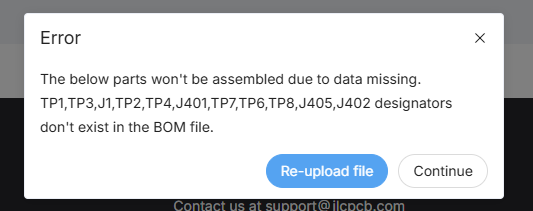
EDit: It seems to say "The below parts won't be assembled due to data missing.
U402,J1,J401,R419,J405,R409,J402,TP1,TP3,TP2,TP4,TP7,TP6,TP8 designators don't exist in the BOM file."
Should it look like this?
This post was modified 7 months ago 3 times by wecan
Posted : 09/03/2026 4:47 pm
Los good so far. THat main gotcha is a bind - the controlled impedance board and it has to be that or "hee not worky".
The TPx and Jx are not fitted, and the USB C socket needs special attention so there is a 3p charge per board.
Remember this design is mostly compatible with the original head but the 2N4416 does take a bit more driving. it's a bit tricky, but the resistors are nice and accessible.
Take everything I say with a pinch of salt, I might be wrong and it's a very *expensive* way to learn!
Posted : 09/03/2026 5:08 pm