
Notifications
Clear all

Top man! That’s the way to look at it.
If I could only apply that “can do” attitude to finishing my home… and half the other projects I never seem to complete. Lol.
I’m making a full immersion driving sim right now. Got almost everything but the really BIG hydraulic rams that throw you about the place. Cost is an issue there. And IF I could get four of them and the power regulator, etc. in here and IF I could turn it on (it’s bound to need three phase) then the bed frame would simply collapse under the stress.
Take everything I say with a pinch of salt, I might be wrong and it's a very *expensive* way to learn!
Posted : 20/04/2026 8:56 am

@marcdraco Your driving sim would be a fantastic idea for a matt video I think, it’s diy so why not.
also when do you expect to get your pcbs? I’m not in a huge hurry but I want to have finished the project in 2 or 3 weeks max.
Posted : 21/04/2026 7:34 am

@marcdraco hey man been a while hope yall been good just checking in to see if a video on v2 is getting made?
Posted : 22/04/2026 6:14 pm

@diyperks I saw on here mentioned that a version 2 was coming? But I never saw it. Was it scrapped? Is it still coming? Also how thick is the copper sheeting on the original? It isn't mentioned anywhere.
Posted : 29/04/2026 5:16 am
Songbird Michelle is the completed "pre-amp" but I don't think Matt will do a video on it unless there's a lot of interest. Michelle is highly expandable, into stereo and even DSPs but it's more costly than the original build (it's a case of balancing the cost vs. spec) and that's a far as I was able to push it before it enters silly money (and I've funded development personally so I know how much it hurts to invest money and not get much, or any!) improvement.
Take everything I say with a pinch of salt, I might be wrong and it's a very *expensive* way to learn!
Posted : 01/05/2026 10:09 am

@marcdraco So what is the currently most up to date version of the microphone that can be accessed and built?
Posted : 03/05/2026 9:50 am
Michelle 3.5 - drop me a note if you have any questions, it does need things like "impedance matching" and such, it's all in there IF you understand the lingo and can follow a schematic (which, to be fair, isn't as good as it should be due to changes in KiCAD and stuff I need to work on).
But it works best (out of the box) with 10mm capsules, the bigger JFETs benefit from a lot more current than this can deliver (easily) due to the VERY low voltage at the head (<2V vs. 30V).
Take everything I say with a pinch of salt, I might be wrong and it's a very *expensive* way to learn!
Posted : 03/05/2026 11:50 am

Hello,
It's a few years later now but me and my 13 year old son are attempting this for a school project.
We're in Australia so it's kind of hard to find some of the bits. So far we haven't been able to find the following item:
- 95mm by 64mm stripboard
How do we know what wattage we want for the following resistors? For example we have found half a watt, quarter watt and full watt
- 100Ω resistors
- 2.2kΩ resistors
- 3.9Ω resistors
What voltage should we use for the rotary switch?
Thanks!
Posted : 11/05/2026 6:17 am
Any stripboard will work just fine - you might see it listed as "Veroboard" but the Chinese copies - be very wary! - are poor. Vero itself was never meant for serious use beyond hobbyist projects so the Chinese took a cheap proto-board that was good at what it did - for what it cost.
And they made it cheaper by cutting corners in every way they could and the result is a far inferior product that WILL cause you a lot of pain.
Amazon and larger sellers should have some - it's available in all manner of sizes, you'll be fine so long as you have a large enough piece.
All the resistors are 1/4W (though almost anything will work, except for the 100R [R saves you finding the wretched Omega symbol every time]). I'd feel a little happier with a 1/2W although that's me being overly conservative.
As a simple rule of thumb, think of it this way (and this is a guide ONLY):
If it's a medium value resistor - > 1k then it's likely to be carrying very little current in a circuit that's operating at no more than 40V total (and that's at peak, with a bad wire, and under constant load you're looking at 2W).
But 2W is beyond what the poor little "voltage inverter" can provide.
Unless you really mess things up most voltages don't exceed about 12v when it's running and anything outside of the power regulation and smoothing isn't
Voltage for the switch is a similar issue. The contacts of many switches are typically rated up to something like 400V (albeit at fairly modest current). You're not going to be using one to switch the kettle on! 😉 The other issue is the contact flash - high voltages cause more damage than the very modest voltages and currents we're talking here - the current in that section is so small you could pass it through a piece of copper wire as thin as a hair and it wouldn't get so much as warm.
The great thing about projects that stay well south of what i consider the safe (est) voltage to work - which is 50V. Now 50 V in the wrong circumstances can hurt you but the chances are small - unless working at 120, 240 mains, three phase and some of the more exotic stuff like Marx generators and such like, the worst thing you can hurt is your bank balanced. Mine's been on life support for some time. 😉
This post was modified 5 months ago by marcdraco
Take everything I say with a pinch of salt, I might be wrong and it's a very *expensive* way to learn!
Posted : 11/05/2026 11:40 am
@marcdraco thank you very much for your response it helped us a lot, we've also tried 2 types of desoldering wick and we can't open them up, do you have any recommendations?
Posted : 17/05/2026 1:13 am
Wick is a PITA - Matt is using the "good" stuff as we used to call it - often came with a dusting of flux to conduct the solder away (it removes the oxide from the copper at a molecular level) so the molten alloy will flow up the wick.
Now, you CAN get very good braid of the type that suits your purpose better as HAM radio cable, braided coaxial is perfectly usable - you can get audio cable from hi-fi places too - the trick is you can strip the outer sheath and (radio often has extra bits of foil wrap.
The key is to (... errr.. this is kinda difficult to describe without sounding biolgical...)
But you ease the outer braid by pushing it back slightly and then loosen the the weave and with care you can remove the inner conductor and sheath,
Does that make some kinda sense without me descending into willy jokes?
Take everything I say with a pinch of salt, I might be wrong and it's a very *expensive* way to learn!
Posted : 17/05/2026 9:47 am
9SL9 reacted

@9sl9 Like you probably are doing, I bought it from ~5 sellers online and none were expandable.
I ended up having luck with some Weller branded wick I bought from home depot, maybe look into that if you are in the US.
If you cant find it I would also be willing to send you some in the mail, as long as you pay shipping.
However, marcdraco's idea is a good one and probably worth trying first.
Posted : 22/05/2026 10:48 pm
marcdraco reacted
I also got busy and had to set my own microphone off to the side for 5 months, it has unfortunately been collecting dust and seeing zero use in that time because of the pesky static noise that was troubling me before.
See here.
I'm still unsure of what the issue even is, but I have a few ideas I will drop below.
My main question:
I am using 2 conductor shielded cable, with the shield being tied to the microphone capsule shell and the other two wires located inside of it. I am wondering if I maybe used the wrong wire and the capsule's connection is also supposed to run inside of the shielding and it is picking up noise from something in my house?
I have not verified that the little USB audio card isn't the source of the noise itself, that will probably be what I check next by just unplugging if from the amplifier board and seeing if the static persists and also unplugging the microphone wire and trying the same.
Again, any help is appreciated.
Edit: I am also wondering about the possibility of noise coming through the USB cable itself, have there been any issues with this before?
This post was modified 5 months ago by Guinea
Posted : 22/05/2026 10:59 pm
Hello mate,
yeah, I'm not entirely surprised that Matt's worked and ours didn't - his gear is likely not producing as much USB noise as some might and MY OWN specifically the ones with more complex engineering fell apart like a house of cards once USB got involved. The problem is (put simply) you have a 1khz plus and ONTOP of that (this is where it gets spooky with a data packet in there. So every 1000th of a second USB sends data across the data lines. That sort of switching causes magnetic fields and that gets back on the power supply... and (deep breath and relax) right into your very sensitive (really must be dead quiet) power rails.
The noise coming up the USB (via the supplies) is better on Matt's original than my first ones because his breaks part of the loop with the NMA0515 and mine did other stuff that tried to out clever the noise coming from OUTSIDE - that's from the mic head - that's "hum" and people using badly serviced radio sets... not a constant whine that sounds like the tinnitus I actually suffer with (and now I mention it...) 😉
This post was modified 5 months ago by marcdraco
Take everything I say with a pinch of salt, I might be wrong and it's a very *expensive* way to learn!
Posted : 23/05/2026 11:27 am

I am an IDIOT! So, I got tired of the little USB interfaces constantly dying and taking the DC convertor with them, and decided to rebuild the mic without one, just a jack socket for an external, more robust interface.
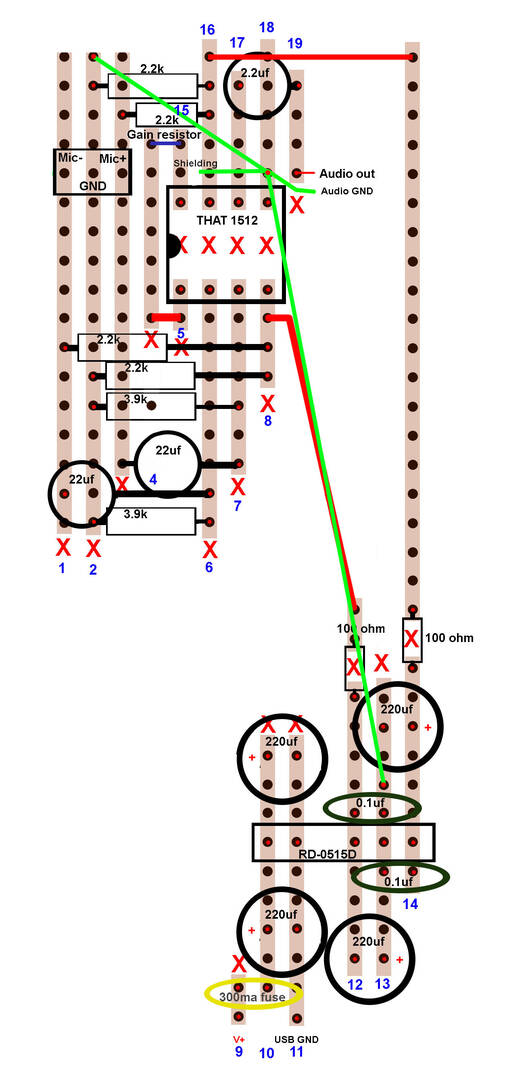
I also decided to change the layout and make some other improvements. But the damn thing wouldn't work. The audio was faint and swamped by a ton of noise. I kept going back to it, trying to figure out what was wrong, but all the voltages were sensible, and everything seemed right.
Then, about 20 minutes ago as I was soaking in the tub, I realised the dumb mistake. At least, i think I did. I haven't checked yet.
In the original design, that little audio interface ties the audio side ground and the USB ground together. I assume mine has been being screwy because I'm using a USB-C socket for power, and a separate output for the audio, and the DC-DC convertor doesn't provide a ground connection between its gnd input pin and the center 0v rail.
Surely that's it, right?
I also realise I might end up with a big ground loop, depending on where I plug everything in. But aren't there tons of mics that have one socket for power and one for audio out?
AH, no, I'm a double idiot. The audio out is plugged into a USB interface, and that is plugged into the PC, and the power lead is coming from a USB socket in the same PC, so they ARE connected, through the PC. So that still leaves me with a problem I can't seem to find.
I even ordered a new IC just to rule it out.
Edit: Make that a triple idiot. even as I was plugging in a new THAT, I spotted the mistake. It's right there on the drawing. And since I thought I was being careful when I made the drawing, I just blindly followed it when I assembled the board
This post was modified 5 months ago 3 times by Ashleigh
Posted : 05/06/2026 8:13 pm

@ashleigh try to rebuild everything from scratch, follow EXACTLY the pcb, I got it working first try, I double checked everything, and powered on the board without the THAT amp, Nothing blew up, nice, checked the voltage on every pins of the amp socket, they were right and finally after Inserting the THAT, it worked!.
Posted : 06/06/2026 4:12 am
@ashleigh one more thing, order the components from a trusted reseller, i got mine from tanotis, if the components are fake, no matter what we do it won't work.
Posted : 06/06/2026 4:14 am
Hmmmm...it's driving me nuts now. It worked fine until it didn't. That time it turned out the little USB adapter died. I went through 3 of them. The enclosure is just too small. I think it keeps shorting on stuff. The last time it went, it took the DC convertor with it. I replaced it but nothing. I replaced the JFET, and the THAT...nothing. Well...an awful lot of noise, and a teeny tiny signal under it. I rebuilt the whole board...still the same. I eventually yanked the JFET and measured it. I didn't want to cus it's annoying to do, but it seemed weird, so on a whim I put the original one back in, and now the signal to noise ratio is vastly better, and the weird pulsing noises have stopped. There's still a ton of noise, but it's the noise of the usual electrical interference from stuff, like it's all outside the enclosure...but it's not outside the enclosure, right now. I'm wondering if the original JFET is damaged after all. The replacement was absolutely crapped out from the get-go...unless someone decided the same part number in the same package , should suddenly get a new pinout. I tried a J305 in there but couldn't get it to bias anywhere near properly. But I was sooo anal, wiring the new board, and I have two THAT 1512s to try, and I don't really see a fault taking the capsule out...so...I dunno.
I'm stuck thinking either having an audio line-out, and separate USB-C power supply is causing some grounding issue, or the fault that killed the DC/DC convertor half killed the JFET, but killed enough other stuff that the JFET ended up getting removed as part of the diagnostics, then I somehow ordered a JFET that was already faulty, or was killed by an existing fault, then somehow the original one worked again, but only half-worked.
It's one of those situations, I think, where you have two or more faults that each interfere with diagnosing each other. at least it was. I think I'm down to one fault now - whatever is causing the really bad SNR. When I first built this thing it sounded great. I just didn't like having a hacked cheapo USB interface bouncing around inside it.
This post was modified 4 months ago by Ashleigh
Posted : 08/06/2026 10:15 pm
AH. Okay, I figured it out, finally. I though the noise was coming from the fact the USB power-in ground and audio side grounds weren't tied together in my mic like in the original, because I was using an external audio interface, and the mic just has a line out. Tying the grounds together inside the mic definitely helped a little, but it was still noisy. I tried powering it with completely ripple free DC by using batteries, and STILL got noise (though, again, reduced) I tried upping the 100r resistors to 470r, again...an improvement, but still noisy. I added extra filtering...still noise. All these things reduced the noise, but didn't remove it.
The one time the mic was properly quiet, was the one time I accidentally put one of the caps on the 15v rails in backwards. Then there was no noise...until the pop. But the mic sounded great until the capacitor blew it's top.
So clearly the noise was coming from the DC-DC convertor! The replacement I'd got, to replace the one that went up in smoke, is a 2 watt one, so I figure it needs more load to bring it into a zone where it's operating quietly. So I added another pair of 2.2k resistors to ground, and the noise was cut significantly. I was going to figure out what resistance I need there so there's enough load to make it totally silent like it used to be, but I figured it's better just to replace the DC convertor, since the enclosure is tight, and made of wood, and I don't want to be throwing extra heat into it for no reason.
The whole thing was complicated by the fact there was a fault that had taken out the DC convertor, but also damaged a couple of the caps, plus a replacement JFET I got for diagnostics when the mic was barely working at all, turned out to be a dud/fake right outta the factory. I had several issues at once that were all pointing fingers at each other, and all while altering the circuit to improve the layout, make more space, and use a line-out instead of having the USB interface onboard. (Which is what kept causing shorts, and killed the DC convertor)
Posted : 20/06/2026 1:54 pm

I'm considering building this microphone (or the updated version, whichever is better) instead of buying an expensive studio microphone, and I have a few questions for those who've built it. What's the sound quality like? I've heard Matt's version, and I think it's pretty good, but would you call it a "studio quality" microphone? How well does it do with noise levels in the circuit, and how well does it pick up bass frequencies? Is it sound accurate? Thanks!
My worktable is a site of frequent detonations. Please knock so I don't start a Lithium fire when you startle me.
Posted : 20/06/2026 11:33 pm
@imp-inventor I mean...it sounds great for a PC mic, but "studio mic" isn't really a thing. You wouldn't record vocals with an SM57 and you wouldn't put a U87 on your bass drum. For vocals, I'm sure you could make it work, but I dunno. If you were recording audiobooks, then yeah, it would be as good as anything else. But for singing, maybe not. Singing can go from very quiet to very loud.
So it depends on the use. As an overhead mic for cymbals, I think it would be great once you find the right gain resistor. For mic-ing any other drum, Hell no! For recording guitar or bass...MAYYYBE. For recording vocals that are at a pretty consistent level, the, sure. Especially at a bit of a distance. Like for recording a choir. You definitely COULD use it in a studio, but if you have a studio, you already spent thousands of times more money than this costs. "Studio" is also a kinda vague term.
So yeah, it all depends on what you want to record. If you're doing voiceovers, and have to choose between this and a U87, I'd just build this, spend the difference on a nice holiday, and nobody will know the difference. If you want to also mic up a guitar amp...it becomes iffy. If you want to mic up an acoustic guitar or piano...sure, this will work as good as anything else.
Posted : 21/06/2026 2:23 am
@ashleigh Ah, my apologies for the vague term. I intend to record vocals--voiceovers and singing, and probably not much else. My current microphone doesn't pick up frequencies below 120hz very well, and I want something that could adequately and clearly capture frequencies down to at least 60hz.
My worktable is a site of frequent detonations. Please knock so I don't start a Lithium fire when you startle me.
Posted : 21/06/2026 3:32 am
I just tested mine, and it's picking stuff up as low as the online test I used goes, and that's below 30hz.
Posted : 23/06/2026 9:00 pm
@ashleigh What sort of test are you using? Also no pressure, but do you have any audio samples (I'm not particular what they are) from the microphone that I could mess around with in my audio processor? They don't have to be vocals; I'm just looking for something to help me get a sense of what I'd be building.
My worktable is a site of frequent detonations. Please knock so I don't start a Lithium fire when you startle me.
Posted : 24/06/2026 12:48 am
Will this test work? It's just my heartbeat.
Posted : 24/06/2026 4:29 am
@imp-inventor I also have a test from my ribbon mic, lemme find the audio file.
Posted : 24/06/2026 4:31 am
@imp-inventor I also have a test from my ribbon mic, lemme find the audio file.
Posted : 24/06/2026 4:31 am
The ribbon mic picked up VERY good low end, even tho i recorded the audio playing from my phone.
Posted : 24/06/2026 4:47 am
@muzammil17 Thanks for the audio sample! Your heartbeat was so loud the audio was peaking. From what I can see (frequency spectrum + messing with EQ) it picks up a decent amount of bass, though perhaps that's because heartbeats have a lot of bass anyway. I wouldn't know; my neck isn't long enough for me to put my ear on my chest.
Ahem. Anyway. Did you build the ribbon mic, or was it pre-made?
If anyone else has some audio samples as well that'd be very helpful. I wouldn't ask, except the price of these parts has sky-rocketed since Matt built it, and I kind of need to justify what I'm spending to build it *nervous laughter*
My worktable is a site of frequent detonations. Please knock so I don't start a Lithium fire when you startle me.
Posted : 24/06/2026 11:15 am
@imp-inventor I built it myself, I can share the images and audio sample, but the I have reached the limit for attachments.
Posted : 24/06/2026 11:17 am