
Notifications
Clear all

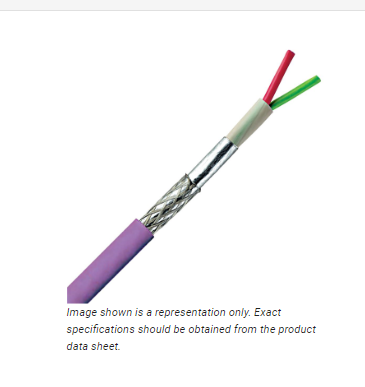
for the audio cable that the homemade cable connects to, does it have to be an aux cable or can it be a random 2 core shielded cable like this one?
Posted : 03/08/2023 4:45 am
For the capacitor, does the voltage matter as long as they are 22uf and 2200 uf?
Posted : 03/08/2023 4:48 am

@acidiconionas Yes. You can (probably) get away without a screen although the screen is used for the power delivery so you would still need three wires. The reason Matt used the de-soldering braid was purely for aesthetics. But functionally this shouldn't be an issue provided you account for the extra weight.
Take everything I say with a pinch of salt, I might be wrong and it's a very *expensive* way to learn!
Posted : 03/08/2023 3:19 pm
@acidiconionas Yeah, voltage always matters - you need at least as high as specified and preferably the next level up. For example, if I'm working with 15V supplies, in theory a 16V capacitor is "safe" but the reality is that you're better off with a 25V one (which is the next step usually) because the 15V nominal voltage is a little close for comfort.
You don't need non-polar for this build although they don't hurt. The non-polarised ones are required for cases when the mic is being removed which can cause a surge of voltage of the opposite polarity.
The values in uF are the same. If you can't get a 22uF you can always get the next preferred value up as these are just processing signals and not part of a timing circuit. But as a rule, always get the next larger size if you can't get the exact one.
Take everything I say with a pinch of salt, I might be wrong and it's a very *expensive* way to learn!
Posted : 03/08/2023 3:24 pm
@marcdraco so some of the capacitors I found were 50v-100v, is that okay?
Posted : 03/08/2023 3:42 pm

I'm really looking forward to the finals. I've been watching this for thread for a long time waiting for it to evolve to a more polished form before I jump in head first.
Posted : 04/08/2023 4:23 pm

Hi, I recently found the video by DIY Perks and saw this forum page, interested in building the microphone I looked around the topic and the threads around it and noticed how many problems people are having to make it. I still want to build the microphone however and wanted to ask for resources and other tips on how to build this, as it seems that people are just looking at the video, troubleshooting on the forums, and maybe getting a response. As someone who still wants to build it, what should I do? print a PCB or do it the way the video does it? Any response is appreciated. (I wish there was just an updated post or something by DIYperks that just summarizes the best way to do it.)
Posted : 04/08/2023 9:06 pm
I'm back after doing some research on circuits. I've got a grasp of how the schematic works but I still don't fully understand how the "signals" will connect to a USB port. Mainly I wanted to ask how I can learn about the build. All the drilling and sanding that's made into a stand, what the name of the "skill" or "craft". hopefully, I can start the build before the end of the year.
Posted : 06/08/2023 5:42 am
@acidiconionas Physically, a higher voltage capacitor will always be larger (although they have got a lot smaller over the decades since I was really active in this field). But generally speaking higher voltage is better. You might loose a little performance in terms of ESR (Equivalent Series Resistance) but that's far more important in power decoupling (vital in some cases) than it is for blocking "stray" DC. Low ESR capacitors cost more because they are harder to make but they are generally better quality than your run of the mill crud.
OK let's look at these wires.
Most of the noise is coupled as stray mains hum and that comes from the impedance converter at the head (that's the transistor in the most basic case). This is why you can't skimp on the Faraday cage surrounding the whole shebang because that diverts the noise around the cage and away to ground. You see this effect when lightning strikes an aircraft or even a car.
(5) PRIUS STRUCK BY LIGHTNING!!! - YouTube
This looks terrifying but what really happens is the lightning hits the metal and then is guided around it until it hits the Earth where all the energy dissipates into the ground.
There are plenty of (actually scary) videos showing this effect. What most don't tell you though is that the energy in the lightning bolt never gets into the car - in fact it never actually gets into the metal proper, rather hugging the outer layer. Braver people that I, have even got into human shaped Faraday cages and demonstrated how even powerful bolts of energy, millions of volts from huge Tesla coils are no match for a flimsy chain mail suit!
Matt's brass Faraday cage works in exactly the same way, allowing the noise to run around the outside of the cage but (and almost like magic) never get in even though there are loads of holes. Explaining why the hole size matters is beyond the scope of this discussion but you can trust me that as described, this one works well.
This applet is an excellent learning tool, although it's limited compared to the more advanced tools, was converted to Javascript by an old mate of mine (who, BTW, is way smarter than I am). Here I've drawn the effect of impedance on a circuit to show how resistance (the simplest form of impedance) can be used to "steer" electrical current.
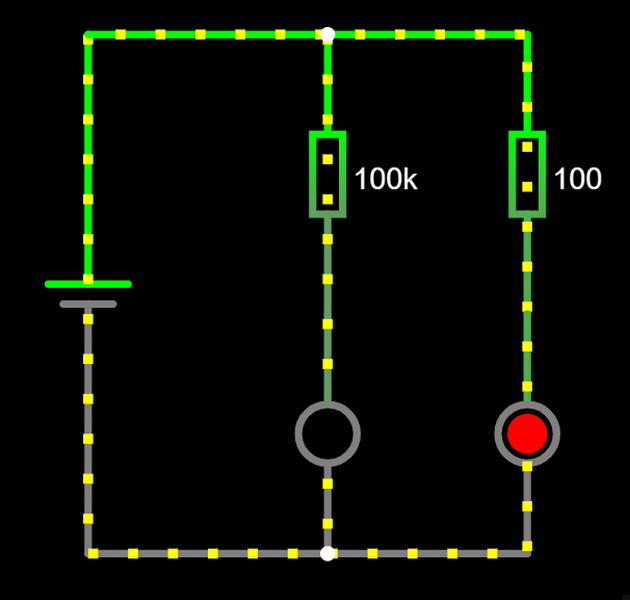
The do-hicky on the left is a simple battery - 5V in this case sending current through two loops, one with 100K in series with an LED and one with 100 ohms in series with an LED. It probably comes as no surprise that the LED in series with 100K doesn't receive anywhere near to enough current to light it, but the other one (in series with 100 ohms) does. You can get the actual values from Ohm's law or in the simulator which has lovely animated representations of where the current is flowing and how much there is.
Most of the electricity takes the path of least resistance lighting the LED, even though a little will flow in the other leg. If you slowly reduce the value of the 100k resistor you will see that current will eventually begin to flow in that leg and the LED will light.
In effect by putting a high-impedance into a circuit we can steer signals where we want them to go. A low impedance path like a wire allows current to flow freely. This matters for the "head" design because the audio signals travel down the two power wires in "anti-phase" relative to each other - but with a greatly reduced impedance relative to the "noise" signals. The two-phase signal is amplified by the THAT1512 in a way that cancels out any remaining noise that might be picked up but that's beyond what I want to go into here.
I get this seems pretty complex stuff and in some ways it is, but the the crucial part is, that while a screen is useful and even preferable, you don't need it once the transistor has converted the tiny signal produced at the electret capsule into a much larger current that (to a large degree) swamps the noise component.
Take everything I say with a pinch of salt, I might be wrong and it's a very *expensive* way to learn!
Posted : 06/08/2023 6:23 pm
@lthorn Hi and welcome to the forums. The final headphone amps are due back next week. The prototype (once I'd ironed out that issue with the 1 ohm resistor that should be 100K ohms) sound delicious and since they have a very high input impedance, they can be inserted into the microphone project quite easily - at least, that's the theory. 😉
Progress rather slowed to a crawl as I've been dealing with other issues in my "day job" and it's eaten away at the time I have to completely test the new R3 Hannah board which is far more adaptable than Matt's original while retaining broad compatibility with and improving on the original design by leveraging some ideas from the manufacturers (That and Murata) that are only practically accessible using SMD.
Right now I'm rather sat on my hands waiting for parts as prototyping eats up a lot - but the new designs work with either a 2SK170, LSK389 (the dual version for improved noise) and some even come with their own transistors pre-soldered for your convenience. I should be getting a new batch of FETs in the next week - probably around the same time as the Matthew amps and thanks to the wonder of SMD technology, they fit beautifully into those little aluminium boxes.
So while I strongly recommend the brass and wood enclosure as Matt describes (and I drool over) you can go cheap and use cast aluminium which is functional and doesn't require anything like Matt's mad metalworking skills. There are some other examples elsewhere on the forums that make me wish I'd paid more attention in "shop" but hey ho...
Most of the little "head" boards do the same job as the single transistor but offer more structural protection to the FETs (it's all to easy to snap a wire off) and a fairly decent amount of screening which eases up the Faraday cage a little. It's still needed but you can be a bit more gung-ho with it.
I'm building a replica of Matt's schematic on some breadboards here just to make sure that everything works the way it should. I bears repeating that I make mistakes, as we all do, but I'm not expecting anyone to pay for my smeg ups. This is a beautiful project that really deserves a nice PCB - and there is already one another member did that should work well.
I'm attempting to improve on it to make it more accessible for more people. The PCBs (thanks to JLCPCB) are a delight to work with. There's very little soldering and what there is, is quite straightforward since it's only for the through-hole parts like the THAT1512, NMA0515 and even the Pololu board which now fits properly and there is space to "glue" the digitiser along the edge making the whole thing very compact indeed.
You'll read about it here first.
Take everything I say with a pinch of salt, I might be wrong and it's a very *expensive* way to learn!
Posted : 06/08/2023 8:07 pm
@swagmaster Hi and welcome to the forums. I'm your local chatterbox. 😉
My being so voluble in this area is rather amusing being that it's about a mic.
I'm just waiting on some parts to test the final PCB design. In case you missed it, I've separated the 15V rails from the input rails and added a 3V supply for a conventional FET. The 1512 is a cracking instrumentation amplifier and I'm (experimenting) with expanding it to be available for more sources. It's a relatively compatible design for differential and single-ended requirements, but more of that when I'm sure this all works as advertised.
The existing PCB designs (on my GitHUB) SHOULD work but I can't guarantee them until I've checked every instance. Right now I've got an issue with oscillator noise (coming from the NMA0515) getting onto the signal lines, albeit at extremely low level. I'll write the whole sorry process up when I'm satisfied it's "safe" enough for people to buy and finish. (I expect a cost around £10-15 or less retail but that depends on a lot of factors and I'm not selling them).
I've put a couple of really experimental designs on the head set, there are nine in all ranging from a mechanically simple one that takes the dual supply all the way through to one designed for an operational amplifier. That one does require some delicate soldering though as I screwed up a part number (story of my life over at JLC) and it requires 3x SMD resistors (603) soldered in manually and that's no fun. There's also one that works more like a the usual, common-or-garden FET amp which gives a greater output voltage but does it in the opposite phase. Something else I promise to explain in more detail when it's all done.
Take everything I say with a pinch of salt, I might be wrong and it's a very *expensive* way to learn!
Posted : 06/08/2023 8:28 pm
Hi @kirby, I can't be a whole lot of help on the mechanics, I still use a hammer when I should use a screwdriver (OK, that's a small exaggeration but you get the idea).
The audio signal is converted into a digital signal by the separate USB board listed in Matt's project resources.
The board simply (!?) converts the signal from the microphone capsule into something that the digitiser can work with. The little Pololu (if I spelled that correctly) board allows you to connect the digitiser which comes with a USB 2.0 connector to the more convenient USB-C. You don't *need* to do that but USB-C has a lot of advantages - one of which is longevity, not to mention being smaller and working both ways around!
The skills are (fairly) basic metalwork and woodwork and you can doubtless find any number of true craftsman (and women) on YouTube who can instruct you in how to get these things mastered. As Matt and I will tell you, no one learned anything without making a few mistakes on the way.
This was another reason I made my PCBs fit a "standard" and low-cost extruded aluminium project case. It's a cop-out because I lack Matt's skills but I just adore the look of the mic, so I took a deep dive. The case will make sure I have a complete project while I learn how to bend a piece of brass (which is very easy) without making it look like an unrecognisable mess of twisted metal (also, very easy).
One piece of gear you WILL need is a fume extractor. I think Matt mentions this and he's smart enough to use one too - old gits like me are too far gone, but if you're starting out with brass work like this, you absolutely *must* have a fume extractor as those lead salts fuming from the work piece are quite toxic.
Perhaps we should encourage Matt to make a simple one for a future video? You really only need a computer fan (but centripetal type is preferably due to their relative power) and some ducting but your lungs are far too important to skimp in this area.
Take everything I say with a pinch of salt, I might be wrong and it's a very *expensive* way to learn!
Posted : 06/08/2023 8:42 pm

Hey, So I've been eyeing this project for the better part of a year, and now that my headset mic is dying I'm preparing to buy the parts.
But I have a few questions regarding this project,
The 2N4416 FET isn't available where I'm located, nor does it make sense economically, coming in at 16$. Some alternative FETs I've found are as follows,
J202, J201, LSK189 (recommended by Matt)
J111-J113 (Recommended as a general replacement to the 2N4416)
J304 (which I found on mouser, and has the exact same specs as the 2N4416 except for the Forward Transconductance Min being at 4500uS, compared to 4000uS on the 2N4416. But Matt concerns that this FET would add noise.)
And there are a few like the LSK170, but from what I've read wouldn't work with the stock components, without any design altercations.
Iv also found the MMBF4416A coming in at a whopping 60 cents, which seems to be just a surface mount 2N4416A.
What am mainly getting at is all of these have seemingly different Specs and names, but supposedly they work with the stock design of the mic and preamp? And trust me I attempted to make sense of all the different specs like the Gate-Source Cutoff Voltage, and Drain-Source Current at Vgs=0, to try to under stand what each number does a mic, to no avail. What specifications of all these FETs matter and what don't for this use case? Will any of these FETs listed work with the JLI2555 and preamp?
Another question, This mic uses a USB analog to digital card, but I am wondering if I can just skip this, by that I mean just connecting the mic outputs off the pre-amp to a regular mic jack cord, and supplying the needed 5V via separate USB cord. I know this is sub-optimal, having 2 cords, but this sounds better than shelling 20$ to (and this is from what I can tell) just to have my audio converted to digital, when I can just connect the analog mic signal straight to my PC, or camera, plus I could use a power-bank if needed. Do these audio cards have special tech wizardry to convert the preamp outputs to a useable sound? Or is the Mic out on the pre amp just regular line-level analog signal that my computer can use? when the board is supplied with the 5V of course.
Also Iv heard of the possibility of DIY Mic V2? any updates? is there a point of me building this if the update is coming out soon? I think it was projected for April 2023 somewhere.
I'm not one to usually to ask for answers, as they can be easily found with some looking, but after reading the 17 pages of this forums and countless doom scrolling until 2am yesterday, I've given up, I can feel my brain melting by the second.
Thanks for Matt for sharing this awesome project, and thank you for any input.
Posted : 07/08/2023 5:48 am
PolarYetti reacted
That missed deadline is on me, sorry. I've hit a few issues ordering parts from China (looooong story) but I fond out the hard and expensive way that early versions of the KiCAD BOM export were less than perfect at producing an accurate BOM.
This has resulted in getting resistors where I needed ferrite beads and 1ohm resistors where I've needed 100K.
I'm closing on the last tests now and I've added some extra features that may be useful. My day job got in the way and it's slowed everything down but it is working.
The 2SK170 is a very good FET and lower noise than the one originally used. It's also in current production so should be relatively easy to get. I've done some head mounted PCBs (you'll have seen pictures in the thread) which work with the original vero design and some that are single ended.
The LS389 (which is a dual 2SK170) on the same die is also a cracker but costs more of course.
You can drive a standard audio input on your PC directly from the pre-amp's output stage.
Keep and eye on this thread for announcement, a lot of work has been done behind the scenes and the Open Source hardware is on my GitHub page ready for us. I'm recommending everyone waits to make sure I have the last bugs out of everything though. The headphone section is due back from JLC this week (it's in Europe somewhere right now) but that should just work.
Take everything I say with a pinch of salt, I might be wrong and it's a very *expensive* way to learn!
Posted : 07/08/2023 5:06 pm
Roman reacted
@marcdraco Thanks a lot, I checked out the designs on your github, seems promising.
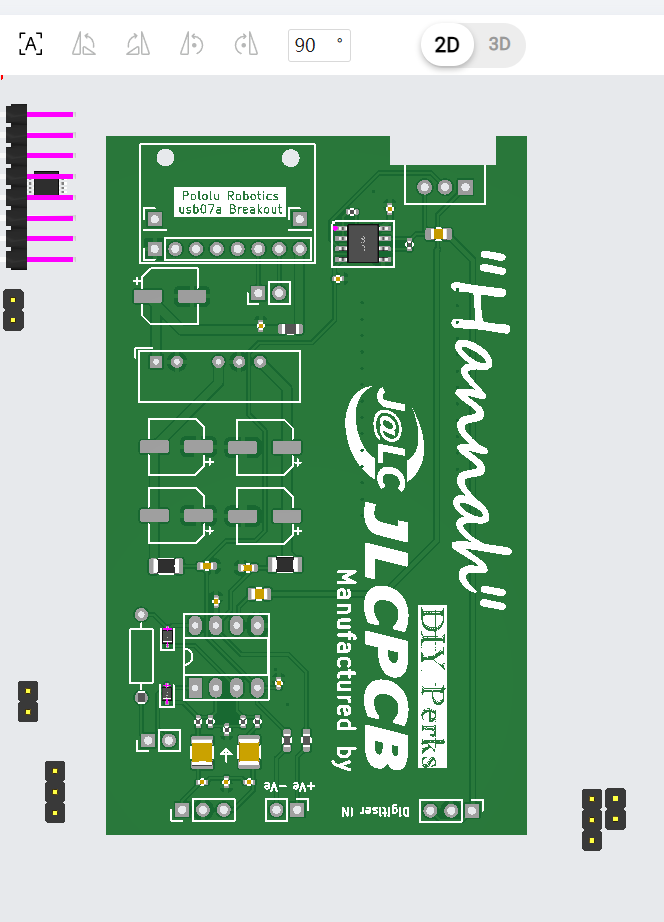
Managed to get JLCPCB to display it, its seems to be missing the caps and THAT1512, and a few other things. I'm assuming these will need to be sourced and hand soldered.
One resistor on the bottom left seems to be way out of place and some other components were in the wrong direction. I moved them out of the way for the time being. Not sure if I uploaded the correct files to JLC
I would love to try this design if its ready, not sure if it is. I wouldn't mind risking it and being the guinea pig
(Edit) After a little bit of digging, the
J304,SMPJ304, are similar to the 2N4416, only difference is Gate to Source Cutoff Voltage is -2 to -6 on the J304, and simply -6 for the 2N4416, power gain is also different. and maybe other differences I haven't noticed.
SMP4416 is a PCB mount 2N4416, they also have a another version, but its not available on mouser. This one is much cheaper and the only drawback is its surface mount, would be harder to solder. this one would work exact as the one used in the video.
though I can't speak on the noise of the MMBF4416A, but at 60 cents it may be an option for someone on a ultra budget. I wouldn't use it. See listed data sheets.
https://www.mouser.com/datasheet/2/308/1/MMBF4416A_D-2316086.pdf
https://www.mouser.com/datasheet/2/676/jfet_2n4416_2n4416a_interfet-2887738.pdf
https://www.mouser.com/datasheet/2/676/jfet_j304_j305_interfet-2887266.pdf
Ended up buying the SMP4416, as it will be exact as the original design and way cheaper than sourcing the 2N4416 for me.
Thank you for the recommendation for the LSK170, but since I don't know if it will work with the mic design shown in the video, and its quite pricy, so I will refrain from using this one until the updated design of the mic.
Hopefully this helps anyone in the same situation as me. I will update if not using the Audio digitizer affects anything sound wise.
Posted : 07/08/2023 10:06 pm
Blast, that's the older version of the artwork - Rev.2, Rev.3 should be on there right now. I'll have to look at that. Rev. 3 has the supply for a electret condenser with its own FET (3V).
Some of the parts are "optional" - the resistor in the bottom corner is through hole and is there as part of the variable volume per Matt's original design. There's a space to put a large cap in there too per THAT's recommendation. You don't "need" the Pololu USB C connector either. Similarly the drive current for the electret is on a through-hole resistor (about 470R - 1K)
KiCad's output doesn't (currently) support the JLC system meaning that many parts are either rotated in the wrong direction and/or are 10s of mms offset from the board. I'm also getting a lot of noise that has no right to be there. I had blamed the NMA0515 but I've made one up for battery operation and it's still not as good as I expected (or as the simulations promised).
If I'm unable to get this one to work with a few simple mods, I'll start again from the ground up. This one was intended to re-use the more expensive parts but that's become increasingly difficult to do and still maintain a decent quality. Matt and I were aiming for something akin to a Rode device.
To be fair, the background noise is difficult to hear, but it's so powerful that it's affecting the amplified microphone heads which I can't abide and I'll not put my name to something so sub-standard.
Keep an eye on the thread, I've tried to clear a couple of days to get this sorted.
Take everything I say with a pinch of salt, I might be wrong and it's a very *expensive* way to learn!
Posted : 08/08/2023 3:16 pm
@marcdraco Saw the message, Will be responding soon.
For someone who isn't a complete audiophile the noise probably won't even be perceived by me. I think, Is it on par of the original mic design? I'm just guessing by the fact your standards are so high for this stuff, anyway, amazing work! Hope to hear you soon.
Posted : 08/08/2023 7:40 pm
marcdraco reacted
Hi @Roman, great to catch up with you. I'm still waiting (yawn) on a pack of 2SK170s but I did finally manage to get the cat of my workstation seat long enough to wire up the only stand-alone mic head on the "9 up" and it works a treat - even without the "fancy" FETs.
Although the design requires fairly high voltage (6V+) compared to a standard capsule (1.5 -> 3V) the quality seems pretty good from a super-quick test. With this sort of slapdash wiring (I've soldered a 9V battery clip to the power in and ground and two separate wires to the digitiser's *microphone* input.
For simple cases this should be all you need since much of the quality comes from the JLI2555. The FETs are SMD Toshiba 2SK208s which are sated for condenser microphones and come fairly close to the 2SK170s and probably won't make a lot of difference.
There's no voltage "gain" on most of these designs in keeping with the "hot/cold" idea from professional mic design which calls for the hot side to be the "voltage follower". The cold side, the antiphase signal is available if you need it, wired to the positive power input - but it's passive (the same signal impedance but no actual signal).
This phase problem only rears up if you have a lot of microphones and some are wired for hot in one phase and some are wired hot for the other. Confused?
Cheaper electret condensers are driven by a simple resistor in series with the power and are wired for "common source". This gives a voltage gain typically in the x10 range which around 20dB and makes them appear more sensitive. Professional mics are designed for common drain (source follower) which gives a slight decrease in gain (about -3dB) but more current which is what you need to drive a length of cable.
I've wired a couple of the heads for this configuration (they work in simulation) but as yet I haven't tried them in real life.
I tried this layout with a couple of the cheapest microphone-able USB digitisers I could find at Amazon (they're even cheaper on eBay) and the overall result is surprisingly pleasing. You'll still need to follow Matt's instructions for the head and make a box with a power supply. Quiescent drain is about 3.5mA so I expect a 9V battery will give many hours of service. It should perform even better with a +15V supply provided it's *quiet*.
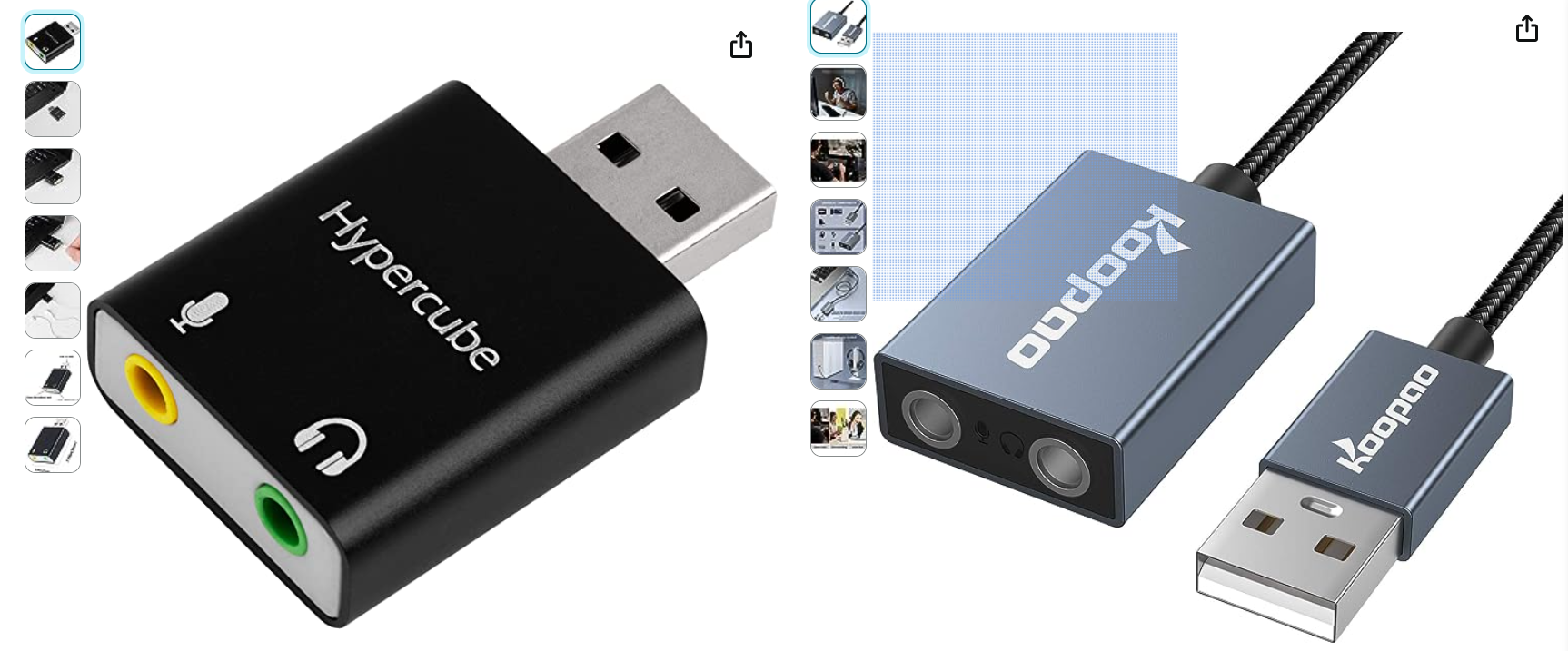
As of this writing I haven't tried it with the NMA0515 supply that's available on Matthew's design and as a separate output in the Hannah board. I'll try to do that later as I've been a little concerned as to the amount of H/F electrical noise getting through.
It's entirely possible to do an amplified version of this using a simple class-A stage but given the limited space on the board, I've held back on that for the 34mm versions. It's certainly something worthy of consideration to keep it simple. Also these digitisers will fit into even less space than the existing one does.
Onward and upward! I still have a very exciting design for Matt to apply his enviable skills to - that one is more about the physics of sound vs. all this electronics and only requires a simple electret to work - one with an internal FET though.
Take everything I say with a pinch of salt, I might be wrong and it's a very *expensive* way to learn!
Posted : 09/08/2023 4:08 pm

Hi All 👋
Like you, I've been lured in by the beauty of this elegant microphone.
I've been skimming the 17 pages of posts on its construction that you all have contributed to. I had already bought most of the components before doing so. 🤞
I am just missing the nma0515sc, 2n4416 and the THAT-1512.
Could someone please confirm what the best replacement for the 2n4416 is. I got a little lost with all of that. Is it LSK189 or 2SK170 or something else. Thank you
P.S I know nothing about mics or electronics. 👍
Posted : 09/08/2023 5:59 pm
Welcome to the forums. I'm rather guilty of the length of this post having a passion for microphones.
The LSK189 and LSK170 are very similar in performance. The LSK170 is the Toshiba version of the 2SK170 (and I'm guilty of switching out the pair). The LSK189 (the single version of the LSK389) is also an excellent device. The crucial difference tends to be in pinouts (at least as far as microphone inputs are concerned). Other specifications are less important in this specific application. The 2SK208 is a very low cost device that also works quite well.
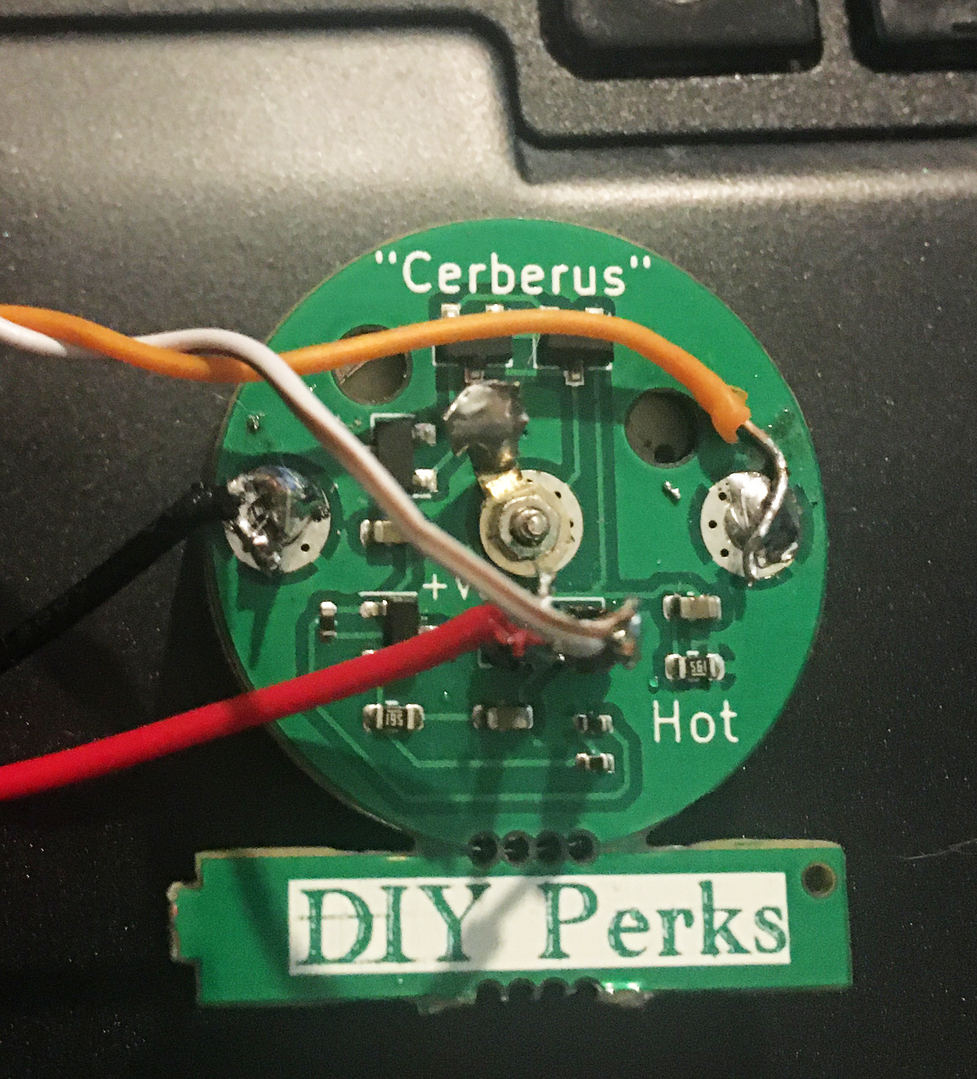
I'm currently testing a dual 2SK208 configuration codename "Cerberus" (pictured above) which developed from this project, one of nine various designs that have spun out. It drives a microphone input on an everyday USB digitiser very well and it's cheap too, but right now we don't have a supply of these for the general public. You can have yours made at JLCPCB but there are gotchas, mostly that it requires a separate regulated supply.
The set does include a dual-LSK170 (or LSK389) that should work with Matt's design but it does mean ordering the full set from JLC which adds up when you have to pay the setup cost, postage and so on. My PCB version of Matt's design has an issue that I've been unable to track down right now which is why I'm not encouraging people to try it.
The thing you need to know about these FETs are which pins are which - source, drain and gate. Generally you can switch source and drain (FETs are unipolar) but the gate matters since that's the "input" terminal. Modern FETs do work better the "right way" around but it does take a little pressure off since you don't have to worry too much about mucking that up. 🙂
Take everything I say with a pinch of salt, I might be wrong and it's a very *expensive* way to learn!
Posted : 10/08/2023 12:48 pm

As for capacitors tailored for audio like UES1H220MPM and UKW1C222MHD, the elevated cost could be justified by potential improvements in audio quality. Their impact on your project's performance might be noticeable, especially if sound quality is a priority.
Now, considering swapping out the 2N4416 Transistor with a J304 due to similar specifications and cost-effectiveness, it's worth exploring this substitution. Just ensure compatibility and performance align with your objectives.
Regarding the sound board, while cheaper options exist, investing in a reputable one like the BEHRINGER Guitar 2 USB could offer better sound fidelity and durability. Quality components tend to yield better results.
Keep in mind that each choice you make impacts the overall performance of your project, so thorough consideration of these components and their respective attributes will ultimately lead to a successful and satisfying result. Happy experimenting!
Posted : 11/08/2023 6:23 am
marcdraco reacted
Just an observation here but the noise figure for the J304/5 is considerably higher that of the LSK170 (at least at the RF it's intended for) and that specs are listed for common source amplifiers. As usual with datasheets they always list the best features at the best operating point. 🙂
I'd completely agree that the Behringer is going to offer excellent performance but (and this is a big one) it won't work with Matt's original design and they all need external power - but not phantom power. With hindsight, I probably should have included one suitable for 48V phantom supply. I'll have to fix that for the next revision as some are really there for my own curiosity since I had space for nine in total.:)
Take everything I say with a pinch of salt, I might be wrong and it's a very *expensive* way to learn!
Posted : 11/08/2023 11:57 am
Welcome to the forums. I'm rather guilty of the length of this post having a passion for microphones.
The LSK189 and LSK170 are very similar in performance. The LSK170 is the Toshiba version of the 2SK170 (and I'm guilty of switching out the pair). The LSK189 (the single version of the LSK389) is also an excellent device.
Thanks for the help. I am trying to match the original as close as possible. So that helped a lot.
Posted : 11/08/2023 1:04 pm
marcdraco reacted

Hi,
First time poster here.
First of all, thanks for the awesome project, and the general helpful tips.
I followed the tutorial, and I have my mic and amplifier working. However, currently everything is still a little bit on the prototype side, as I first wanted to make sure everything is working (shielding around amplifier and capsule is already in place, as this made of course a major difference. Some cables for me are currently still Dupont cables, e.g. the ones from USB to VIn, and from the audio interface to Gnd/ Out)
One problem however is remaining. I currently have my gain already set to a resistance of 220 Ohm, but I (still) hear a static beeping sound when recording. I guess this has to do with some sort of ground loop/ some sort of grounding error?
Additional observation: Below sound samples are recorded with the microphone being plugged into a USB hub. If I plug the microphone directly into the motherboard, no change is observed, but e.g. with a different USB hub the beeping sound is much more pronounced. Would a USB ground loop isolator help in this case?
The beeping is def. coming from the amplifier, as for testing, I completely disconnected the microphone capsule pins, and just recorded a short while in Audacity:
Even with the gain being set to infinity (by just omitting a cable/ resistance between the 2 pins), the beeping is faintly heard.
When connecting the capsule, I have the following result (played from my smartphone into the mic):
Please ignore that the sound does not seem balanced, my phone was slightly off to the side when recording. Like mentioned, the mic is (kinda) working, but I seem to have some kind of issue still
Two things I did differently compared to the original project (as I informed myself online, and that is what I got):
- Added a very small capacitor right after the USB connection (I read that this might flatten spikes in the power drawn from the USB port, which might again be the root cause of the problem)
- Put a small capacitor in between those 2 pins; tbh here I did not really get the reason (only doing electronics as a small hobby on the side), but this helped getting rid of quite some noise after I introduced this (that was one issue I had prior to posting; I had quite some noise when recording, which I got rid of by this solution)
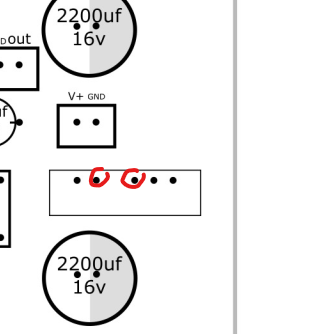
The rest of the build is as described. Any input would be really appreciated.
I mean, a 'solution' of course is to set the gain lower on Audacity/ Windows, and moving the mic closer to myself, however, imo this is not really a solution for me as I would like to also record musical stuff for further usage in projects, so if I boost the volume later, the beeping noise will be heard again....
Thanks for any kind of support & kind greetings,
Robert
EDIT: I found a solution (will post a sound example in a little bit as I have no access to my working station for a little bit due to work).
As I suspected a ground loop to be the issue, I discussed a little bit with a friend, and he told me to just try powering the amp with a powerbank or external source, other than tapping into the USB power cable that is also transmitting the audio data.
This works wonders. I still hear a tiny beep/ noise when I crank the gain AFTER recording, but I guess that is a normal behavior for any microphone, right?
However, I would still love to get some input on what I did wrong/ why you guys dont have the similar problem. I mean, my amp now needs a battery, honestly, fine for me if now my audio quality is usable, but still, how do I get rid of a ground loop in the 'correct' way?
Posted : 16/08/2023 10:49 pm
I did a more advanced version of Matt's design (Hannah) and it's been plagued by similar problems which I haven't managed to get to the bottom of. There's an annoying (if low level) oscillation on the output which I can't nail down but I think it's actually in my apartment. I can't hear your noise right now because I need headphones to hear clearly rather than these laptop speakers. This is actually a fascinating problem, but it's niggling too.
On a slightly different note, I've figured out how to piggy-back some of my "head" amplifier boards and the moment I get two minutes to sit down I'll finish the rest of the layouts (they're quite time-consuming to route due to the lack of space even with SMD components.
More news on that in a couple of days and I've weeded out the ones that don't cut the mustard - some didn't even cut the tomato ketchup either, but hey ho. Most of them where my tinkering with different ways to achieve the same effect which is to convert the impedance of the condenser to the impedance of the pre-amp.
By unpopular demand (but useful) I've made a convertor to mix up the stand-alone heads from a 12-15V design to 48v design. A couple of them also feature useful gain and can take a choice of operational amplifier. The existing designs are fine but these are better and will be uploaded to my Github when they are ready.
Codename: "Cerberus" is a standalone design on the original block that comes (if ordered with parts from the BOM) with it's own 2SK208 FET which is comparable to the LSK170 when paralleled up.
While this is an extreme deviation from Matt's original vision they are an outgrowth (an evolution if you like) and only exist because of that. The best part is they can all drive a microphone input directly which means you have a choice of pre-amps and the 48V adaptor mounts right behind the main board right at the head. Details (of what I hope is the last) follow soon.
Take everything I say with a pinch of salt, I might be wrong and it's a very *expensive* way to learn!
Posted : 18/08/2023 7:42 pm

My issues
Ok, so I put together the microphone, and… I have no audio output, I got some increasing noise once, but nothing more. So now I need some help troubleshooting. I’ve checked all my solder joints, and the digitizer is 100% working. But everything else is suspect, especially the connectors, I think it might be the one connecting the preamp to the digitizer.
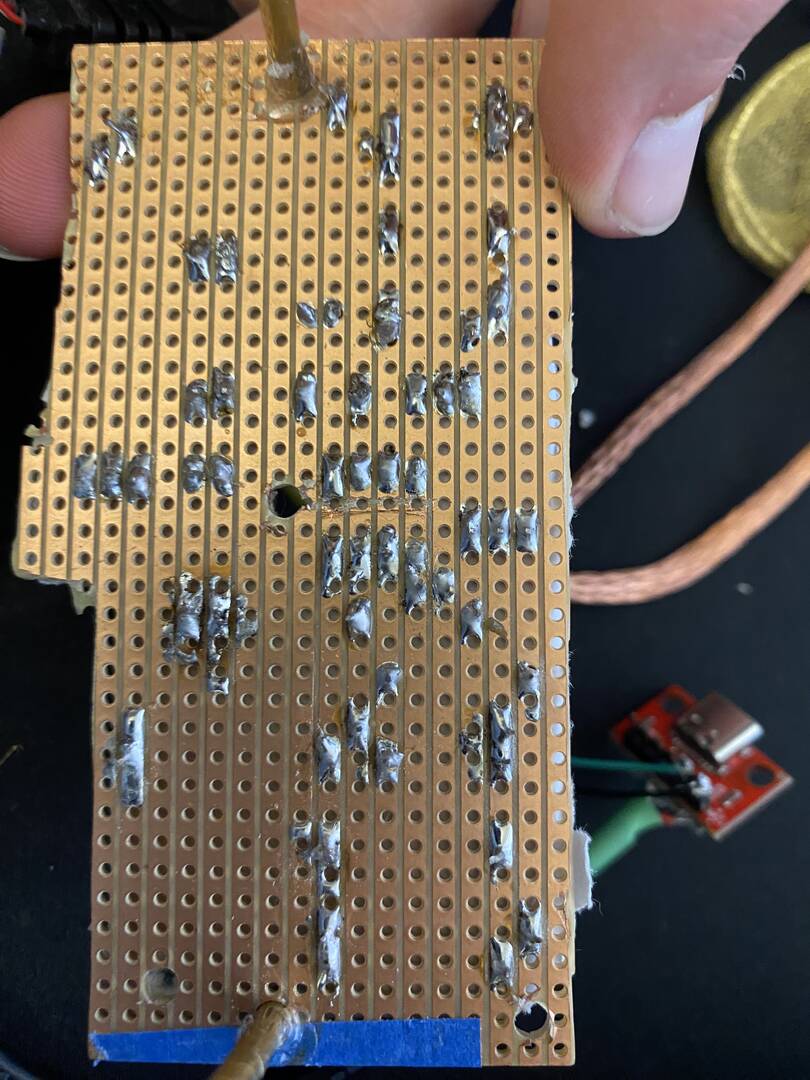
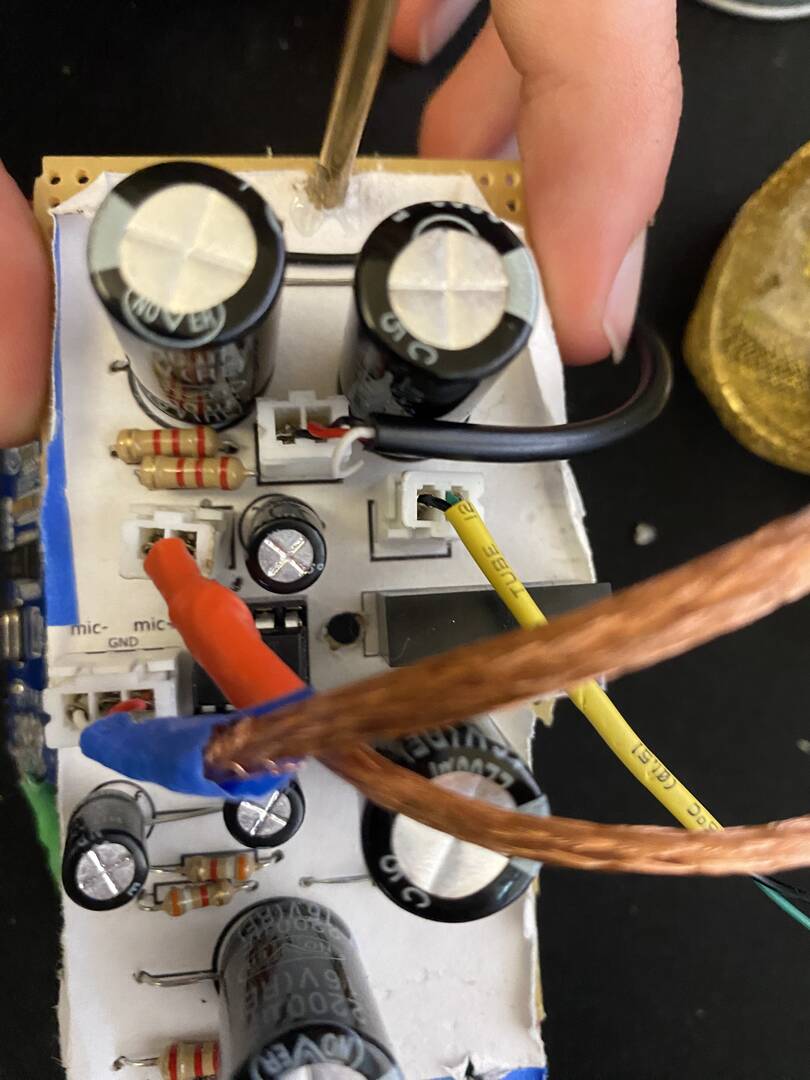
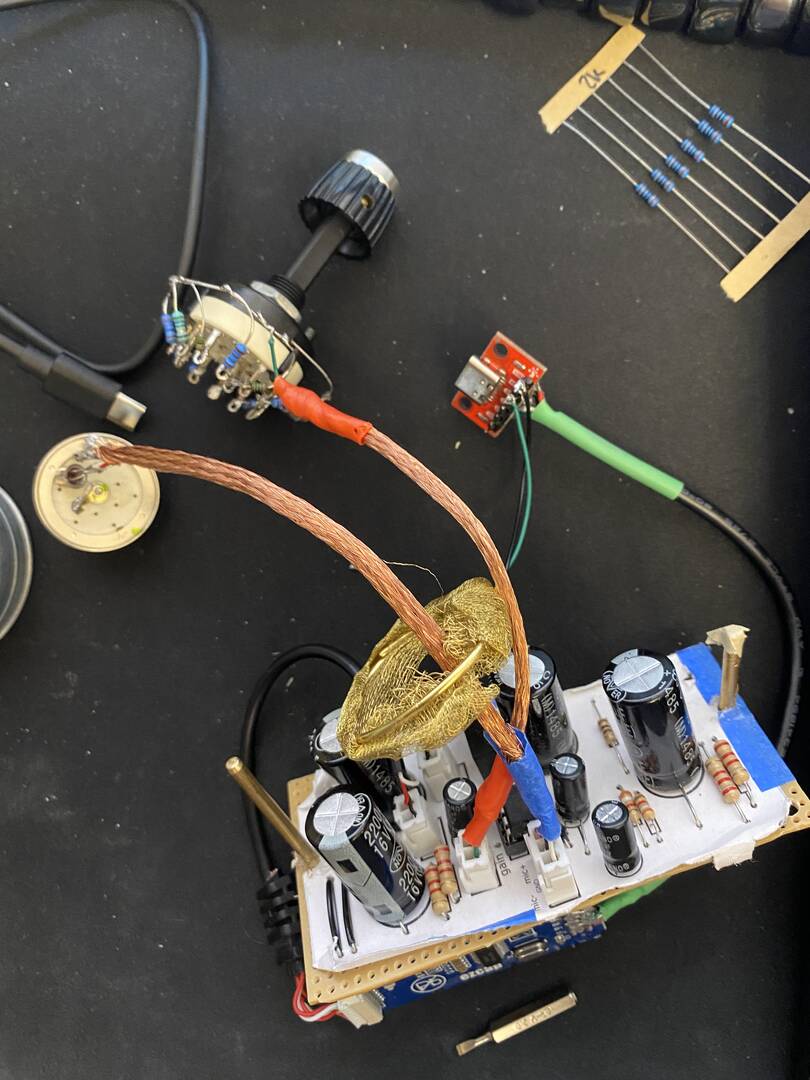
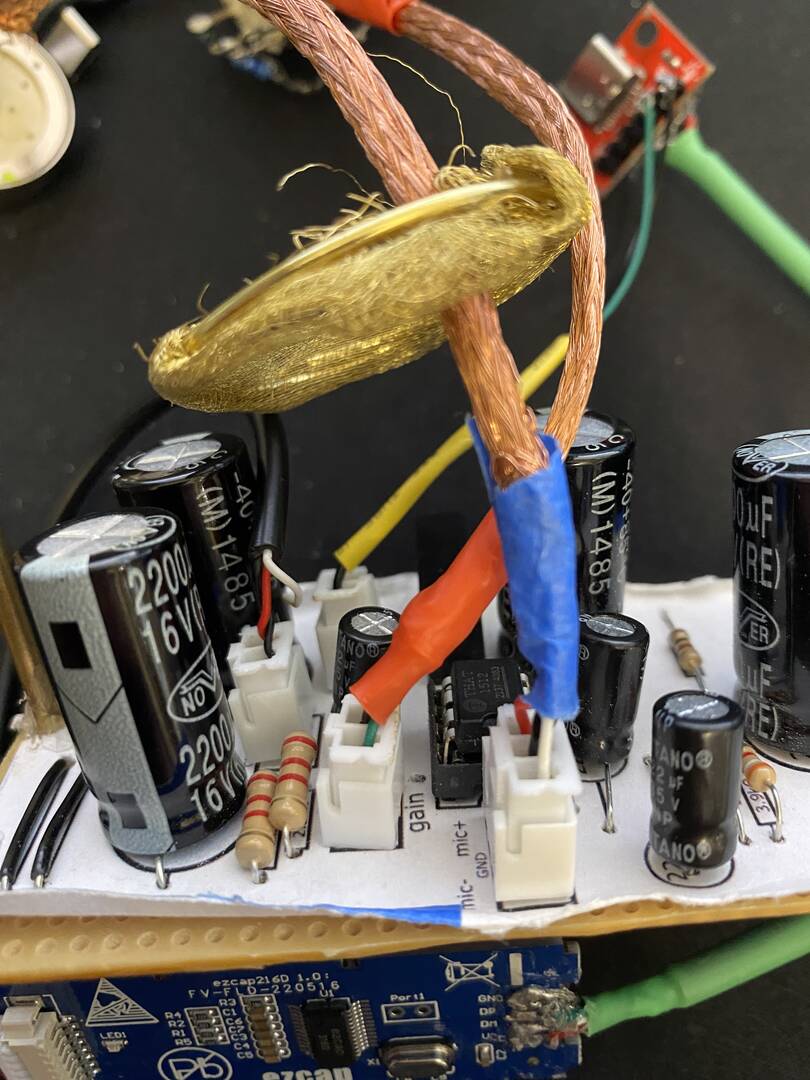
Posted : 24/08/2023 12:07 am
It's hard to see from here but this is an excellent demonstration of why stripboard is a poor choice for newbies.
I grew up on that crap and I've made more mistakes with it that I want to count - I still do on the occasion I'm stuck using it. I do PCBs now for all of the prototypes because even though they are expensive, they are a lot less hassle.
The first problem I can see here is the ratty edges we see this stuff leave behind when we try to cut it without "special" tools or experience.
Most stripboard (Vero is the "best" one) comes from 3rd party developers which use poor quality resin-bonded paper (think a low-quality hardboard that frays on the corners when you bump against it). The quality of the bonding determines not just physical strength but also the way it cuts and how the copper strips are held to the surface of the paper.
These resins are not particularly heat stable so newbies, often equipped with an iron tip that has more in common with a 9-iron than it does with a precision instruments, overheat and burn the strip clean off the board. Now add in a very (and I mean VERY) thin deposit of copper strip which has been laid down and drilled so there is very little actual conductor of the flimsy piece of foil that was there in the first place.
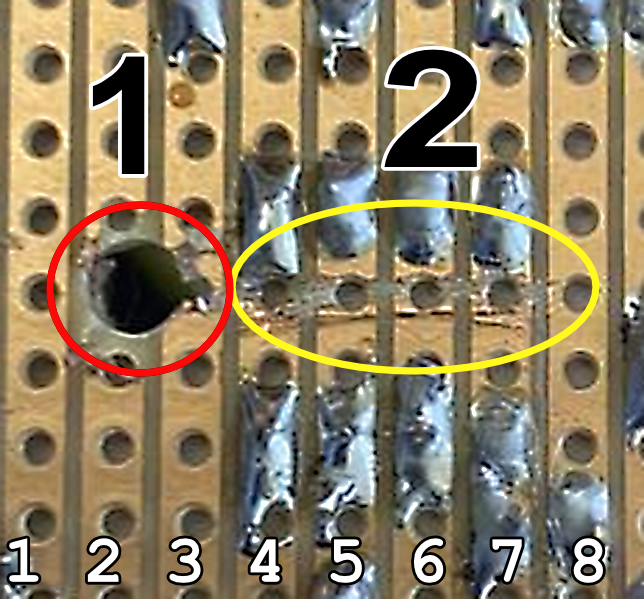
Some of these these wretched and difficult problems are on display here.
I've numbered the tracks 1-8 for the sake of this small section of your board. I haven't compared this to Matt's so it's worth looking back at that, but this is to look at why stripboard is for experts only, ironically. The picture isn't high-mag so this isn't what I would be able to tell with a meter and my dissection scope.
- Track 2 has a drill point - which has removed some of that stupidly thin copper. Now this isn't an issue but it shows just how little grip that foil has on the carrier. You need a really sharp HS steel drill to do this and you need to start on the copper side.
- About 10 o-clock on that drill point looks like a little bit of copper is almost shorting onto track 1. These copper slivers are sometimes so hard to see that they are invisible to the naked eye, but they conduct electricity just like a small-value resistor of a few 10s ohms at best. Such a simple problem will wreck any chance of a board working if it gets into the sensitive areas and this board has a lot.
- Worse though (sorry, this isn't meant to make you feel like an idiot @gamepin we've all done it) the hole has drifted well into the adjoining, Track 3, potentially resulting in more slivers getting into the solderworks.
- Tracks 4-7 are where the THAT1512 is fitted, and this is a crucially high-gain area on the board. It's essential both sides of the IC are separated properly and this is where a stripboard cutter is useful. I'm guessing you've used a craft knife or similar? Perhaps even a screwdriver? [Those of you who have never done this obviously haven't worked with strip board all that much]. It's not clear without a continuity meter if all of those cuts are deep and wide enough to keep the tracks separate, but I'm not 100% convinced they are. Again, there is a slight nick in Track 8.
These are the most obvious errors but I'm sure there will be others - another beginner gotcha is to use brass or other metal for mounting our boards. Nylon (or plastic) standoffs are a far better bet as they won't accidentally short something you didn't notice.
If you have it available, I would strongly suggest you prepare a new piece of stripboard, paying attention to getting those holes centred and not encroaching onto other tracks and invest in a stripboard cutting tool to nick the tracks. A small (SHARP) HSS drill tip will do this but you need one that will cut the copper right through without cutting a hole right through the board (around 3mm as I recall).
It should be possible to recover most if not all of the parts from the board and you can get a clean start. The neater you can make your circuit, the more likely it will work as expected.
But all of this is just down to trial and error. No one became an expert without taking a lot of missteps on the way. I know I have.
Take everything I say with a pinch of salt, I might be wrong and it's a very *expensive* way to learn!
Posted : 24/08/2023 3:19 pm

Hi everyone,
I tried building the microphone, however I do not get any sound at all, not even noise.
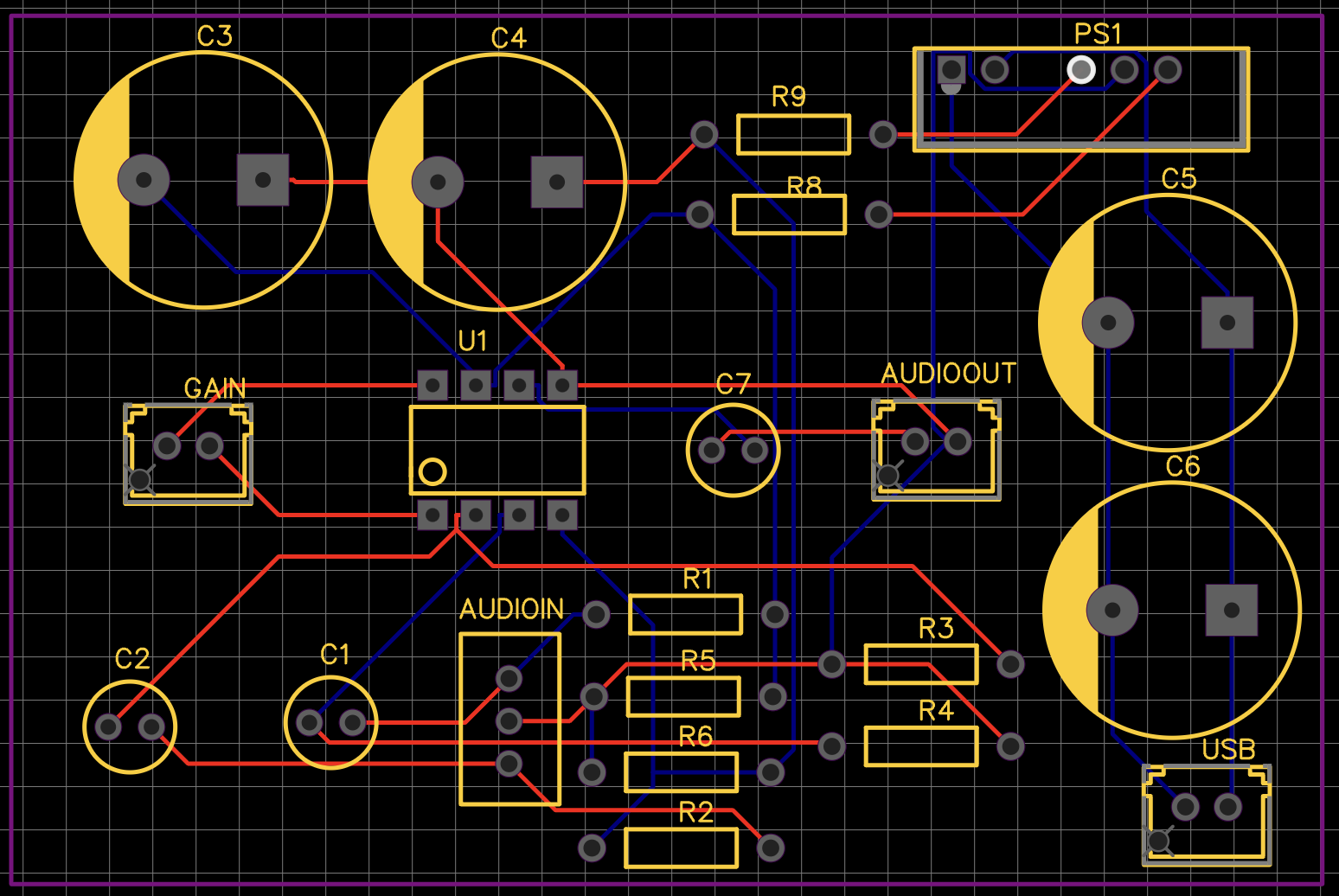
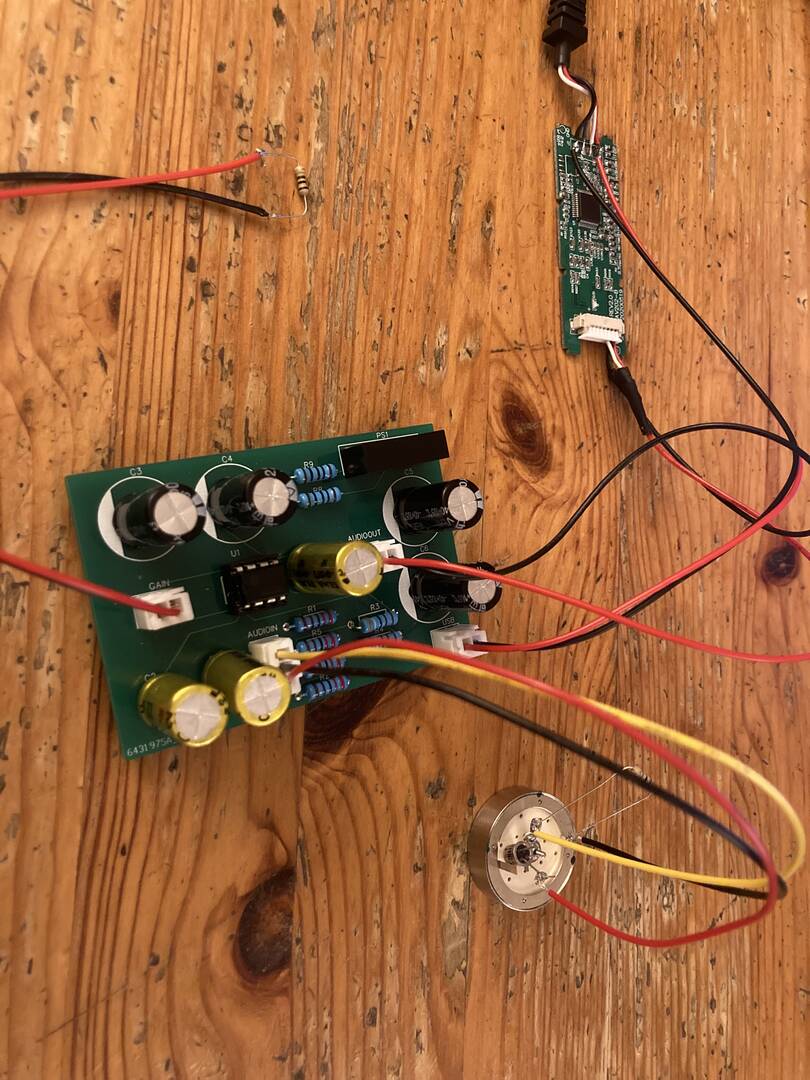
Here is the PCB I did, and what it looks like with everything wired up.
I tried the following things :
- I wired a jack to the ADC to check if it worked. I guess it is working since sound is coming through.
- I changed the gain from 100 ohm to 10 ohm
- I added a 1M resistor between the central tab of the mic and ground (I don't even know if it's where it is supposed to be)
- I removed the THAT1512 and did some measurements on the socket :
pin 4-7 = 27.7V, pin 5-4 = -13.9V, pin 5-7 = 13.9V, pin 5 to any other pin is around 0
I noticed that the values changed if the capsule is removed :
pin 4-7 = 29.3V, pin 5-4 = -14.7V, pin 5-7 = 14.7V, pin 5 to any other pin is around 0 - I then added the THAT and the values changed (and the capsule) :
pin 4-7 = 25.1V, pin 5-4 = -11.7V, pin 5-7 = 13.5V, pin 5 to 1,8 and 6 = -10.6V, pin 5 to 2 and 3 = 0V
(the THAT gets a bit hot) - I measured the voltage between the legs of the different resistors and ground and it was around +-15 volts (something like +-11V to +-15V)
- I checked the values of the resistors and it matched except for the two resistors marked as r5 and r6, their values slowly increase to 1.9 k ohm and 0.7 k ohm respectively
I have checked the the board multiple times but couldn't find anything. If you have any idea of what could be going wrong i'd be really grateful.
Posted : 02/09/2023 11:47 pm
Hello again,
as an update to my last post: here is the performance of my mic with the amp being powered by a Power-bank. I now realize that I still have a very audible beeping sound in the background when cranking the playback volume higher...:
How can I fix the beeping issue?
I can confirm that now, when I disconnect the capsule from the amplifier, there is no audible beeping anymore. Even when cranking the gain very high after the recording, I can only hear static noise.
Connecting the capsule now causes the audible beeping.
Also, I would still be interested in how to solve this ground loop issue in the correct way (can it still have to do something with that issue as well?).
EDIT (Again):
Sometimes, everything seems to be working quite well.
Here is a sample of me being simply quiet:
The spectrogram looks like this. Is this distribution to be expected?:
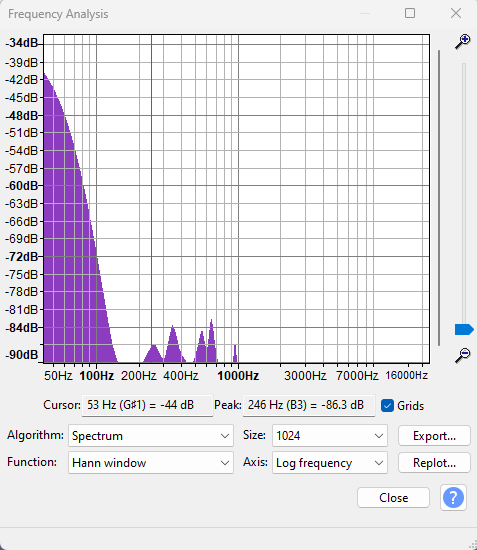
Kind regards,
Robert
Posted : 03/09/2023 3:38 pm