
Notifications
Clear all

Lack of knowledge does not an idiot make, @kirby.
The correct root word is "ignorant" but so many people these days think that means "dense" or "stupid" we've lost the ability to use it correctly and POLITELY!
The Veroboard/stripboard is about 100mm (4") long by 70mm (a little over 2.5") so the box needs to be slightly larger to accommodate that. I won't try and guess because I'll get it wlong (sic).
I don't think Matt specified these dimensions because they're not really critical and the way to do it is to fix the box around your completed project, leaving yourself enough room for the ADC and some mountings etc.
The FET is the transistor that you solder to the JLI2555 capsule (this is part of my improvements but they are no help as yet since I'm waiting on the final boards and the current ones are likely too difficult to solder for less experienced people) - the best laid plans of Mice and Marc you see.
A FET means a "field effect transistor" it's one of two major branches of transistor that are always specified for this sort of thing because BJT or "bipolar" transistors won't work. No point my explaining why because it's quite technical and you don't need to know that if you're not designing this stuff.
The resistors blowing the input to the THAT1512 are 10 ohms a piece in series with the input pins (2 and 3) but you ONLY need them if you're disconnecting the power from the head (unplugging it) and since this is a static design you don't. (It does mean you have to remove the power if you're playing with it during construction just in in case something slips.) This is also why THAT specify those annoying unpolarised electrolytic capacitors which can be a bind to locate.
If you can't find de-soldering braid it is possible (albeit challenging) to remove the braided screen from coaxial aerial cable or better quality audio hookups. The problem with that is its often not specified and cheaper audio hookups tend to use "lapping" where the outer shield copper is essentially spun around the inner conductor/s. It's an effective shield, and cheaper to make, but falls apart when the outer sheath is removed.
This is a very important part of the build since it protects the delicate copper wires running from the head to the amplifier board. Brilliant idea whoever thought of that I just wish there wasn't so much of this cheap braid hanging around that appears to open up but won't.
This DIY Micrphone – What are you working on? – DIY Perks Forum thread from @midnight_vanisher has some terrific pictures which should help with the dimensions. He seems like a stand-up chap too so he might have dimensions you can crib.
Take everything I say with a pinch of salt, I might be wrong and it's a very *expensive* way to learn!
Posted : 15/06/2023 12:22 pm
OK, since this blighter is taking me a long time to get to the sort of quality I'm prepared to put my name on, here's a stop-gap measure for people who are having issues sourcing the transistor. It's just an inch across and (once assembled) fits snugly on the
marcdraco/PerksSpecial: Custom PCB for the JLI2555 Capsule (github.com)
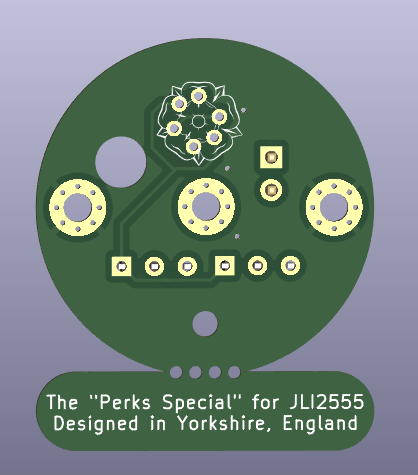
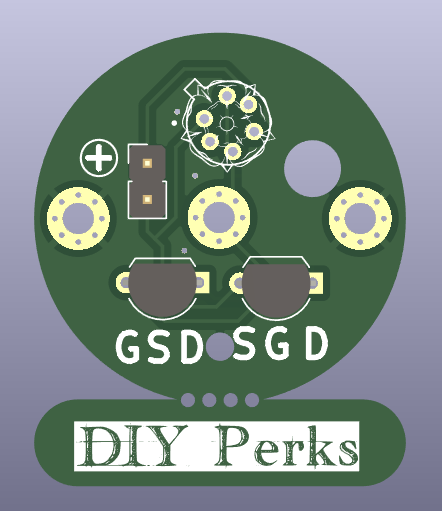
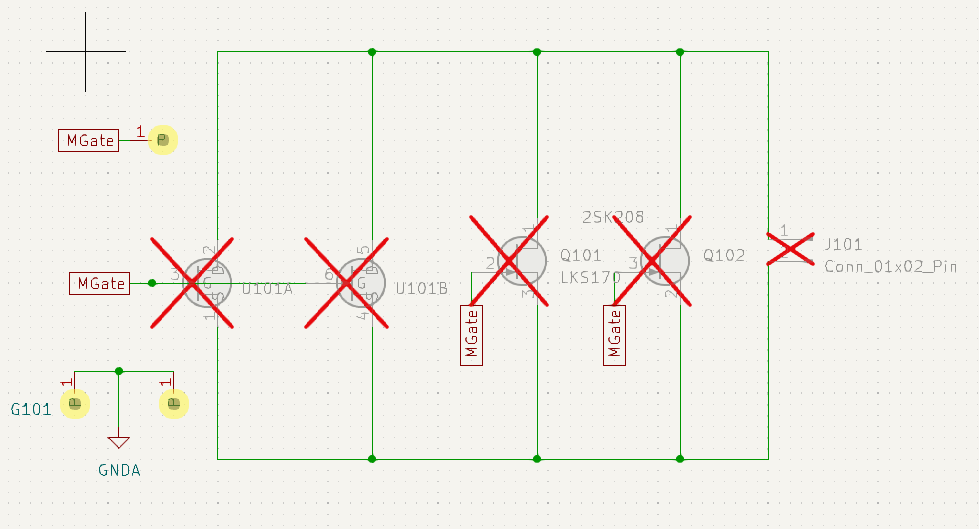
You can see from the schematic (such as it is) is mostly about these devices wired in parallel. Now this is a technique I've used but not in such a simple circuit, so this is intended to provide a platform for pretty much any through-hole FET you can find - I recommend several types, including the original FET as specified in Matt's design. For the sake of convenience and clarity which I would suggest you order from JLC PCB unless you can get a better price elsewhere.
The channel in a FET is technically bidirectional so the Source and Drain terminals are interchangeable with the source being the one most negative with respect to the gate. To this end I've included the two common TO92 layouts along with the 6-pin TO-71 for the LSK389 and LSK489, but my own choice would be the LSK170 for its cost and availability but the 2SK208 (in a TO92 plastic package) should work just fine. These are all low-noise FETs.
The full KiCAD project is on github, minus the copyright artwork.
Take everything I say with a pinch of salt, I might be wrong and it's a very *expensive* way to learn!
Posted : 23/06/2023 6:24 pm
Lamechial reacted

@marcdraco Once again, I have to say that I’m quite excited, especially since you’ve sent pictures and files for the custom board! I admit I have no idea what most of the electrical engineering terms you use mean since I have no experience in the field, but I await the final instructions so that I can actually build my own. Appreciate you carrying this project!
Posted : 23/06/2023 7:50 pm
marcdraco reacted
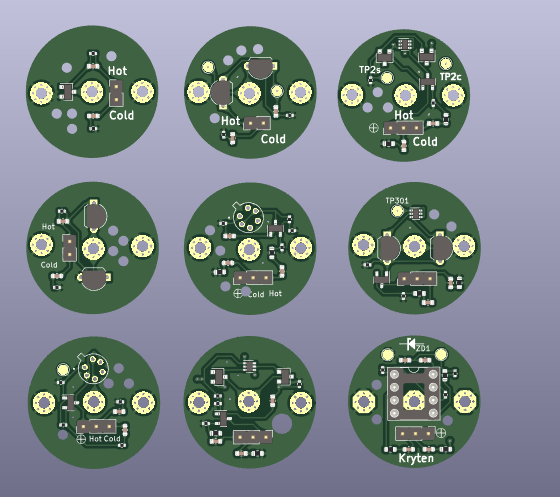
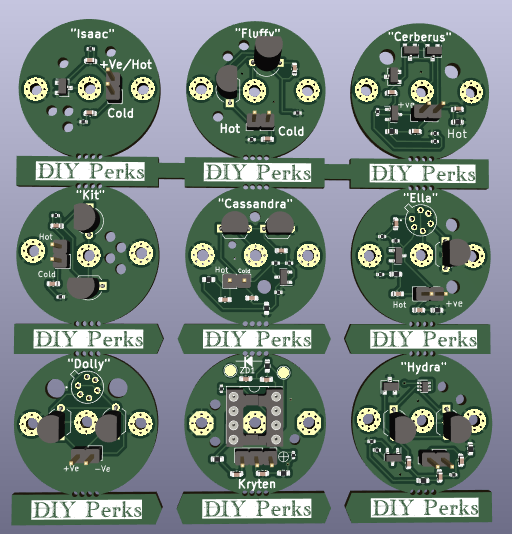
I'm currently sifting through nine different designs (below) which all vary in complexity, but for the most part I've had to drop the "phantom" power which is a technique where we put the audio signal on same piece of copper wire as the power signal. For a bunch of reasons which I won't detail here, it's just too difficult to make a more "advanced" head and maintain the +/- 15V supplies. The one in the bottom corner developed from my earlier attempts but now I've made that single-supply too. It works in the sim, they all do, but I'll hold off a little until I can get the more tricky ones tested on a breadboard.
The single most important change on this lot is that they use a 2.54mm (1/10th inch) hole pitch rather than my earlier cockup of 1.27mm (1/20th inch) pitch which is difficult even for a skilled operator. Most of the designs can (but don't have to) supply a matched signal impedance.
This means that people can use these heads with a variety of different pre-amps either single-ended or differential (balanced).
Differential is largely meant for signals travelling over a distance of many meters and often many tens of meters where the signal can be exposed to all sorts of electronic noise. I can understand why Matt used it for his design, but it's not really necessary and with proper screening you can run several meters of cable in many applications.
We can't get away without sending power to the electronics at the head (and it has to be there unless the entire contraption is encased in a shield). You don't need to understand all of this stuff to understand it though. But Matt's inspiration has resulted in a design that can create amazing microphones with just a JLI2555 and one of these. The one in the bottom right (codename: Kryten) is designed to take a whole bunch of different FET/BiFET operational amplifiers (from the low-cost TL072 jellybean through some of the Texas OPA series). It's an easy way to get the project up and running and upgrade it as budget allows without having to start with a new capsule. I'm slightly hobbled because I snapped one off the two tabs on the capsule while I was swapping out different designs. Entirely my own fault but these things are not really intended for experiments! 🙂
The upside of this method is it's easier to design the pre-amp because it was the split voltage phantom supply where I came unstuck. Ooops.
Take everything I say with a pinch of salt, I might be wrong and it's a very *expensive* way to learn!
Posted : 25/06/2023 6:33 pm

Looking forward to building one of these smaller units that @marcdraco is finalising.
Do we know what sort of costs are involved for the budget versions?
Will anyone in the EU be selling the blank PCBs?
Posted : 27/06/2023 11:19 am
Hi @xane For most people. it's going to be as easy to just order some from JLCPCB from the Gerbers. They're still non-commercial unless Matt wants to sort a local supplier and licence off kits. That's entirely up to him. The small set(s) fit easily inside the 100x100mm dual-layer "offer" that most of the Chinese board places seem to give amazing deals on. I've found JLC to be excellent.
That should give you an idea of the cost, about $10-15, including shipping for blanks. I've specified 402 SMD parts in some places but you can just knock out the ones you don't want from the BOM. I believe JLC is still doing the assembly for free. Some of the semiconductors (specifically the dual-matched transistor pairs BC856-AS7) are "extended parts" and therefore cost more. That gets you five of each design too - so plenty to play with. 😉
A lot depends on which one(s) you want to use. The one for Matt's original Vero layout is on my Github as shown earlier. It's a "blank" board designed to fit one of a number of different transistors (FETS) and is powered by Matt's "+/- 15V" phantom power. This is the only one currently able to work with that board but I will do a couple of others. The idea behind these was to produce a screened platform to avoid stress on the transistor's "legs". The main change is that it also takes an LS389 dual monolithic FET which is wired in parallel, a technique that drops the effective noise component down another 6db.
Someone else has made a PCB of Matt's original board which is also Open Source hardware if you want to go that route as it should provide superior performance to Veroboard.
As they are (to date) still experimental I can only offer Gerbers/BOMs to people willing to take the risk as all or none of them might work. I've slowed development down because I find if I leave it a week and re-check everything, "obvious mistakes" jump out at me some of which are deal-breakers.
The new designs are all intended for us with a separate power supply of about 3V or more. A couple, like Kryten need a bit more (10V+) because in that case it uses an operational amplifier and has to generate a split supply on the board.
Matt's preamp design needs some minor changes to work with this but it's nothing difficult and I'll describe how to do that when I have confirmation these designs work as advertised. Although they are single supply they still deliver a balanced output with "hot" in-phase and "cold" outputs per industry standards which means you can adapt them to work with alternative preamps.
Some of the boards are experimental of course which means YMMV as the final test is always the one where you use the real thing vs. running it in a Spice simulation. This is particularly applicable to the 856AS mentioned above and experimental inasmuch as you just gave me an idea on how to bypass those for people who aren't too fussy about the current mirror which is only there to try and keep both transistors working at the same channel current. 😉 (In practice the wide variations in manufacturing tolerances make this a bit of a craps shoot but it should help.
You're literally on the cutting edge of these designs - I'll get as many (SMD free) versions on the artwork as possible which means nine-up for the 100mm square - they're perforated for separation.
The only "accurate" way to do this is to use a monolithic design (LSK389/489) which tend to be closer as they are on the same piece of semiconductor material. Versions intended for the monolithic FETs don't have the current mirror as it's largely redundant.
One of the variations comes with its own FETs (again, if you don't want these, just leave them off the BOM) which, while not quite as quiet as the larger "through hole" FETS still provide excellent performance in a parallel configuration. The noise performance of all of these designs easily perform at least equal or better than Matt's single FET.
Some of them do offer a third output which, if you're counting, means three conductors in the solder braid. This isn't an issue but it does require a little care. The "third" lead carries the "cold" side to a balanced per--amplifier but as it stands, I've not put a differential signal on that output, rather just loaded it so the pre-amp sees a balanced signal. This may change today of course. 🙂
I'm a little held up (life getting in the way) and I have to get my own test harness working properly too it's not behaving as it should and unfortunately these things can't be made on a breadboard unless you put the whole thing in a paint tin - and my Chinese breadboards are a bit.. well, you buy cheap and all that.
Take everything I say with a pinch of salt, I might be wrong and it's a very *expensive* way to learn!
Posted : 28/06/2023 2:06 pm
Thanks for the information + effort. It is a lot to take in since I don't have *any* experience designing circuits or selecting individual components.
I have done several SMD soldering practice boards with decent luck and have my pair of cheap fetless electrets already.
I would love to look at the BOM, but I doubt I will be able to make much sense of the options. I do have some metal tins + breadboard if it came to it 🤣
Posted : 28/06/2023 8:12 pm
Honestly, it's easier to have the SMD assembly done at JLCPCB (or similar). I've made the "alternative" components through-hole with one exception and that's simply because the board is such a squash that I've had to SMD mount it even though it's a through-hole device. The reason for all this palaver is that the boards mount on the 26mm ring but there is a small void underneath about 20mm across that allows for some room for the through-hole devices to fit without shorting on the ground.
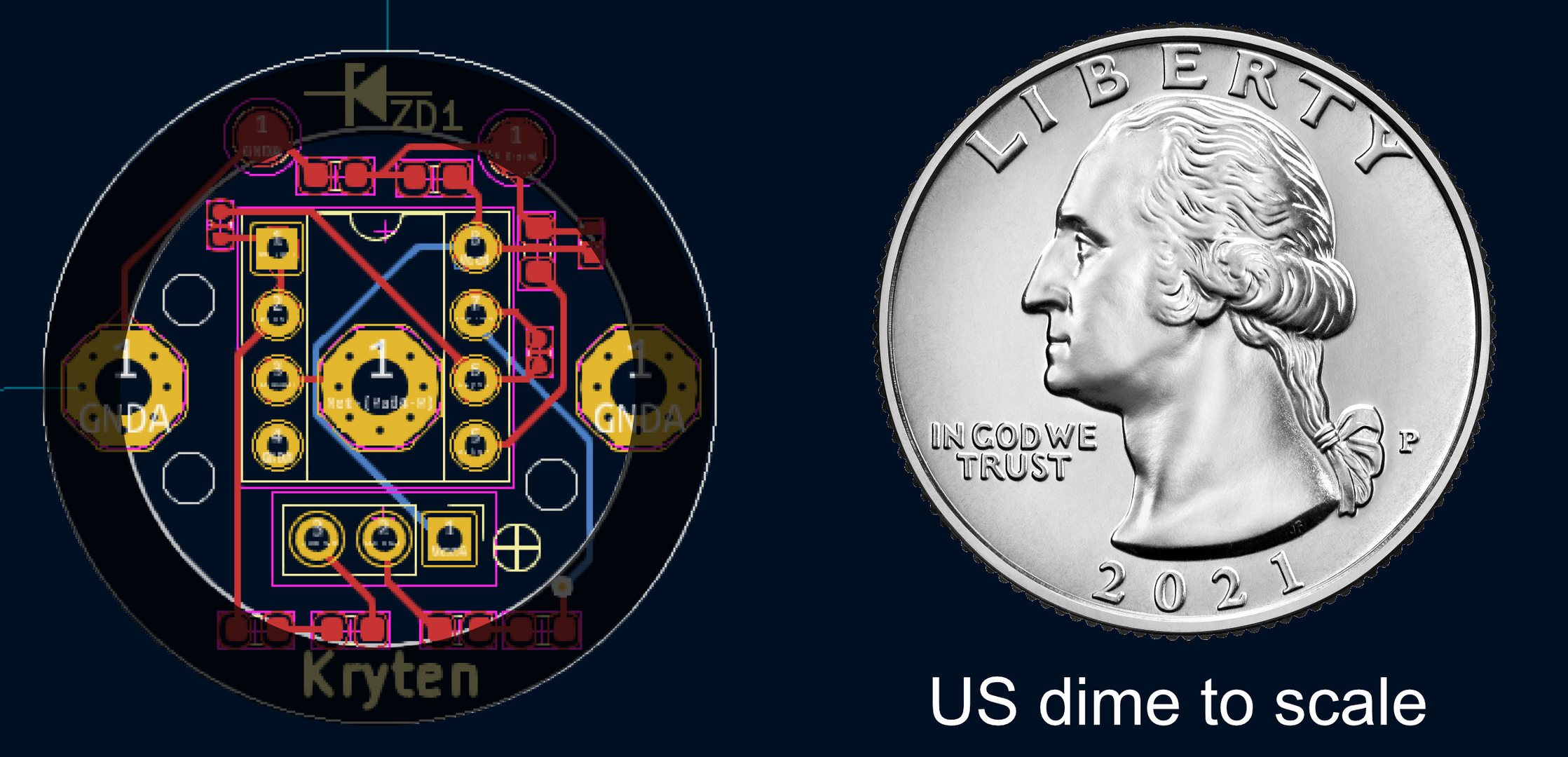
It's tough to appreciate how small these things are until you hold one (it's caught me out a couple of times not leaving myself enough room to work on the completed boards. I've shaded the area where the lower-side of the PCB (and any through-hole components can short). We do have enough room to put an entire amplifier on here sufficient to produce a headphone output, Matt and I did the work but there are a couple of issues, mainly that it means SMD assembling on both sides which is difficult at best! The real issue though is there's just nothing to gain other than doing it for the hell of it.
It still needs power and supplies and although it would drive a "line" level input, there's no real advantage to that either. So we figured it was best to concentrate in getting a ludicrously low-noise, wide bandwidth head amplifier that can drive the project (the USB-C mic) or alternative projects adapting poor quality Chinese mics or entirely separate builds. To a large degree, this is the most gnarly part of the whole thing since it's where the majority of the noise comes from and so anything we can do to swamp it with signal is a good thing. My brief is to bring it into line with Rode designs hence why we're experimenting with top-quality monolithic FETs, but the design you see here will (if it works!) allow for the use of an operational amplifier producing a fully differential signal, similar to that popular in the DIY community.
In the background I have a modified version of this one that works with unpowered capsules - that's the ones that require a 48V (typical) polarisation voltage to work. Although this one is first in the queue, that design also piggy-backs directly to the capsule making it possible to produce quite bijou designs that Matt is known for while potentially allowing use of the best capsules in production (for those people with the money to drop on a $300-$500 capsule that is). I'll stick to my Chinese knock offs and cross my fingers.
Take everything I say with a pinch of salt, I might be wrong and it's a very *expensive* way to learn!
Posted : 29/06/2023 4:17 pm
Would placing the PCB at the rear of the capsule cause any issues such as what is mentioned at 6min 48sec in the build video?
I was able to harvest a 2SK596 jfet and test my capsule wired directly into a usb headset dongle (Hyper-X HX-USCCPSS with a cx20773 chip) and it sounds surprisingly good at least for my needs even with very little applied boost in software, I am not sure why.
Are these USB devices with mic inputs a better buy than the line level versions?
Posted : 02/07/2023 6:19 pm
@xane You mean the rear pressure wave? Normally yes, each of the designs (I've just sent these off to JLC today actually) have breather holes. The problems start if we seal off the rear of a cardioid pattern microphone because the rear pressure wave is what cancels out sounds coming from the rear giving it that specific pattern. If we sealed it off completely it would become an omni in effect.
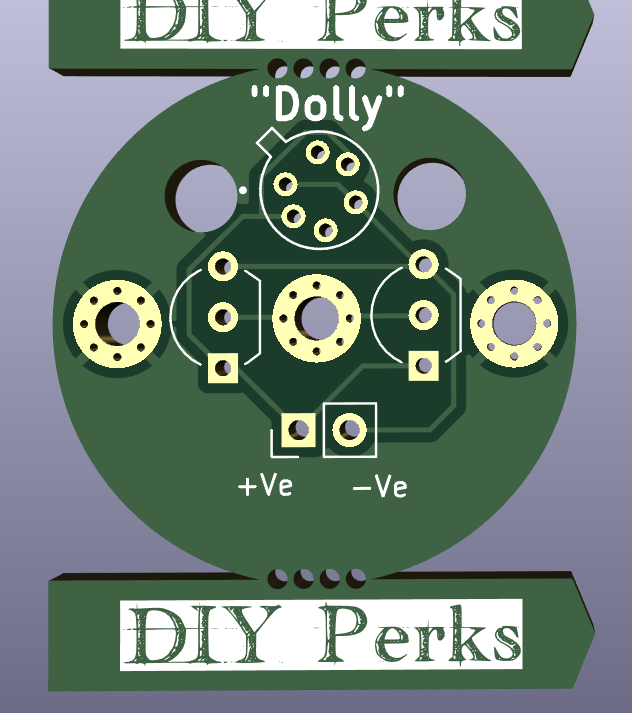
I've created a high-performance, low-noise version of Matthew's single transistor original using either an LSK389 or single/dual LSK170s - it's "Dolly" in this image, Dolly being a "clone" if you get the joke.
The others are largely experimental (and of course it depends on approval from JLC, finger's crossed) and are designed for my alternative pre-amp which is based on Matthew's original but with a single-voltage, single ended (or pseudo-balanced) but deliver a punishing amount of current to overwhelm any pickup.
The revised pre-amp has a Baxendall volume control (option) and I've separated off the headphone stage since it was causing too many problems with the power supplies. (This beastie can be USB 2 or 3 and USB 3 doesn't supply anywhere near enough juice to drive a pair of cans if there are loads of other things pulling current. Spinning the headphone section off also allows people who have got a working version to add a sweet little headphone amp for monitoring or just listening to music - and should (cough, cough, splutter) work fine without requiring a fancy power supply. I won't know for sure myself until these come back as a lot of the design lies in the PCB layout.
I'm not familiar with the 2SK596, but I looked up the spec sheet and it's another of the small number of JFETs specifically intended for low-noise impedance conversion (e.g. condenser microphones). Boards here designed for the LSK170 will work just fine with a '596 if that's what people can get, so I'll add that to the list of alternative.
A couple of the designs here come fitted (if ordered assembled) with an alternative 2SK208 which is another low-noise impedance converter.
Inspired by my utter INability to create beautiful work like Matthew and some of the other builders here (cough, choke, spit...) I've changed the PCB size to drop into a standard-sized aluminium case with just some drilling required. I'll pop them on my GitHUB soon but they all come with a warning that (as of today) they are untested in their final state. As careful as I am, I still screw up - last time managing to drop a via close enough to nick a track, shorting a signal to ground and ruining the whole design. A costly mistake - but I don't want other people to pay for my smeg-ups.
Both designs will fit into Matthew's gorgeous brass designs though. I hope I can convince him to create one for the headphone amp. The *current* and unconfirmed designs are on the GitHUB here - the schematics will follow when I've received and tested the prototypes.
marcdraco/Matthew
marcdraco/Hannah
marcdraco/HydraHeads
As for digitizers, I'm with Matthew on this one - they are (unless we spend serious money) quite well matured now. The problem with ADCs is sampling speed - but and the faster, therefore better quality, we go the more expensive the hardware. At the very top of this pyramid are "flash" ADCs which don't integrate using a successive approximation like the cheaper ones to, they measure the actual levels. I looked at making a discrete version but the costs are prohibitive.
We have come up with a way to improve dynamic range by at least 12dB but that requires software support that I simply haven't had time to look at. I will try to sort something in time but it really needs a plugin to go with (for example) Audacity as it involves merging two separate signals into one logarithmically scaled file.
The issue I have with the digitizers like Matthew shows in the video (and I've designed the latest PCB so that it (just) sits on there and could be held in place with hot glue (!) ) is the inter-channel crosstalk. Or, put in more English terms, the left channel bleeds into the right and vice versa which is totally unacceptable. It doesn't matter on a mono input like a microphone but dual channels - per the design mentioned simply won't work.
Take everything I say with a pinch of salt, I might be wrong and it's a very *expensive* way to learn!
Posted : 05/07/2023 5:22 pm

@marcdraco Hi Marc, I have been following your Hannah design from the sidelines for a while and wanted to ask how it was going?
How far into the testing process you believe you are at the current moment and if you could share some of your current progress? I have been enjoying the vast knowlegde you have been sharing on the forum.
Posted : 10/07/2023 9:11 am
marcdraco reacted
Kind of you to say Mike (@mike_sorensen), but also note that I try to share my screw ups too - so we don't all repeat them! 🙂
I've just checked at JLCPCB and the current set - nine heads plus a separate headphone and microphone preamp are heading into final assembly today or tomorrow.
I re-did Hannah and the Matthew headphone amp so the PCB would carry the digitizer Matt (@diyperks) used if you remove it from its plastic case and both boards will fit (snugly) in these little cases.
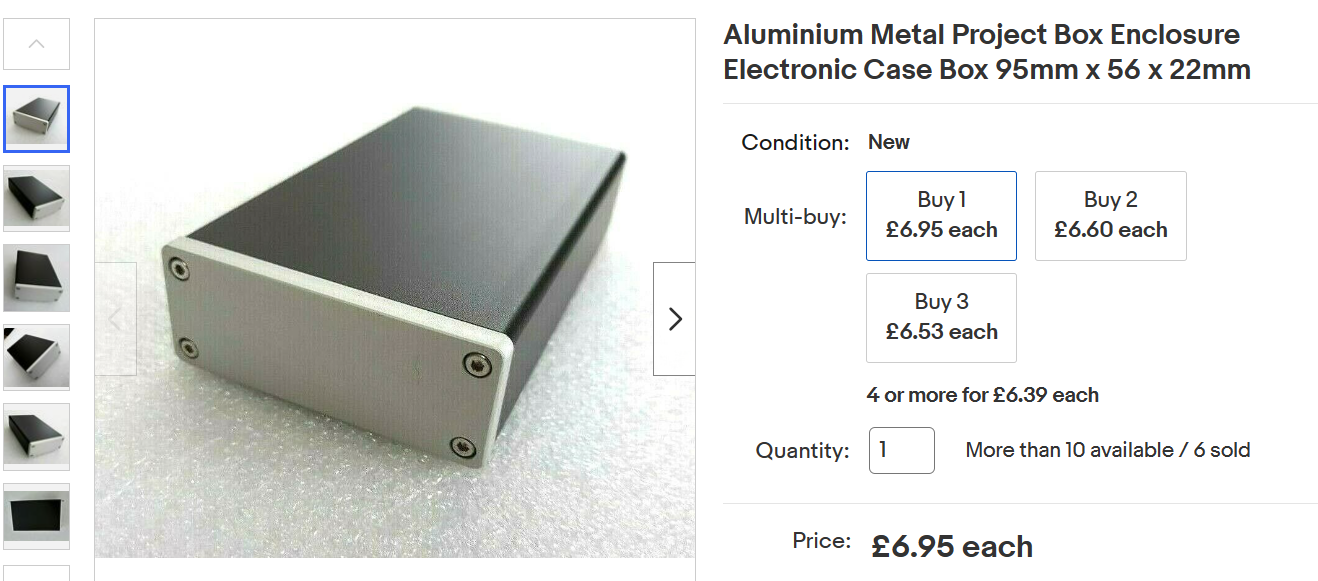
I should go without saying perhaps that I prefer Matt's "steampunk" brass designs as they are aesthetically beyond compare, but these are cheap and only require a simple twist drill to make the necessary holes for power, in, out and so on. Hannah is very tight in this regard (now stop that laughing at the back) because it carries both the THAT1510/1512 and the digitiser. You can see that large area at the top in this picture which is where that sits. This isn't an idea solution and I've had to take a chunk out of the left-top so we can squeeze in a small potentiometer for volume control.
It's still possible to use Matt's original design (using fixed position switch) by bypassing this section and fitting the rotary switch just below the THAT (bottom right where you can see that through-hole resistor. I have done some early work on a digital volume control for this too but I'm sat on my hands as that might be just overcomplicating it and KISS applies to the best designs.
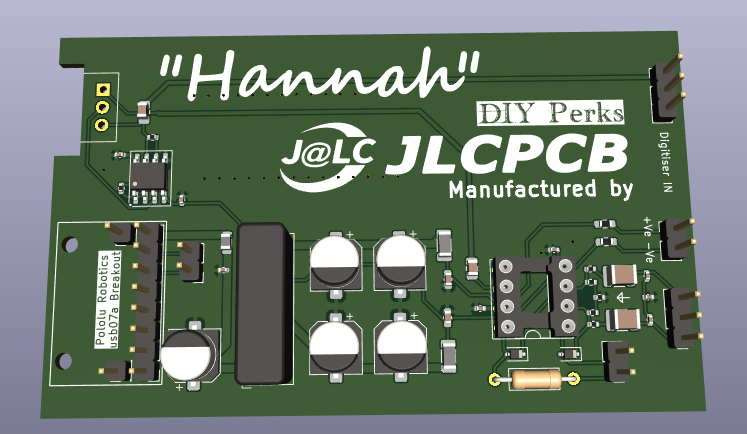
Another change I've made is to the mic power - and this is to to allow more electret microphones to take advantage of the input stage.
Matt used a rather clever (clever in the Richard Feynman way, not Stockton Rush way) variation of phantom power to make his FEThead operate but I've hit the buffers with that on a few occasions so I've separated the power supplies (+ and - are still available on the board) from the input. While I've still got to test these (again, I'll waste my beer money before I waste anyone else's) this should allow you to use this design with alternative condenser mics including ones with internal FETs like the Panasonic WM-61a series and even some from JLI and others. Most of the new heads (except Dolly, which is a high-performance version of Matt's original using more readily accessible parts) only require a single voltage supply to keep things sane.
The pin headers are optional, but they act as a guide to keep the wiring in place and they are neater.
The current artwork is all on my GitHUB (marcdraco) under Matthew, Hannah and Hydraheads respectively for your inspection. I'll put the whole project there when I'm happy it works within reason - software doesn't usually cost a fortune if there's a bug, hardware not so much so! The headphone amp has its own Baxendall volume - which is easier to control digitally but (again) there isn't the room on the board.
The the reason for using a Baxendall design is (apart from its reliable volume performance vs. a traditional logarithmic pot) is that it's far easier to adapt to a digital potentiometer but driving the same requires something like a small "Arduino" board (more specifically a small microcontroller) or perhaps by other more traditional digital means. I've done these things but I'm trying to keep it simple...
It's clearly possible to control the whole shooting match from the computer but that means more than one USB endpoint - one for the digitizer and one for the volume control plus the extra software. I'll leave that to someone else since Windows coding isn't really my thing.
The Matthew board isn't as well developed (but there is room to trim it a bit) if you're putting it in one of those cheap aluminium extrusions.
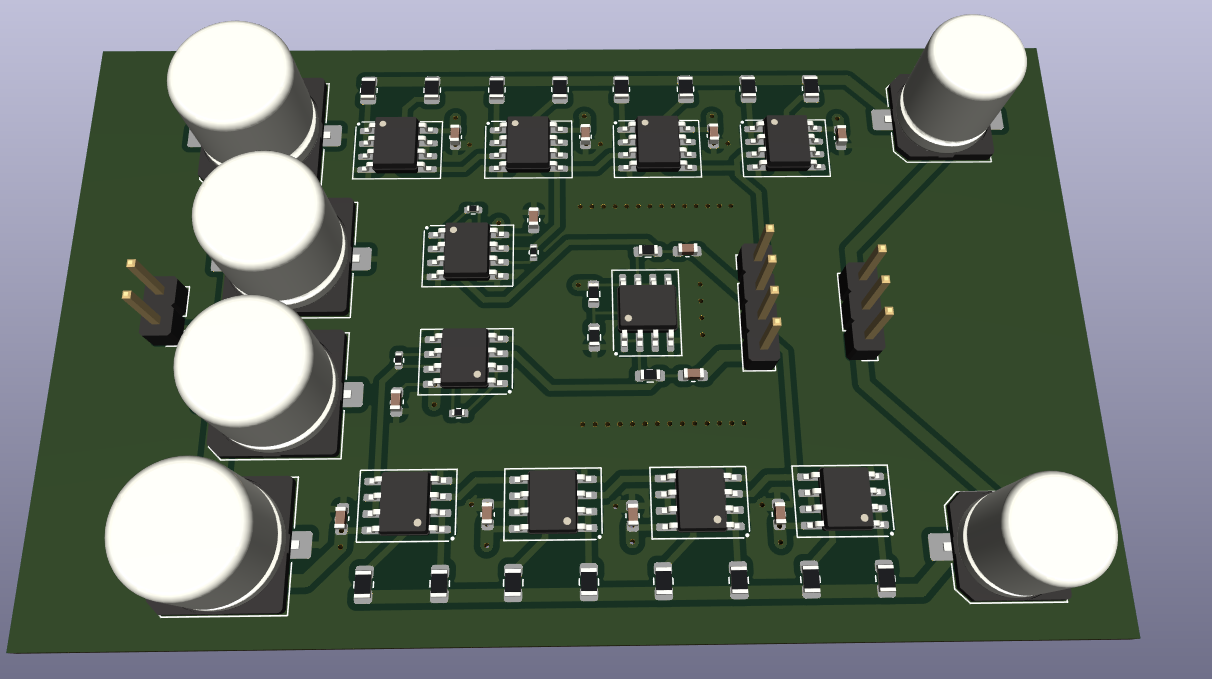
This is a single-supply, 12V but it should go lower, using multiple NE5532s to deliver a very low-distortion signal for monitoring or just enjoying music in stereo by headphones. (This is where I carelessly came unstuck with the NWA0515 because they amps just pull too much current even when they are sitting doing nothing.)
EDIT/UPDATE: I've received confirmation from JLC that these are en-route from China via FedX so they should be here in a week.
Take everything I say with a pinch of salt, I might be wrong and it's a very *expensive* way to learn!
UPDATE: for those following - the boards have arrived and although I'm short of some parts (you know as ya do) I'm going to work around that and see what works and what doesn't... because I'm human and a smeg up stuff like forgetting to put the top silkscreen on the Matthew amp. :/ Still if that's the worst of it...
Well so far the pre-amp and digitizer section works but there is an issue with the Baxendall control on the single-supply headphone board (the headphone amp works beautifully but the volume control is a bust). Thanks LTSPice for lying to me... I knew I should have put that on a breadboard. I have some more testing to do but the new single (separated) supply design seems good. I've only tested Cerberus for now since I doesn't need any extra parts as the entire board was assembled at JLCPCB.
If anyone wants the relevant PCBs they are on my GitHUB page. The volume control was an option on the pre-amp and that works quite well but this does mean "jumping" the output to bypass the volume circuit which is not what you want on a headphone amp.
The revised pre-amp design works with one exception which JLC are looking at now. There's something to kill RF noise from entering via the USB power but rather than passing DC as its supposed to do, it appears to be operating as a 6K resistor. I've checked on my BOM and it's correct even down to the JLC part number so I'm no further forward. At least that one is essentially optional and can be bridged with a zero ohm resistor or (gasp) a solder bridge. 😉
When the cat decides to leave my lap (his claws are sharp and too close to the family jewels for comfort) I'll be able to insert the digitiser segment and may even be able to run some more tests.
As always, I apologise for the delays but the turnaround time is measured in weeks (at best) even when I have them on a rush job. So any improvements I do today will take another month or so to get back to us. The only design improvement I've noted is a minor one to provide a regulated 3-5V output to power electrets with internal FETs. The Panasonic ones I've used before are known to go to 9V and probably will work at 15V but I'm not that brave. A 3V regulator is easily constructed with a couple of diodes (or even the right-colour of LED) and a current limiting resistor.
UPDATE 2:
I've just managed to slap something together and while it's not even close to being finished (I need to make a basket for the head so I can test it properly) and there are some other things to do, I thought those of you who are waiting deserved to see a picture of the real thing so here it is (obviously with its guts spread out around the table) but you can see how the digitizer Matt specified sits quite easily on the edge of the board. A little bit of soldering trickery is required of course, but not too much.
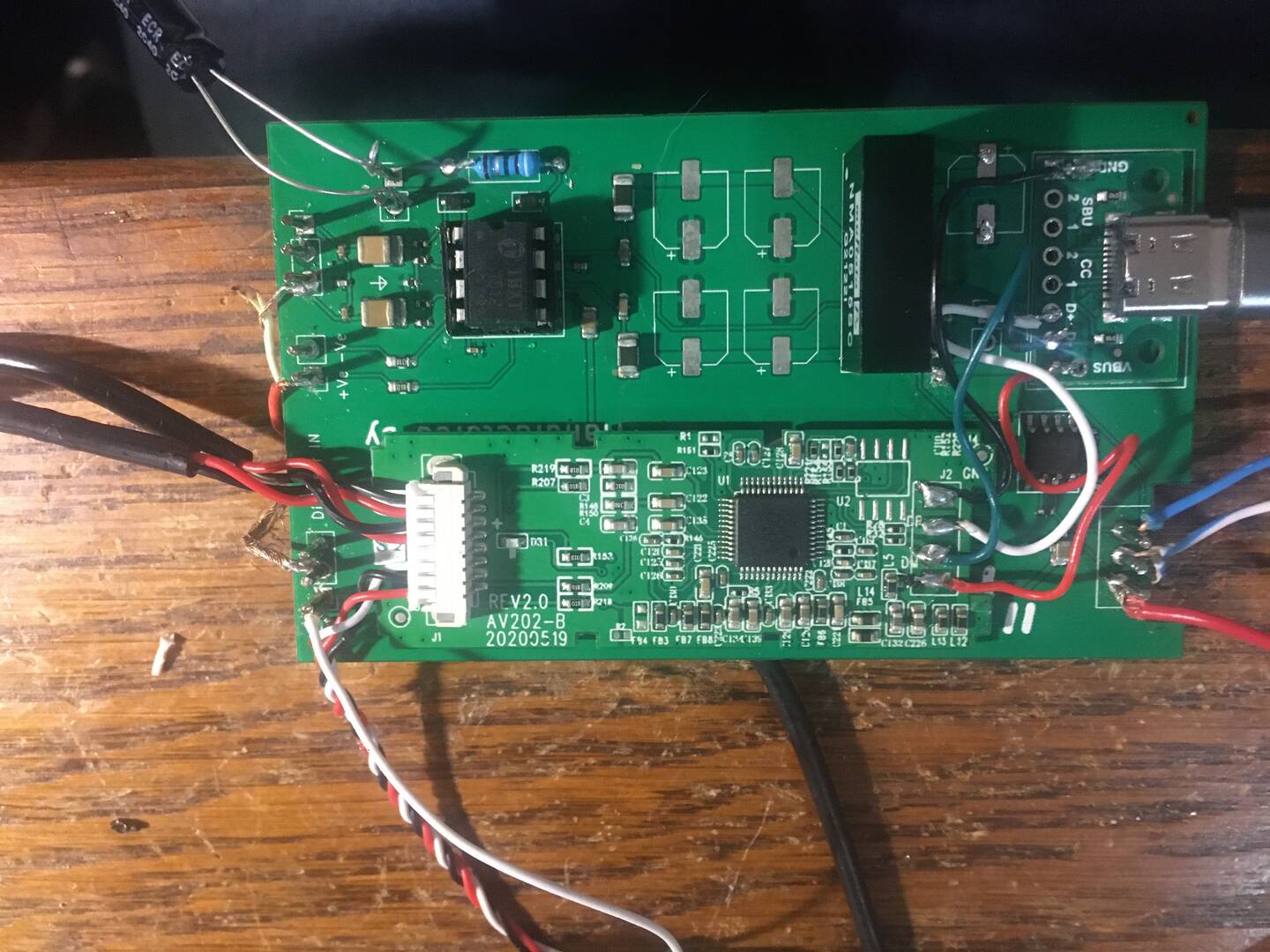
The artwork I had for the Pololu wotzit was out of scale so the fixing points are wrong. Annoying but not the end of the world. I'll endeavour to fix that if I do another run of these from that blueprint as it's physical and the only actual "error" on the board is that ferrite bead that's acting as a resistor. Beyond that, I still have some work to do experimenting with the supplies - the THAT1510/12 with 30v differential supplies drive the input well beyond what the digitizer is expecting so it looks like the 10V version of the splitter might be sufficient (and will be less stressed).
You might also notice some oddities around the 1512 - a "large" (not SMD) resistor and a capacitor hanging off?! I won't go into to the technicalities of this but the capacitor/resistor form part of a negative feedback system that controls the "open loop" gain of the THAT. This is fairly standard in operational amplifier design where the capacitor is fitted from the inverting input to ground, but it's easier elsewhere in an instrumentation amplifier which is what the THAT1510 and 1512 are modelled on. In both cases this should reduce DC at the output to nil but I'm not that brave so I've put a capacitor on the output too (you know, belt and braces).
The current experimental design runs the THAT at up to X1000 gain which is far more than we need (even with a volume control) but the resistor is fixed and can be replaced or even supplemented with a rotary switch per Matt's original design. Naturally this PCB being smaller, it will fit easily inside that beautiful case.
As mentioned earlier it looks like I've made a plateful of fetid dingoes kidneys of the single-supply Baxendall volume control and in writing this I think I know why too so unless I can figure out where I dropped the cannonball on my toes, I'll remove it from the V2 design. It does sound rather delicious though so that's something.
Take everything I say with a pinch of salt, I might be wrong and it's a very *expensive* way to learn!
Posted : 17/07/2023 12:40 pm

Hello! I am pretty new to the electronics world, and thought that this might be appropriate project to tackle, given that I want to be more versed in the audio world. However, I have run into a few obstacles, and I do not have confidence in the knowledge I have to solve these problem because I simply do not know or have experience in this type of work. I have soldered everything onto the stripboard, and have changed (or left out, rather) a few things from the original, which are as follows:
1. No solder wick shielding on the wire connecting to the capsule
2. Keeping the USB connection on the breakout board.
As such, there's a few questions that have risen up during my time on this project. Please note that I am not well versed in the different components in the electronics world, and may need clarification on what something may be... Sorry!
Here's my board.
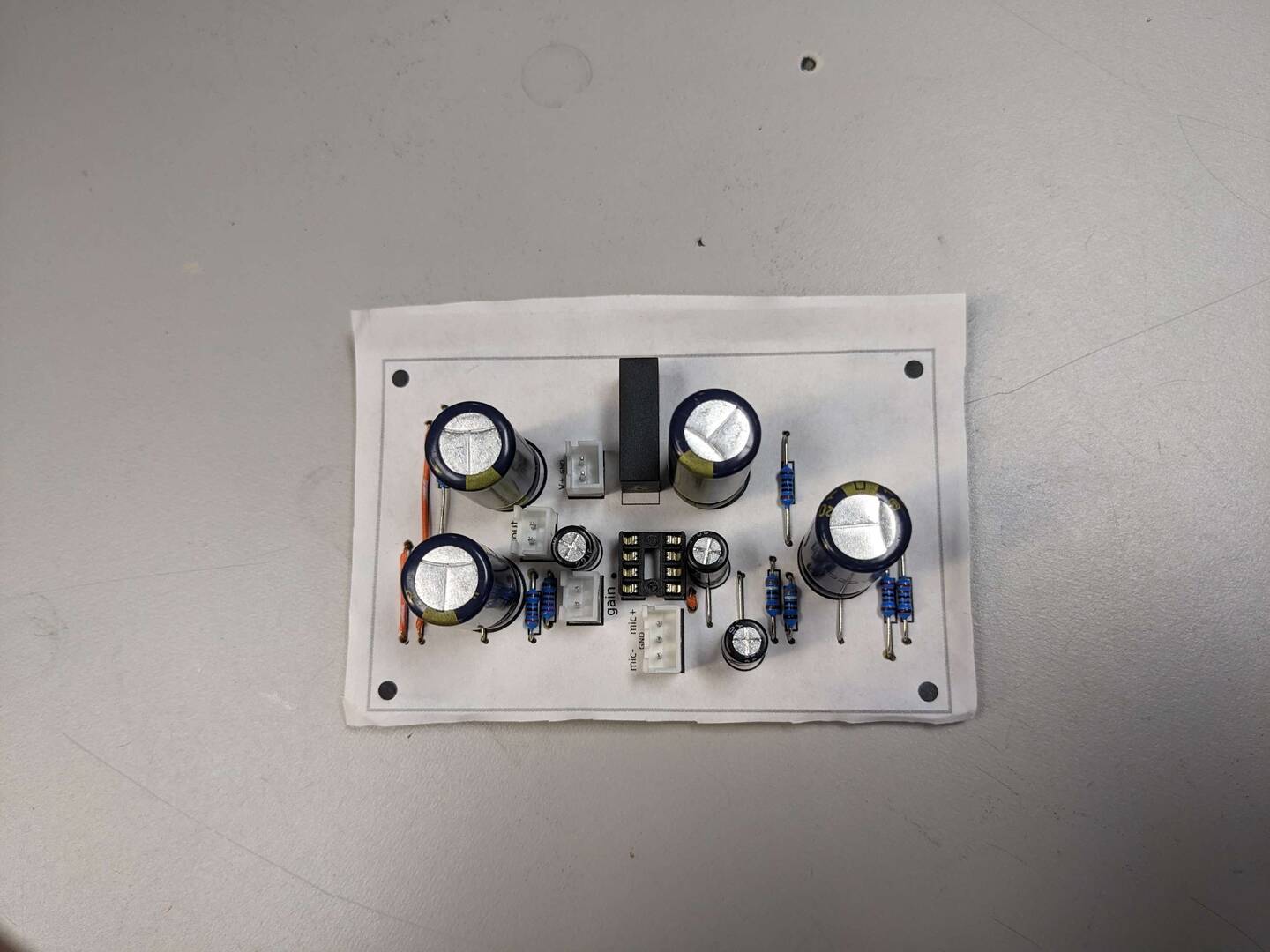
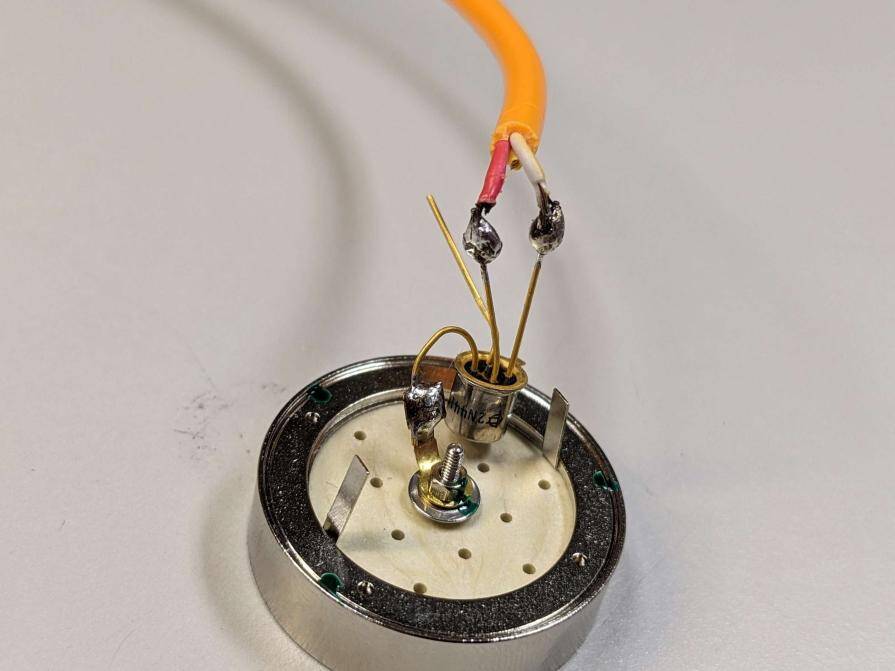
My first question comes from my decision to go without the shielding on the cable going to the capsule. I have noticed that the 3 pin connector for the microphone has a ground pin. Was I supposed to have a third cable to solder to the grounding tab on the capsule so that it could then be connected to the ground tab? I also read somewhere that the fourth leg (that was originally chopped off) should have been grounded instead. I don't know how true that is, but I thought I'd keep it on just in case and confirm somewhere.
My second question is about the breakout board. I wanted to keep the USB connector because that would be the most convenient in my applications, but I have run into the problem of figuring out how to supply power to the pre-amp board. In the original video, he used a usb-c breakout board that was able to solder on a cable with the 2 pin connector to supply power, but I'm not sure how I am supposed to do that if I leave the cable on there. Would I have to buy a breakout board for a USB, or am I able to splice a wire or something? Sorry if that's a dumb question...
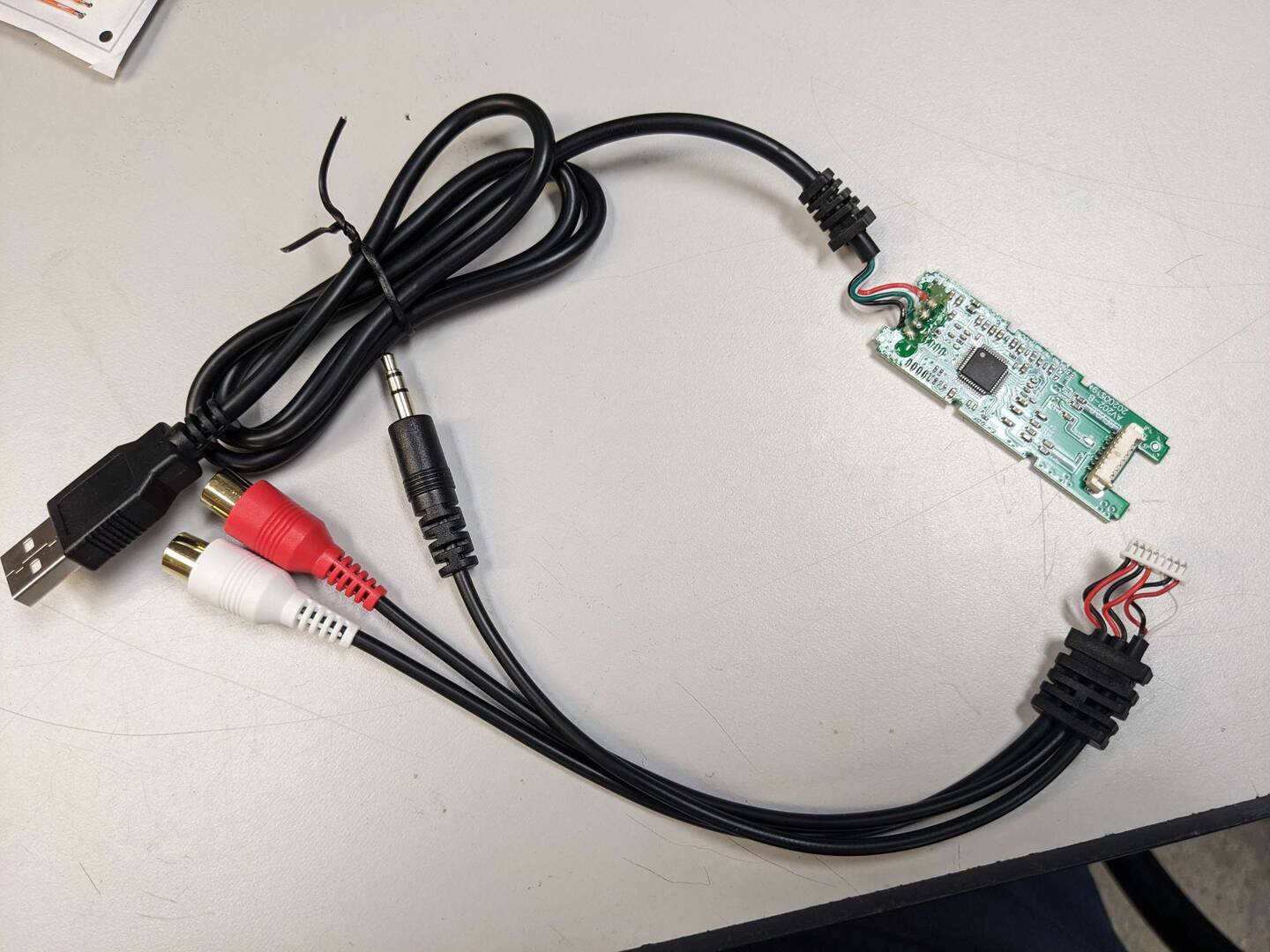
Thank you for reading through this! I've subscribed to the forum so I should be able to see replies and stuff. It's my first time using this site, so I'll try to be responsive!
Posted : 19/07/2023 11:25 pm
Welcome to the DIY Perks forum and don't worry about your lack of knowledge, we're all learning. I've been charting my own mistakes along the road of developing this excellent project into something simpler to make without losing the appeal of its neo-Steampunk look.
Starting at the head (capsule) I've run through five different variations with some spectacular fails, including one that short-circuited the power because one of the layers "slipped" a small fraction of an inch. That head unit is still causing me issues due to a feature in KiCAD which I've detailed below.
The transistor at the capsule has a fourth pin which is connected to the “can” – that’s the metal case that encapsulates the functional part (the FET itself). This is present because the part is designed for radio frequency work (although it works well down into the audio range). Matt’s design clipped it off because the whole capsule is encapsulated in a Faraday cage. The metal can of the microphone capsule is grounded via the brass cage and that is grounded through the 0v rail.
The reason I originally got involved here was to improve that design and make it easier to solder the transistor to the capsule. This developed into a whole range of different designs, many of which never made it past the drawing board stage.
These designs are quite mature now as Matt and I worked behind the scenes and you can get five made up at JLCPCB for just a few dollars – for bare boards. The multiple designs can be fitted (at JLC) with different variations of the head, some of which have their own FET on the board. I’ll have to write these up but many now only work with my variation of the pre-amp which is now in its final version. The current one works but due to an error in ordering (a bug in my software outputting the bill of materials) which is a bit of a bind. That error, which I overlooked, resulted in a tiny R/F suppressor getting replaced with a resistor sufficient to kill the board. Ho hum.
Dolly (shown here) is one of those heads and an improvement on Matt’s original using easily available transistors and is itself heavily screened. The idea is you assemble the board which fits right on the back of your microphone capsule. The brave (or well off) can use an LSK398 which is a dual transistor organised in parallel to get the capsule noise down even lower. The other eight designs on the artwork are experimental because they are all single-supply which means the layout you have won't work.
The pre-amplifier with its space for the digitizer can be seen in one of my experimental mockups further up the thread. You can get that made up at JLCPCB for a small price too since almost all of the parts are stock items.
I have a few of these left in case anyone wants one but the new ones are off to China today and feature a new power supply output for smaller electrets that have on-board FETs so that they too can reap the benefits of this beautiful amp.
Take everything I say with a pinch of salt, I might be wrong and it's a very *expensive* way to learn!
Posted : 20/07/2023 2:15 pm
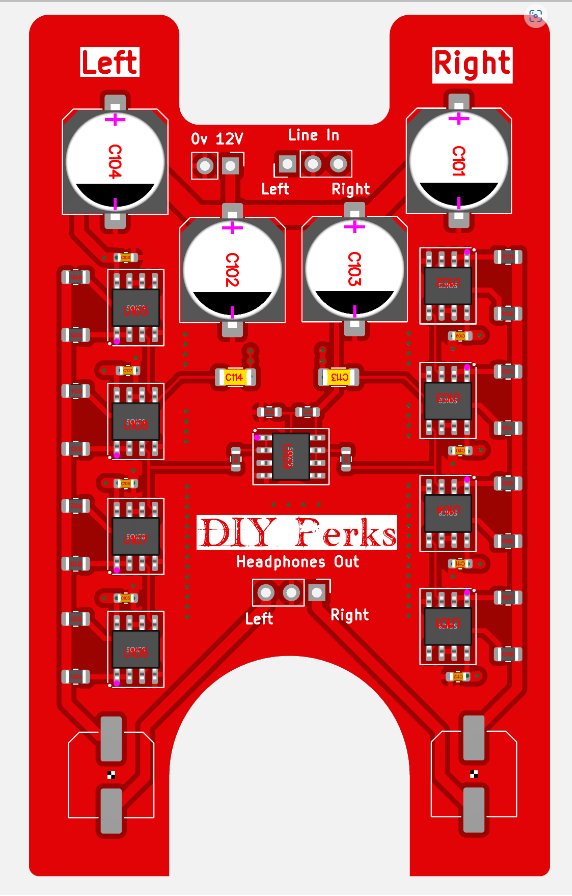
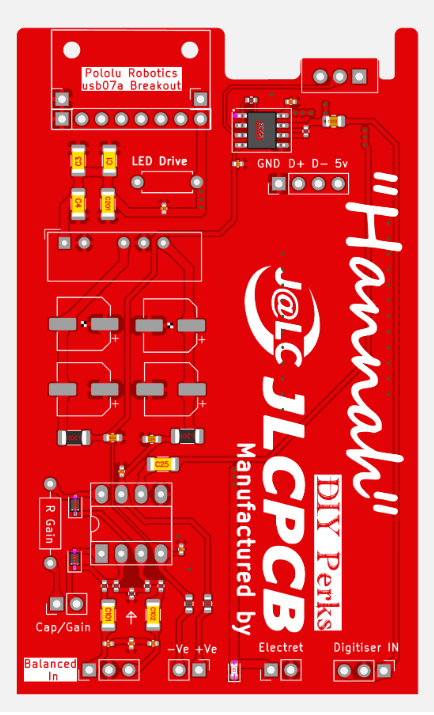
Just a quick update for everyone, I've just ordered these boards - the slightly improved (pre-amp) and the headphone amplifier from JLC so hopefully we should have final working prototypes in the next couple of weeks (I've only ordered 5 for this run because if something goes wrong that's a lot of stuff in the trash!)
The gotcha is something in KiCAD's production ordering which catches me out every time - sometimes I miss parts off that should be in and occasionally the system inserts an SMD part where I've specified a through-hole one as these are easier for us to experiment with.
Take everything I say with a pinch of salt, I might be wrong and it's a very *expensive* way to learn!
Posted : 20/07/2023 8:22 pm
but I'm not sure how I am supposed to do that if I leave the cable on there. Would I have to buy a breakout board for a USB, or am I able to splice a wire or something? Sorry if that's a dumb question
Yes you can retain your usb cable and splice into it for 5volts and ground to power your amp. If there is no glue on the rear it may be easier to not splice but instead attach some wires to the pcb directly.
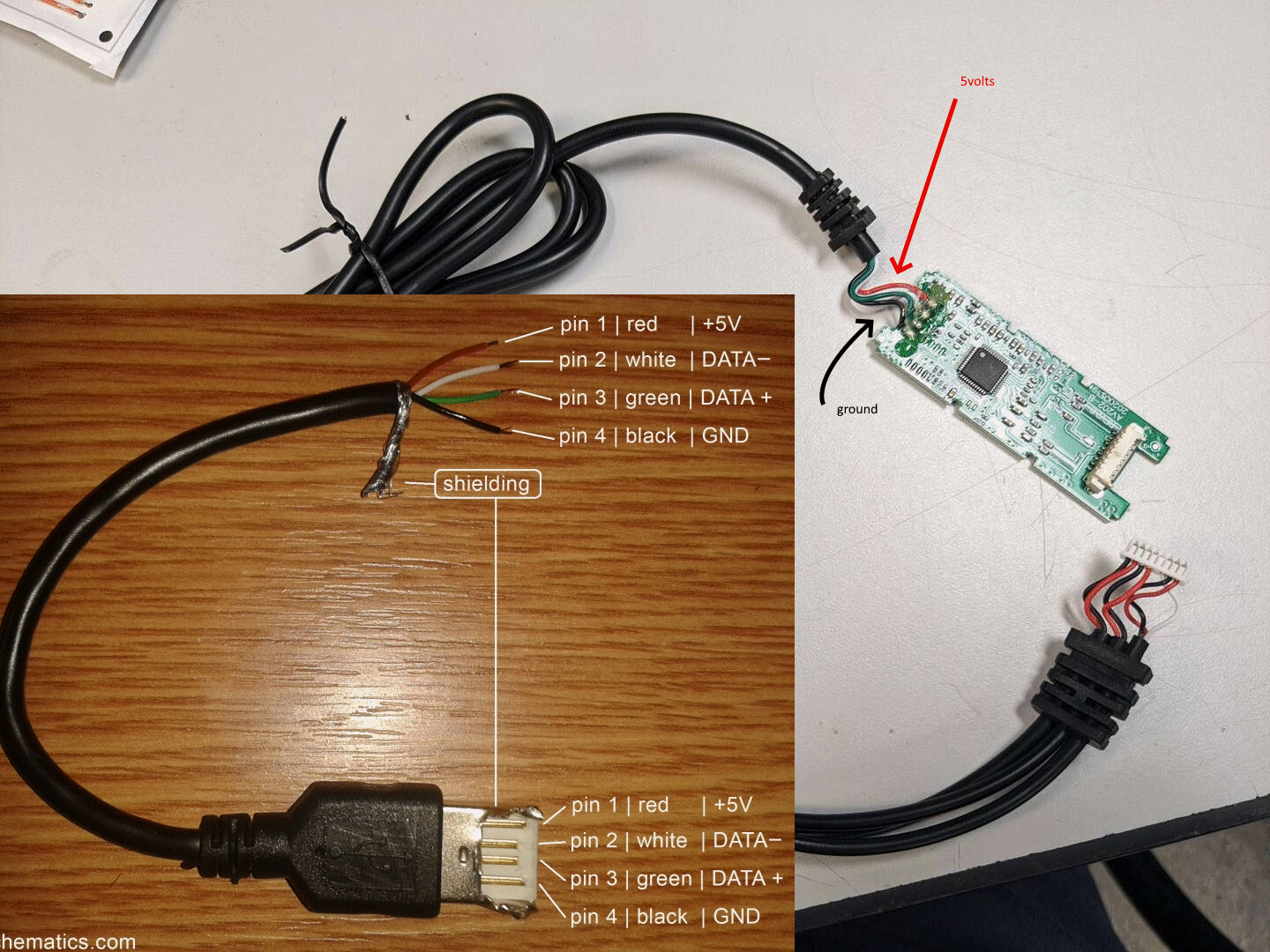
Posted : 21/07/2023 3:11 am
marcdraco reacted
Thanks for all the effort + updates Marcdraco.
I was concerned having the PCB so close to the capsule was going to drastically change the sound? A similar size bit of cardboard behind a bare capsule in open air seemed to have a suprisingly negative effect on the sound.
Posted : 21/07/2023 3:22 am
marcdraco reacted

Can someone find a decently priced desoldering wick that works off US amazon?
i am kinda on a budget rn and the one i just bought today turned out to be a flat braid and i dont wanna spend more money only to get the wrong thing again
Posted : 21/07/2023 4:19 am
@xane Yeah it can, which is why the boards have as many "breather" holes as possible. There's not a huge amount of space to build a circuit (and still have space for holes) but so long as the rear pressure wave can reach the back of the diaphragm there shouldn't be a notable difference. I've found (to my surprise) that you don't need a very large hole for sound pressure to pass through. Dolly (the backwardly compatible one) has a couple of large breathers with more if you don't mount all three of the through-hole devices.
Direction of pressure also counts because this is what controls the shape of the cardioid lobes. I expect there will be some change in those, but my tests - to date - have not revealed any change in frequency response. These boards will also "drive" other FETless capsules including omni-directional ones which don't need that rear access.
Take everything I say with a pinch of salt, I might be wrong and it's a very *expensive* way to learn!
Posted : 21/07/2023 11:13 am
@acidiconionas I think the issue is that the companies that sell the braid don't actually make it so it's very difficult to say "use this Acme Braids 2mm braid" because if Acme sources from a different supplier, then it might just be the cheap stuff.
Amazon will allow you to post the question to the supplier and other customers so that's your best route in that regard.
Since you don't need a huge amount the alternative is to look out some *braided* screened cable of a diameter you can cope with.
* DO NOT DO THE FOLLOWING INDOORS *
Braided screened is the expensive option but preferable to lapped (which is far cheaper to make because the wires are simply laid over the inner conductors) and with a little care and a small heat gun or even an OLD soldering iron you can remove the plastic sheaths. I've done this with a razor blade but the chance of nicking the braid, leaving messy bits, is very high, as is the chance of cutting your fingers! You don't need a lot of heat, just enough to make the plastic more plastic. Also, and I shouldn't have to say it, but ... use tools to remove the hot plastic, not your bare fingers!
Braided screen can be pushed back a little (you an see Matt doing this in the video I think) so that it balloons and frees itself from the inner conductor(s) and after that it can be tugged gently whereupon it tightens back up.
I'm old enough to remember when we took screened cables apart to use as solder wick and also that wick used to be sold with powdered flux to make it easier to remove the excess alloy. It's depressing to see how low some companies will go to make a few fractions of a penny per unit. A "true" tubular braid seems able to wick up solder far more effectively than these flat pretenders although I can't be sure why that is but it likely has something to do with the capillary action. As an aside, I once tried using lapped screening from some discarded cable as a solder wick. That worked about as well as you could expect.
Take everything I say with a pinch of salt, I might be wrong and it's a very *expensive* way to learn!
Posted : 21/07/2023 11:38 am
Ah thats great to hear about the holes in the PCB acting as breathers!
Has anyone with poor DIY skills found a suitable capsule holder?
I came across these marketed as 25mm brass watch parts ultrasonic cleaner baskets, finding actual dimensions is proving to be difficult though.
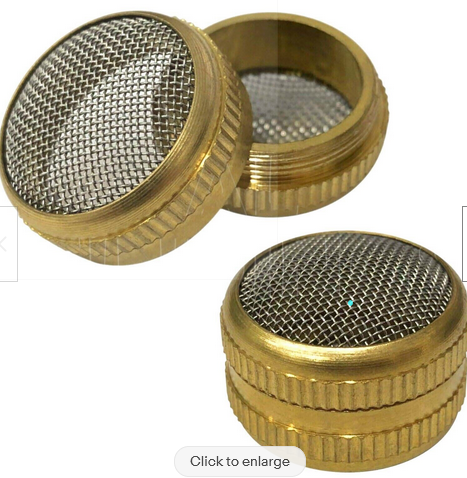
(there is a 50mm variant if it helps anyone, little big for my goals though)
Posted : 24/07/2023 6:06 pm
The capsule is 26mm diameter which is **** typical isn't it. Those look like they would be great too.
I have some issues with noise on the power supply which I need to iron out. My designs "assume" (cough) a very stable supply but it even with an improved filter (per Murata specs) it's not enough to skill some H/F noise. "Dolly" shouldn't be affected but most of the others are. So I'm still on the case. 🙂
Take everything I say with a pinch of salt, I might be wrong and it's a very *expensive* way to learn!
Posted : 24/07/2023 6:14 pm
The capsule is 26mm diameter which is **** typical isn't it. Those look like they would be great too.
I have some issues with noise on the power supply which I need to iron out. My designs "assume" (cough) a very stable supply but it even with an improved filter (per Murata specs) it's not enough to skill some H/F noise. "Dolly" shouldn't be affected but most of the others are. So I'm still on the case. 🙂
Take everything I say with a pinch of salt, I might be wrong and it's a very *expensive* way to learn!
Posted : 24/07/2023 6:14 pm

I was having confusion on how the sound card is being connected to the board, which pin to which, can anyone help on that ? Lots of thanks
Posted : 25/07/2023 11:45 am
We can help but you'll need to be more specific. The sound card - I assume you mean the digitiser - plugs into the USB port on your PC. The one Matt used has two stereo inputs but they are paralleled so you just need to pick one.
The easiest way is probably the separate phono sockets. But I can't be 100% sure without seeing pictures of your problem.
Take everything I say with a pinch of salt, I might be wrong and it's a very *expensive* way to learn!
Posted : 25/07/2023 7:40 pm

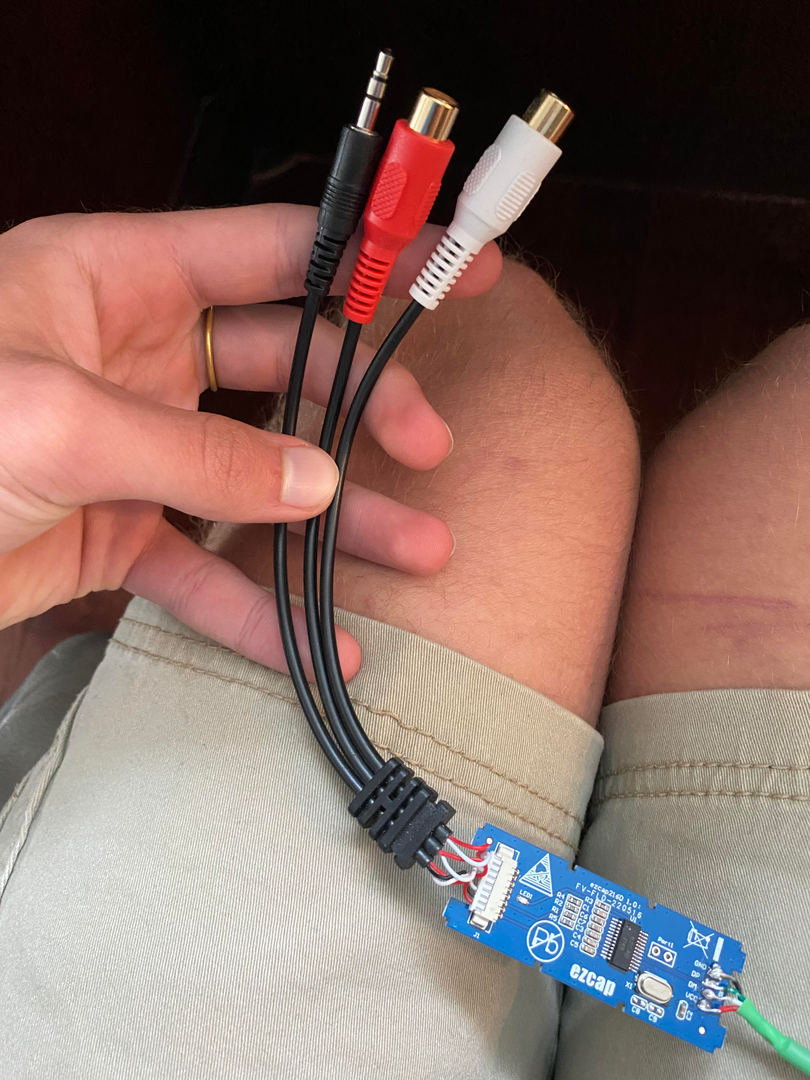
I think I have the same question, Which cables get spliced into the board, and into which connector?
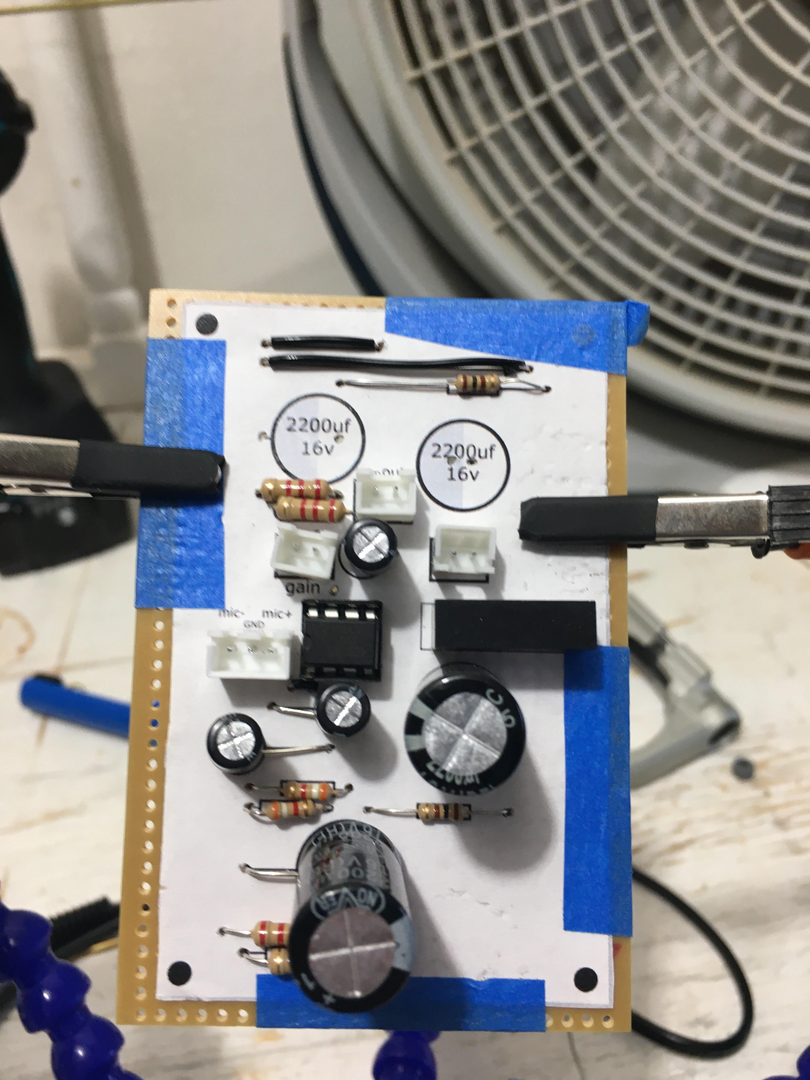
(just a reference)
Posted : 31/07/2023 3:42 pm
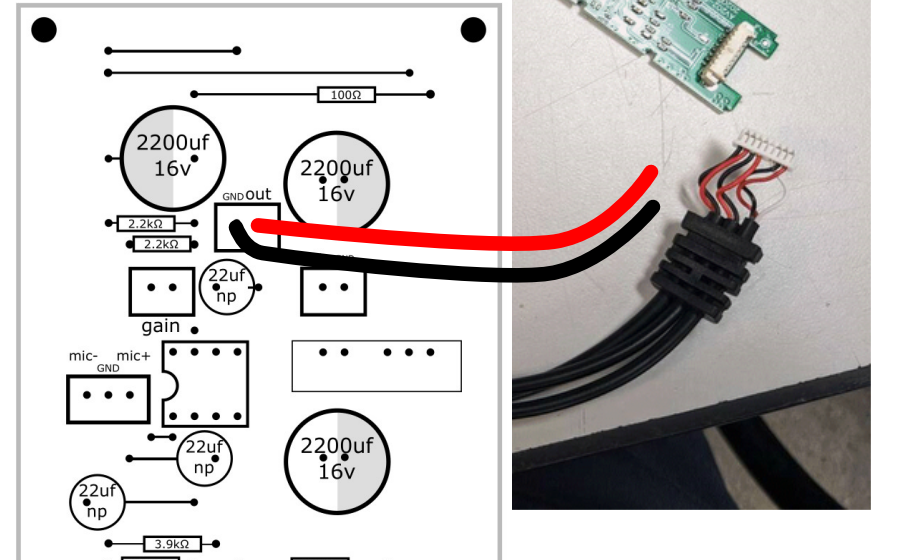
I've pinched part of @xane's excellent picture above to show this a little more clearly. There's a socked there marked GND and OUT.
This is a mono input but the digitiser has TWO stereo inputs which seems to make things more complicated than they really are.
The colour code on this device seems to be RED = right OR left, WHITE=left and BLACK=ground (0v, earth, etc.)
For my build I cut the white plug off here so I was left with just the wires but that's a little tricky and it's FAR easier to either cut one of the phono sockets off and wire to that OR even solder a phono plug (male) onto the output marked on the page with the red "wire" going to the centre of the plug and the black one going to the outer.
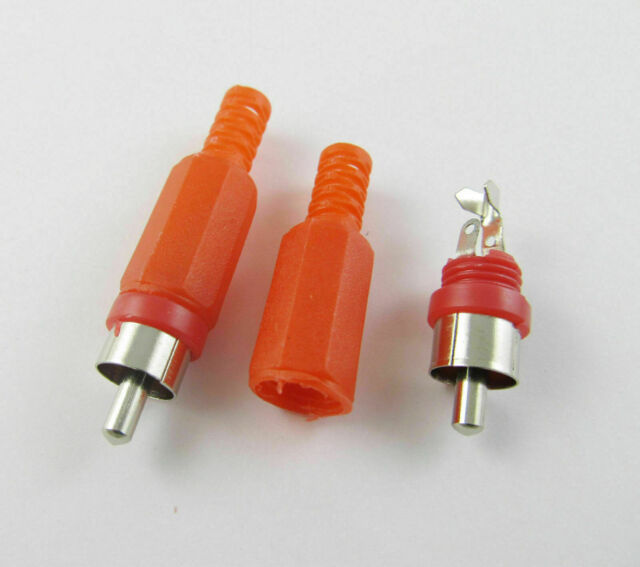
This is a male phono (right) although it's actually signal agnostic. The colour just helps us get the stereo image the correct way around. The other input is the 3.5mm plug which is where that white wire comes from. You can similarly wire a 3.5mm stereo socket with black to the common and red to either (or both) of the other terminals.
The wiring to the Polu Robotics board is detailed in @xane's post above and also in Matt's video.
What you need to remember with audio is that the signal is carried on the centre terminals or centre cable. The digitiser has four signal inputs and all of them can be driven by the THAT1512.
Take everything I say with a pinch of salt, I might be wrong and it's a very *expensive* way to learn!
Posted : 31/07/2023 4:38 pm
so basically I splice a black cable and a red cable into the appropriate sockets?
Posted : 31/07/2023 10:35 pm
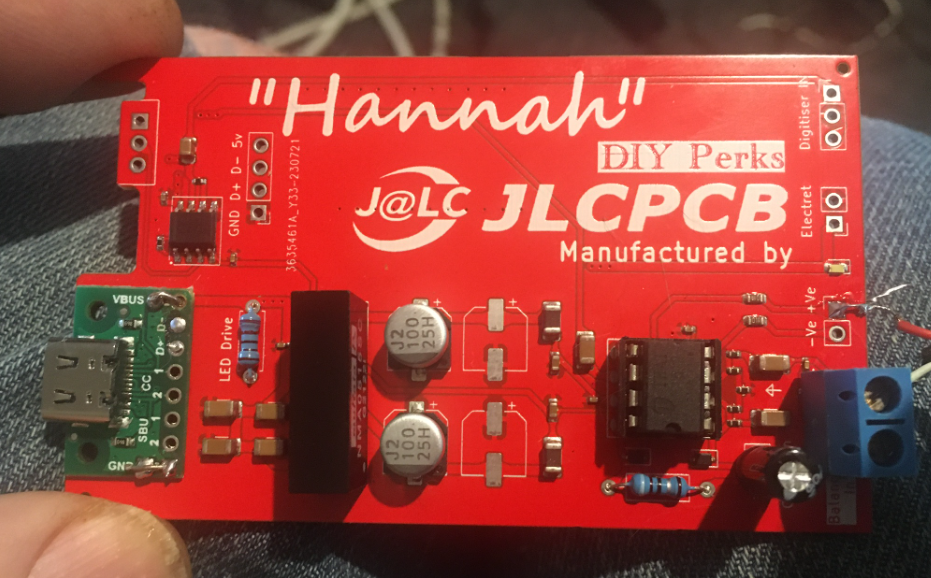
For those following the development of the pre-amp for the USB-C mic project. Here is the final working prototype. I didn't fit all the capacitors but they should be really. The USB-C adaptor now fits properly and can be bolted to the board. I've only soldered it in place for now. The digitiser fits in on the top half and can be fixed with most filler adhesives when everything is working as it should be. I have some further testing to do on the noise performance because there is power supply noise creeping in from somewhere that's really quite annoying and since this design can support a much wider variety of external mics (including normal electrets) I need to nail that down.
Take everything I say with a pinch of salt, I might be wrong and it's a very *expensive* way to learn!
Posted : 01/08/2023 12:53 pm
PolarYetti and GamePIN reacted