
Notifications
Clear all

@marcdraco Does the usb need data transmission? if not then i found this usb isolator, dont't know whether it will work. https://fiio.com/productinfo/392240.html, or maybe we can make battery powered mic?
Edit: just noticied that it needs data lines, my mistake.....
Don't worry about mistakes, I make more than enough for all of us put together mate. :/
Some things that work (according to the datasheets which is all we have to go on) often don't. Some of the advice is just plain wrong and for someone like me returning from a >40 year hiatus, having to learn CAD layout, SMD and very high-speed mixed signals it's been a baptism of fire.

Take everything I say with a pinch of salt, I might be wrong and it's a very *expensive* way to learn!
Posted : 02/10/2025 11:16 am
Muzammil17 reacted

this is discontinued, but the ic is still available, and the board looks easy(sort of) to reverse engineer, https://www.audiophonics.fr/en/interface-modules/audiophonics-usb-isolator-module-adum-4160-raspberry-pi-p-8395.html?srsltid=AfmBOoqIuUBWgEsrjBpYVu7UcMq83LvoUn7Vpw3nhXsTQV9q73TRB-gf
Posted : 02/10/2025 11:22 am
marcdraco reacted
i also found these, https://www.amazon.com/Topping-Isolator-Compatible-PCM32bit-withstands/dp/B09MF9VTQG
https://www.aliexpress.com/item/1005001369085297.html
Edit: fixed the link.
Don't think this would work, it's USB 2.0 and doesn't support the USB 1.1 that the digitiser works at - although it does raise an interesting issue (ground lifters).
Ground loops are what amount to little aerials. Radiation from mains wiring (this happens all the time) causes several points with a different "ground reference" due to the different impedance in each leg and that causes the ground to "wobble" at the mains frequency.
This translates to hum at the output because all the amplifiers across the entire system have to follow the ground. A few mV of wobble in a power amplifier isn't going to be that bad because they rarely have any actual voltage gain. Wobble on the the pre-amps, where there is a voltage gain 100x, 1000x or more, means that the output follows the hum - and that gets onto your speakers, headphones, etc.
This problem is particularly annoying for live performers with many using a dangerous botch of disconnecting the equipment from their protective earth - which is usually also connected to the ground reference. The difference is that the ground reference is local to the circuit (think something powered from a battery) whereas the protective earth is connected to a huge piece of metal buried in the foundations. Should the live connection from the mains come adrift and hit the earth terminal, something that while rare, can happen, there is nowhere for the current to flow - until a performer comes along and completes the circuit by (for example) touching a microphone.
Earth connections are there for a reason.
The safe solution is to use an isolation transformer which galvanically isolates the building mains from the mains current driving the equipment. These transformers create a mains level voltage (1:1) but without a ground referenced to the incoming live, so simply touching the live wire won't deliver a potentially lethal shock. You can still get killed by an isolation transformer - it's still mains level voltage - but not by simply touching a ground.
EDIT:
Here's quickie that illustrates the problem. Here's a spice simulation of these noise pulses on a typical 5V line with a 10 uF capacitor (green), a 1000 uF (blue) and 4.4 mF (red) per Matt's original. It's a real bind the USB inventors didn't attend to this issue which would have be present since the earliest invocations, but it's what we have to deal with.

Take everything I say with a pinch of salt, I might be wrong and it's a very *expensive* way to learn!
Posted : 02/10/2025 11:43 am
This supports usb 1.1, but it requires a separate power supply.
Posted : 02/10/2025 11:54 am
marcdraco reacted
Makes sense that it would - but ground lifting doesn't help the crud on the 5V line - see the edited post above for the real issue we're dealing with.
Take everything I say with a pinch of salt, I might be wrong and it's a very *expensive* way to learn!
Posted : 02/10/2025 12:49 pm
this is discontinued, but the ic is still available, and the board looks easy(sort of) to reverse engineer, https://www.audiophonics.fr/en/interface-modules/audiophonics-usb-isolator-module-adum-4160-raspberry-pi-p-8395.html?srsltid=AfmBOoqIuUBWgEsrjBpYVu7UcMq83LvoUn7Vpw3nhXsTQV9q73TRB-gf
You're right and this is the sort of thing we really need. Looks like AD had the solution all along and yes, it's quite straightforward to make our own. It's not the cheapest of chips but JLC does stock it (it lists 1800 or so in stock right now).
I'll see what I can cook up from the datasheet. 🙂
Take everything I say with a pinch of salt, I might be wrong and it's a very *expensive* way to learn!
Posted : 02/10/2025 1:10 pm
Muzammil17 reacted
Hi all, I haven't posted an update of late - mostly life getting the way, so I thought I'd better let everyone know that while it's moving like a drunken snail, things are moving.
There are two boards here on my testing harness. Left is "Alpha" which is an improved version of Matt's original still under development. It works as shown here but I felt there was still room for a few tweaks like regulators. This is a PCB only, two layer and no vias so it could be made at home if you have the gear. Cost from JLC is a few £s plus shipping. BOM is similar. The additional parts are common ones you can get on eBay or even might have in your parts bin if you've been at this for a while. Positions and values are marked on the board for everything but the smallest parts.
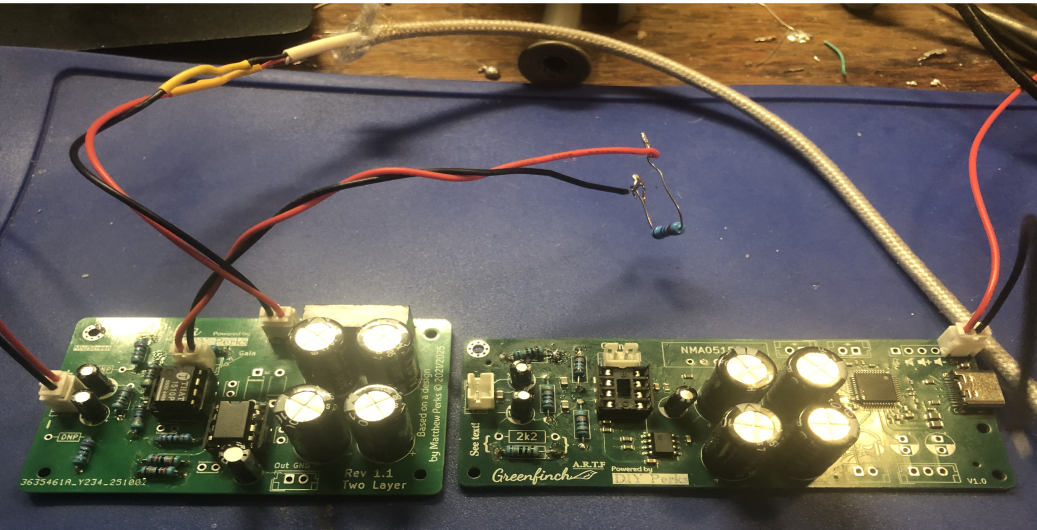
On the right on this image is something I've been working on since late last year, yes I'm that slow. This integrates the Alpha with a complete headset digitiser and USB-C port. The digital section is SMD (and rather difficult to make at home) but the left of the board is almost identical to Matt's original BOM.
Spotted an extra 8-pin IC? That's a JFET op amp like a TL072 - but any FET input dual will work here. The current version (not shown) has a tracking adjustment to vary the output swing from 0 - which is pretty useless all the way to 2.5V peak, so it will drive pretty much any digitiser including those TV ones.
So where are the plans? Well to date, I'm not 100% happy with the performance of Greenfinch (the larger one) and I'm holding off until I've built a prototype for the upgraded Alpha. The current one doesn't have adjustable output and that is something it needs to prevent blowing up digitiser boards that don't have protection diodes. Hence it's still all experimental.
Take everything I say with a pinch of salt, I might be wrong and it's a very *expensive* way to learn!
Posted : 24/10/2025 12:25 pm
PolarYetti and Muzammil17 reacted

@marcdraco I assume this is V2? I guess we're still a while away from a version your happy with lol
Posted : 29/10/2025 3:02 am
It's close, I'm about done trying to do this using analogue/digital mixed mode like this. The "final" one (which is all through the hole parts) should go to JLC this week. It has trimming to match the output to the digitiser of your choice but with more sensitivity. However I just can't get enough reduction in that USB whine that rides on the power leads of the one with the on-board digitiser.
Now it is likely that an external power brick would do the job. In fact, the nature of the isolated NMA0515 can produce very clean power lines but there seems to be just enough noise on the grounds creeping back in that it's driven me up the wall and back.
So I threw away the reference design and started again (this happened a couple of months back) and it's proceeding along quietly with these. If the latest iteration works (I'm laying it out at the moment) it should be fantastic as it uses a relatively new chip from TI designed specifically with professional mics in mind. If my cat would let me sleep I might even have it back this time next week. I just don't want to jinx it as this branch will be much more practical and it allows me to do little tricks that just aren't possible with a THAT.
Take everything I say with a pinch of salt, I might be wrong and it's a very *expensive* way to learn!
Posted : 29/10/2025 8:40 am
@marcdraco Amazing news! We appreciate all the work you put into this, is this going to be a new video that matt makes or is that still up in the air?
Posted : 29/10/2025 3:07 pm
In all honestly, I don't know. Matt is aware of the developments (I'm sure he watches the forum periodically). It remains officially a DIY Perks Project at least until I've completed the current run and the one I'm still plodding away at. If (and it is IF) the TI-based board works, it's pretty much out of the box with only a few JST plugs required.
Due to the cost of some of the components, I'm having to go slower than usual. There are lots of things I can do with this new chip and its paper specifications are pretty impressive, meeting or exceeding the THAT1512 but with fewer supporting components. I wish I'd gone this way originally but in all honesty I've been playing catch-up trying to shed my 1970s/1980s experience and drag my hairy white wossisname into the 21st century: kicking and screaming if necessary. Adjusting to a CAD system took me a while but it's been learning what I can get away with (or not).
I've probably remarked on this before but a surprising number of reference designs still have some egregious errors with things like ferrite beads, which one expert recently remarked "every time you think you need a bead you probably don't" reflecting on how we're all lulled into some "magic" that happens with these tiny chip inductors. Sometimes datasheets even miss out important information like CMI's CM6533 which was an expensive one that I got lumbered with.
Take everything I say with a pinch of salt, I might be wrong and it's a very *expensive* way to learn!
Posted : 29/10/2025 3:39 pm
@marcdraco I see 90% of this stuff is way out of my league since im use to electronic work on things like robots so im very glad to hear that its pretty plug and play and learning all this new stuff this fast while still having a life is crazy impressive! I cant wait till v2 is finished up lol I was thinking about building v1 but with all the issues / discontinued parts think id rather wait lol
Posted : 29/10/2025 4:30 pm
I still have the improved V1 under development - that's gone off to JLC today too with some minor tweaks. It's fully through-hole so it's easy to build if you just want the experience of making up a PCB. All the major parts are marked on the silkscreen so it's almost impossible to do it wrong. This will allow people who have the V1 to upgrade more easily and it's certainly easier to build than fighting with Verboard (esp. cheapo Chinese clones) and the tendency for solder bridges to form if you're new to it. Performance is broadly similar to the original design with the addition of an output adjustment to allow it to interface to a larger number of digitisers.
SMD is certainly easy for end users (you just get them made up in China) but for me it takes away some of the pride of making the whole thing almost from scratch.
There's a V3 (or V2.5 if you prefer) in the works but with my glacial production rate it's anyone's guess how long it will take. It could certainly use someone with extensive USB coding experience (and the time) to allow for something like an STM32-F7 series to send the digital audio over USB. The current chips limit us to 48KHz per channel locked to the USB via a PLL.
PLLs - "phase locked loops" are an incredibly important building block in many electronic designs in analogue and digital. The idea is the loop will follow "lock on" to some known signal which could even be buried in a lot of noise. Once you have a lock (which happens in a few hundred cycles or less) they can filter out the expected signal. They are also used in FM decoding because the PLL follows the signal as the carrier frequency is modulated (changed over time). The PLL's tracking signal which drives a voltage controlled oscillator, gives us the audio.
However, in digital circuits like ADCs, a PLL can be used to lock onto a low frequency signal and multiply it by many times "synthesising" the high frequency signal required internally by the IC. This is great in theory but USB clocks are surprisingly unstable and any instability there means there will be jitter (small variations) in the multiplied signal. And not all PLLs are created equal either which is why better designs usually offload that job to an external crystal.
Jitter isn't always a major issue, you can imagine it like this, if the PLL is trying to generate a 12.288 MHz clock from USB (rather than use a 12.288 MHz crystal) which is typical for a 48 Khz (per channel) sample rate it won't always be exactly that frequency.
The sample rate is encoded in the recorded signal, be that WAV, MP3, Ogg what have you and any jitter in the recorded signal will appear in the audio which isn't ideal if you're trying to record music, particularly with delicate instruments like an acoustic guitar. I've got a fairly musical ear and I can't say I've ever noticed and this may end up being a nothingburger (something we can measure but we cannot hear), but it's something to be aware of. The complex nature of human speech means that only exceptionally bad and fluttering jitter won't be noticeable so for a vocal mic it's not something we need to worry about unduly.
CMI used to make a crystal locked USB audio chip but it's no longer in production so I don't want to risk making up a board that will be a mother to get parts for. The "B" part uses a PLL to generate its timing so it is rather dependent on how stable your PC's clocks are. At least for the V2. The V3 leapfrogs this issue but it's a good deal more complicated and requires a least one MCU (I'm using a Pi Pico, but it's fairly hardware agnostic) to operate.
Matt and I originally discussed a modular approach but the problem is that I2S was never designed to run over external cables. The main signalling (bit and frame clocks plus the serialised data) can run over DuPont cables because it's relatively sedentary (compared to modern IC speeds that is) but the "master" (now called controller) clock at 12.288MHz for a 48 Kbps sampling is just a bit too fast.
Now you might reasonably think, "12 megs"? That's barely 1/10th of the frequency of FM radio and my radios are fine." (The UK's FM band runs from 88 to 108 MHz with other parts of the world operating similarly).
But these aren't lovely undulating sine waves like a radio signal, these things are switching hard on and off at that speed. With a typical rise time from 0 to 3,3 volts (1,8 or 5,0 volts in some cases) measured in few billionths of second. Square waves like this are made from an infinite number of sine waves (harmonics) and those things radiate right off the wires into the surroundings which is bad enough, but we can make a metal can to screen them. The real issue though is that these signals can be distorted simply by going traversing from one side of a PCB to the other as the impedance (frequency dependent resistance) changes. If that wasn't bad enough running them through a DuPont header is laughably difficult as some of the signal invariably "reflects" back from the the junction.
Reflections are a particularly nasty problem for high-speed digital design requiring a bunch of techniques which are too complex to detail here. They're caused by a pair of fields (electric and magnetic) that cause current to flow trying to navigate around a corner. Literally. I've written a fuller description of this for my next book but I won't be able to complete the book until I've finished a V2/V3 and pushed it as far as I can. At that point I'll let people with more experience at the programming side develop it further.
Take everything I say with a pinch of salt, I might be wrong and it's a very *expensive* way to learn!
Posted : 29/10/2025 5:36 pm
Muzammil17 reacted
@marcdraco So from what i'm getting the difference between the v2 and the v3 is only the fact that you're attempting to leapfrog over the issue of the clock's maybe being unstable using the l2s but the problem with that is that it was never designed to run long range? And even if you got a different cable type that would work i would assume that you'd still have the reflection and impudence problem. Assuming these issues are exclusive the v3 im sure that computer clocks have gotten stable enough to the point that the jitters are small enough so that you can hear them unless the audio is very slowed / analyzed. also i assume theres no other usb audio chips that are crystal locked?
Posted : 31/10/2025 9:42 pm
There are Xtal locked chips from TI but nothing that gives me the functions that the CM108 does and that's stocked at JLCPCB. It's unclear at this stage why this is but it's far from trivial to write the code for to convert a bitstream (be that I2S or PCM) to a USB compatible audio stream. If anyone finds an Open Source driver for Arduino (or has written one) please do hit me up. This level of coding is above my pay grade. 🙂
We take a standard USB audio device as a given (most chips are driverless) although there are odd ones, the CM108 being one actually, that can do more in software. The official driver lost support way back in Windows 7 although I've found a third-party one that claims Windows 10 compatibility and that might even stretch to Windows 11 too. Linux and Mac OS-X users are stuck with a "basic" audio driver.
There are plenty of MCUs more than up to the task - the ARM M0+ like Pi Pico and Xiao plus STM32F4 and F7 lines should all be able to do it in their sleep (so to speak). ESP32 could in theory but that lacks the USB hardware on chip so that adds another level of complexity.
Digging Deeper
USB full speed runs at 12 MHz so a PLL is used to synthesise the required master clock which is 12.288MHz for a 48K sampling rate (256 x 48 K = 12.288 MHz). 48 K is almost the minimum Nyquist frequency of 40 K to capture audible frequencies and some lower harmonics).
Doesn't sound too hard but PLLs are generally better at multiplying frequencies by some integer amount. 12.288MHz would be a cinch from a 48K base clock. We can get crystals and even pre-packaged digital oscillators for this and the 24.576 rate for 96 K/192 K too but that doesn't help here which is annoying. The 12.288MHz is divided back to give the main sampling bit clock so it has to be accurate.
Reason being is the 48K bit clock is encoded in the signal sent to the DAC when the audio is replayed. Now say we took a 12MHz base clock and divided that by 256 (which is dead easy) because it's just 2^8 and computers are good at this sort of thing. But that would sample the audio at 46.875 KHz and play it back at 48 Khz which will cause an audible shift in the the sound.
And Deeper Still
The problem of sending high-speed digital signals over any interconnect (HDMI and USB 3/4) are modern examples is twofold. First you need a differential line driver to help maintain signal integrity over the cable and then you have to deal with the issue of the terminations - any 90 degree turn creates another change in impedance which is why you don't see them on high-speed digital boards, even a tight turn with two 45 degree bends can cause issues. KiCAD can fillet a gentle curve in the traces to ameliorate this but that's only on surface tracks. If you need to switch layers that causes more issues.
Even boring USB 1.1 uses a differential pair with a 90 ohm impedance which has to be matched in the cable and on the board or it goes south pretty quickly: from occasional dropouts to completely dead.
This cable issue had been a massive pain - I've tried (and failed) to make one by hand. The way I'd figured it was by removing the inner data lines and screening them away from the power, that nasty whine would go away. But, at least for the cables I tried, it appears that the conductors are bundled in such a way as to maintain that target impedance. This is to do with the way the electric and magnetic fields conspire to produce the target impedance. It's a well known problem which (again) doesn't have a trivial solution.
To give you an idea, USB's impedance on a typical four layer impedance controlled board, the two data traces running on the surface have to be 0.276mm wide and parallel from input to the chip with a spacing of 0.2 mm. On a two layer 1.6 mm board it's more like 1mm wide, doable but not very practical! If you pop one of those cheap USB codecs apart and measure the thickness of the PCB, you'll see they are very thin - two layer but skinny. Less material = lower cost.
This is all connected to the interactions of the fields from the top layer to the next ground AND the field interaction between the two traces. A lot of clever maths goes into this but the the big firms have calculators to do it for us. If not there's always Saturn PCB tools which is excellent to tinker with even if it seems complicated.
Back to the Future Point
My feeling is that clock jitter (as you suspect) is more of a measurable issue than it is audible. Clock inaccuracy is more of a problem actually, because the PLL is relying on a 12 MHz clock which is synthesised at the computer and if it's not bang on, that will shift the output frequency if the audio is replayed locked to a more accurate clock (perhaps on a different PC). These chips went crystal-less (some have the option to do both) to make the boards smaller, simpler and, more importantly, cheaper which is crucial for OEMs making these things by the truckload.
This post was modified 12 months ago by marcdraco
Take everything I say with a pinch of salt, I might be wrong and it's a very *expensive* way to learn!
Posted : 01/11/2025 10:30 am
Muzammil17 reacted
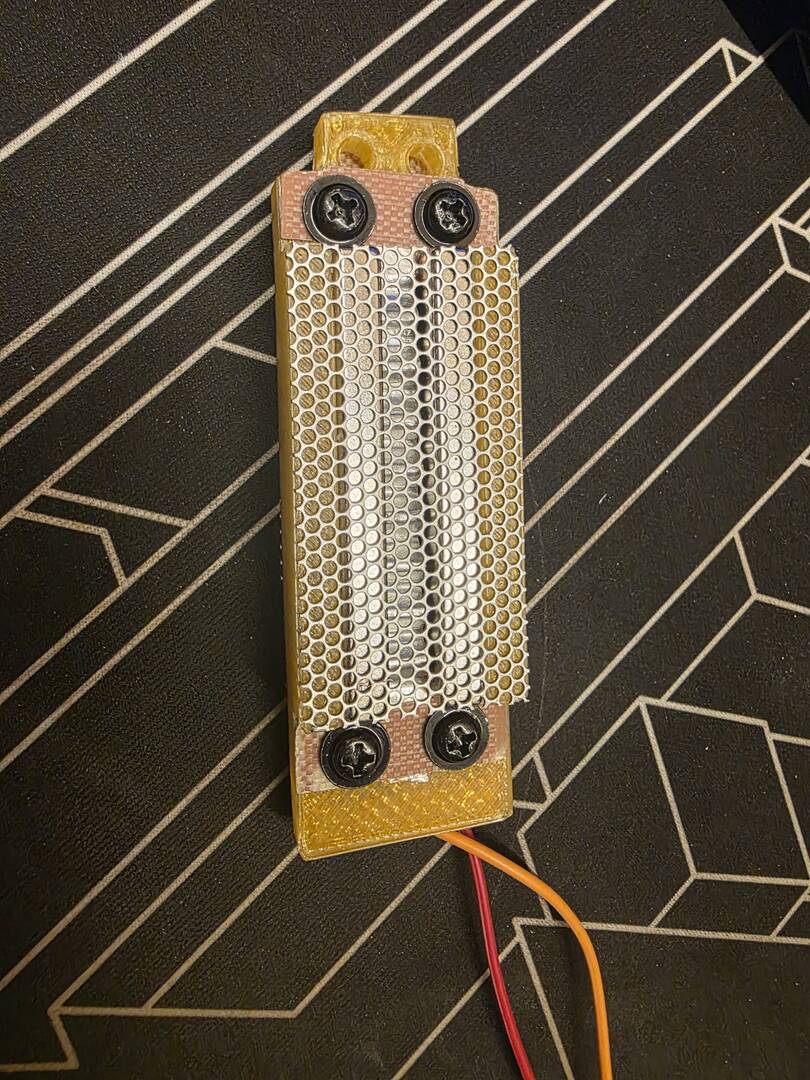
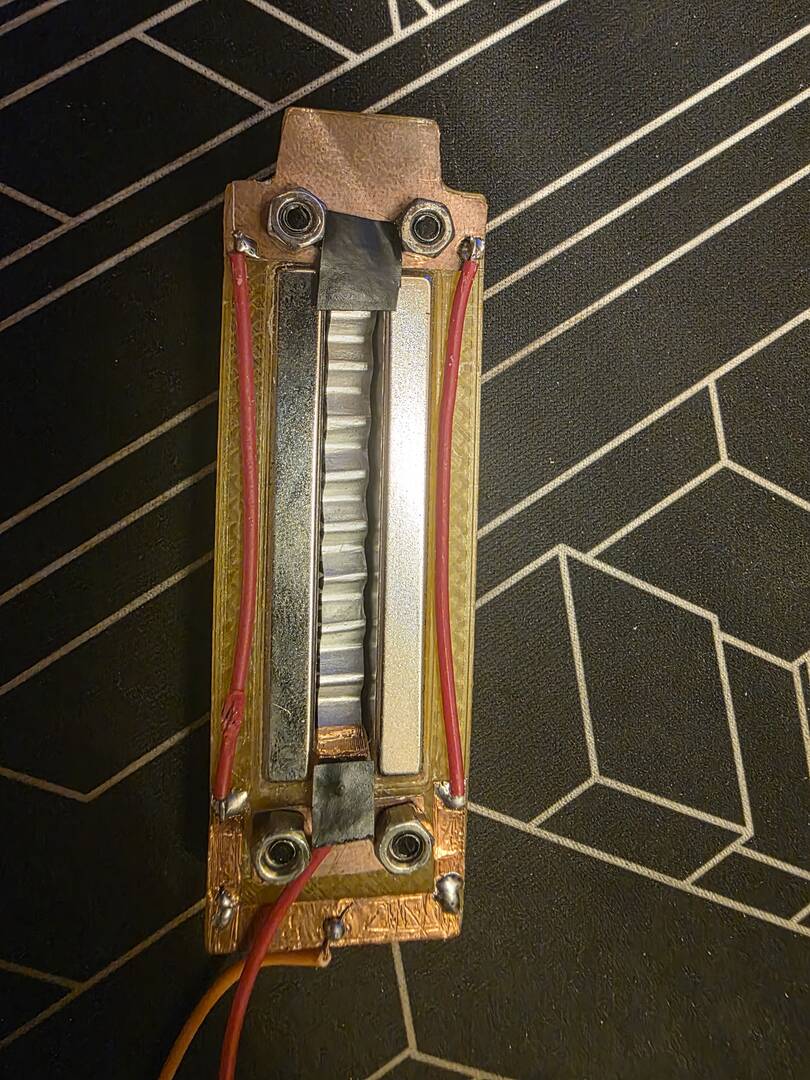
Hello Everyone!, this is sort of off topic, but i made a ribbon mic, and used the DIY Perks Pre amp and connected the ribbon mic to it, i had to modify the pre amp to make it work with ribbon mic, Huge Thanks to @marcdraco for helping me make it.
Posted : 03/11/2025 2:45 pm
marcdraco reacted
i used my phone to play the audio, the phone was around 2 inches away from the mic, i didn't use the transformer and directly connected the ribbon mic to the pre amp.
Posted : 03/11/2025 2:47 pm
marcdraco reacted
That just shows how good that original design is! And without a transformer? The mind boggles! Very well done my friend, very well done indeed.
Take everything I say with a pinch of salt, I might be wrong and it's a very *expensive* way to learn!
Posted : 03/11/2025 2:52 pm
Muzammil17 reacted
@marcdraco Thank you very much my friend! without your help i wouldn't have been able to do it.
Posted : 03/11/2025 2:54 pm
marcdraco reacted

Soo, my mic was working fine, but I no longer neeeded a mic for anything, so it lived in a drawer for a bit. Now I need a mic again and it's decided not to work. I did get it working, by doing virtually nothing, but then it wasn't working by the time I put it back together. Windows detects it, but not as a mic. Just as SOMETHING.
Poking around, I'm getting continuity between "Mic -" and ground, and I don't think I should be. Certainly not based on the schematic. Besides, if it was supposed to be connected to ground, why bother running an extra wire up there? There are no shorts between traces on the vero board. Maybe the transistor is dead? But that doesn't explain it working momentarily, eh? I think an intermittent short...unless there's supposed to be continuity to ground there...which makes no sense at all to me.
Also...why is there a resistor from the hot tab, to the chassis of the capsule? I don't remember putting that there, and it's not on the schematic!
Posted : 03/11/2025 3:05 pm
@ashleigh that continuity isn't normal, i guess there is some loose component that is shorting the two lines, as you said it is working momentarily.
Posted : 03/11/2025 3:17 pm
Also...why is there a resistor from the hot tab, to the chassis of the capsule? I don't remember putting that there, and it's not on the schematic!
Could be a gate load resistor. In theory a JFET needs a fiddlingly small amount of reverse current (nanoamps or less) to bias the device into its active state as a diode junction (depletion layer) forms from the drain to the gate.
I've experimented a lot with this and it appears that electrets will usually work without the gate resistor which is typically in the region of 1 - 10 giga Ohms.
I've asked around and no one seems really sure why this is - it's a quantum effect. My working theory is that the "fixed" charge on the capsule pushes and pulls electrons in the gate region causing the transistor to operate normally.
The really wacky thing about JFETs is that most work either way around. A conductive channel (which is like a variable resistor in effect) runs from the Drain to the Source. Electrons flow FROM the source and out via the Drain which is why the terminals are described as such, following electron flow vs. conventional current. Just FYI, bipolar transistor terminals are also named for electron flow hence the seemingly odd names. Electrons flow (are emitted) by the emitter and flow to the Collector where they are "collected" (sorta).
One thing about JFETs is they are very tough little blighters (unlike MOSFETs which are quite fragile due to the construction of the gate junction.
The reason JFETs aren't as popular as they might otherwise be is they are absolute swines to design with due to the huge variations in performance. It's a real shame as they are often substantially quieter than low-cost bipolar devices and also offer a massive input impedance which makes them useful for sensors in medical setting and for devices like electret capsules.
Take everything I say with a pinch of salt, I might be wrong and it's a very *expensive* way to learn!
Posted : 03/11/2025 4:00 pm
Oh, I think I found the problem. Well...several problems. I remember before the mic got put in storage, I completely re-did the circuit board. I just shuffled everything down the board (a new board, i mean) to make room. I made a mistake with one of the jumpers and fried the op amp. (this was also the cause of the short) I've corrected that, and luckily I had a spare THAT1512. Buuuut...I vaguely remember some discussion about the orientation of that bottom 2200uf cap. Looking at the drawing and the schematic, it appears to be backwards? Was it supposed to have the positive side connected to the ground trace like that? I'm getting some awfully strong deja vu.
This post was modified 12 months ago by Ashleigh
Posted : 06/11/2025 3:18 am
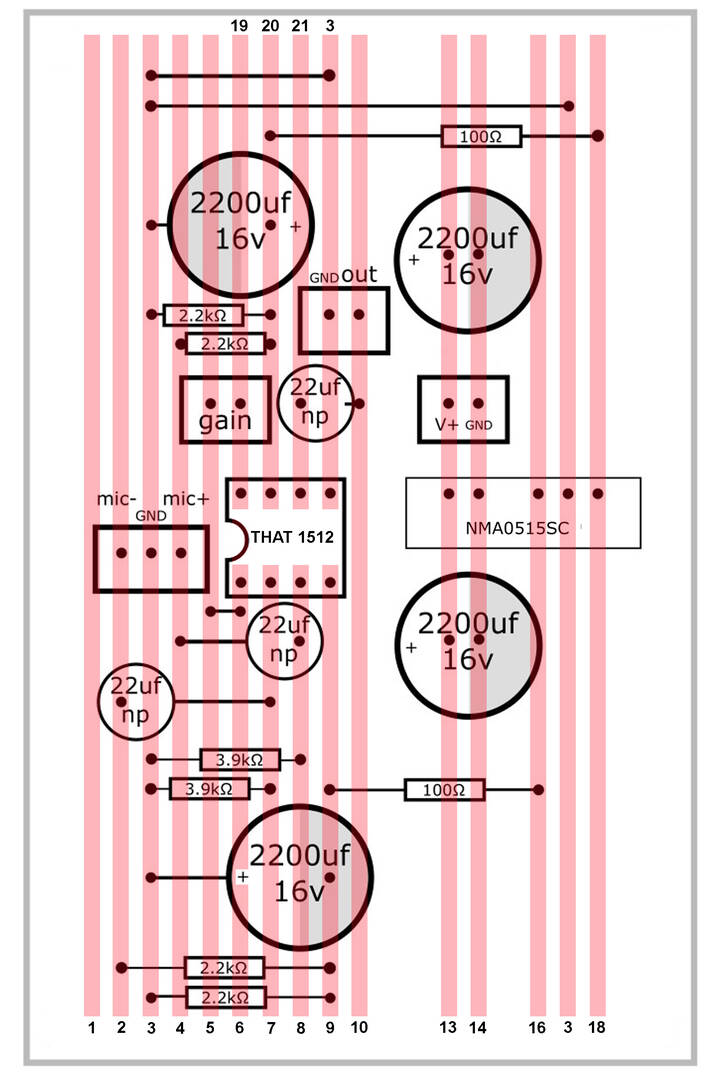
Hmmm...still not got a working mic here. Though...reading back through the thread, I realise I'd got the mic to work by snipping out the resistor on the capsule...the one I recently soldered back in place, thinking it had broken free. But the mic at least worked before I cut the resistor. Just with a lot of noise. Now...nothing.
The pic is just a visual aid. It's just quicker to say, for example : "I'm reading 20000 volts between 3 and 8" than, "I have a short between the left side of the resistor by the second cap from the left, and the black thing that looks like velvet pancakes"
But mostly, I made the drawing to avoid looking at the circuit board, cus it's getting late. I'll do some measuring tomorrow. But i'm already pretty sure I just did something dumb. Like the time people kept telling me my mic sounded bad and I couldn't figure out why, and it was because there was a mic in my webcam, which Windows automatically used, and the cam had been plugged in, then fell down the back of the PC and i forgot about it.
That's the level of problem I'm expecting to find. Not a cold solder joint or misplaced component (I mean ANOTHER one! I think I got them all now!)
EDIT! UGH! Even the drawing is messed up! 6 should just be another 5! Ah, well. That will learn me for doing 5 things at once at 4:45 am
This post was modified 12 months ago by Ashleigh
Posted : 06/11/2025 4:41 am
placer_facil and marcdraco reacted
Drum roll maestro, if you please...
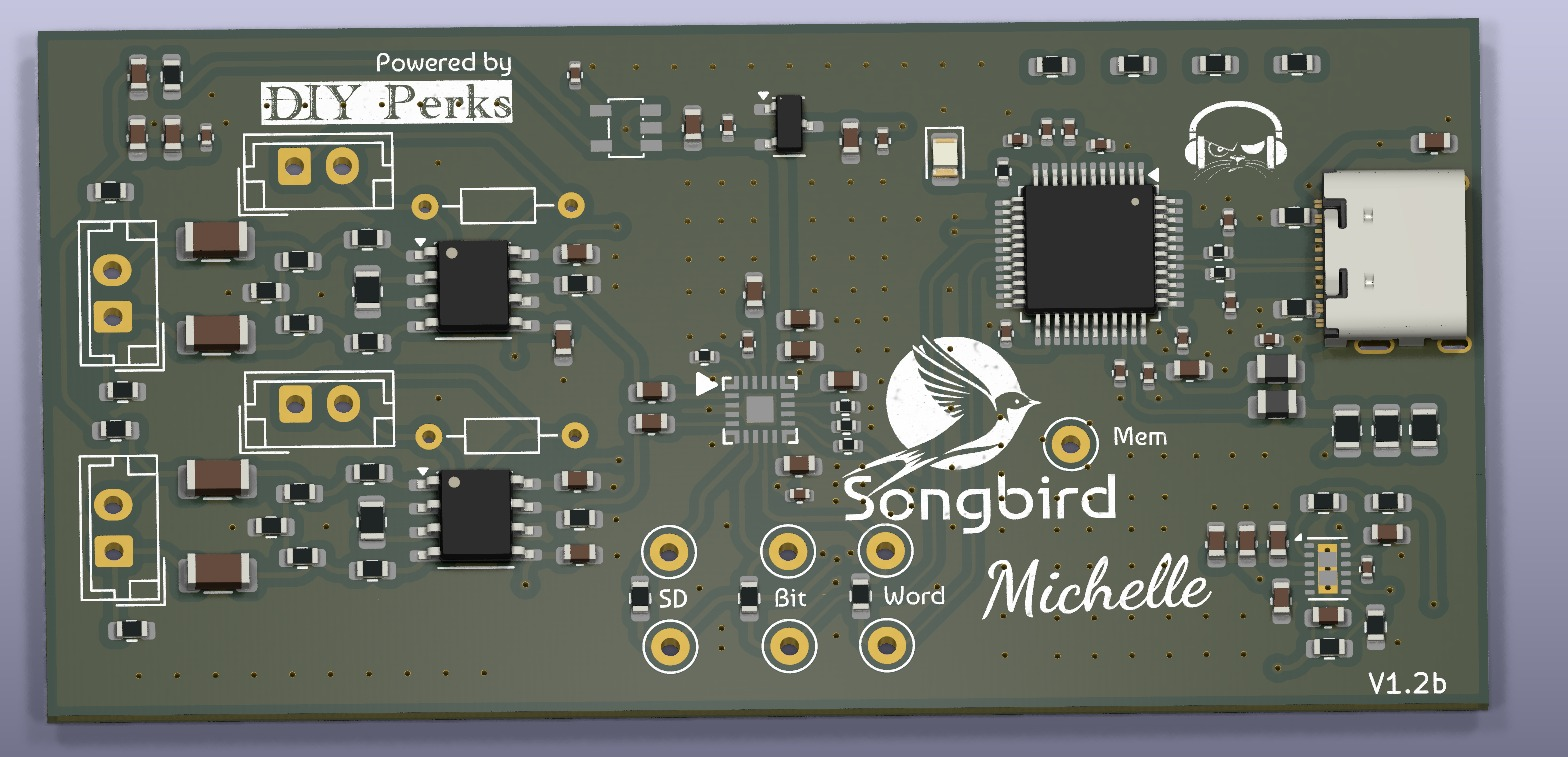
They're finally here. The V2 board has arrived (yes, I know it doesn't say that on the silkscreen...)
After an insanely long development period where I've tried (and generally failed) to make things work the way Matt (@diyperks) did so expertly with a THAT1512 and a handful of parts, I just threw away everything and tried to make a better digitiser.
Did that and it still screamed at 1KHz, 2KHz, 4Hz... and so on. Long story short this is due to the data transfer making the power supply so noisy that I couldn't get it tamed to the point where it could be considered a professional grade. Frankly a lot of amateurs wouldn't be too happy either I shouldn't wonder. I know I would have been quite cross.
This, on the other hand, now this is... beautiful. I've been sitting on the early prototypes for a while until I could at least get a start on the digitial sections. It's almost silent even after applying a considerable amount of gain (x100) but there's more.
THAT1512 has been replaced by an alternative the TI INA849D and the NMA0515 with an LM27762 (not shown on this preview due a lack of a 3D model). USB I/F is courtesy of a CMI108B which has a so-so ADC but I2S input and this is the killer feature.
Soldering (assuming you don't go native and just try to solder it all yourself- and you're a braver person than I if you) is limited to just a couple of JST plugs. One for the each capsule and one for each of the gain controls which are separate. This is by design for a future improvement.
But that's not the best bit.
At the heart of the new design is a surprisingly low-cost but exceptionally well specified ADC with 32-bit, I2S output. Now this does get hacked back to 16-bit through the USB interface but there are taps on the board to siphon off an I2S signal to a DAC (for headphone support) or something like an ESP32, Pi Pico, STM32, Raspberry Pi etc. for further processing.
The digital side has slowed things down quite a bit since I homed in on the Pico after working with @Yamithewitch for a while on an STM32. That development continues and I'll update the design as and when that issue is sorted.
I even did a version based on the ADAU1701 but the key here is keeping the cost as low as practical while still producing a professional grade microphone.
Oh the input - yeah that's stereo although the output (being a single microphone) is still mono. There's a reason to this but more of that later (some of you will be able to figure it out, I'm sure).
Now I just need to find something other than my weird voice to record. I don't currently know anyone with an acoustic guitar but there'll be someone local to me, I'm sure and then you can have a listen for yourselves.
The digitiser is capable of 192K at 32bit but this version doesn't support that as the CMI108 is limited to 48K and supplies the master clock for this version of the board. Nothing necessarily wrong with that as this is better than CD quality. Faster data requires some more development with Pico or even Teensy due to the throughput of digital information. These things can be added by someone else as the design will be fully Open Sourced (per previous boards).
It even works with low-cost electret microphone (drive voltage reduced from 28V down to 1,8V) capsules in case you don't want to go the whole 9-yards with a JLI2555 and a nice JFET.
Take everything I say with a pinch of salt, I might be wrong and it's a very *expensive* way to learn!
Posted : 21/11/2025 5:25 pm

Hi @marcdraco thank you for the amazing work. Ive been planning for a while now to make this mic as a present for my girlfriend but after reading this forum i decided to wait. And my prayers have been answered with this release. Will this be available soon? It would be nice to already buy it assembled but buying the components and board separately and soldering myself isnt out of the question.
Posted : 22/11/2025 1:08 pm
Yeah, Matt will be getting a board to integrate into the full V2 build soon, but it's broadly compatible with the original. This version lacks a grounding strap (which is required for the full differential supply Matt built into the V1) but it works equally well with any electret condensor Mic. Matt has heard it with a VERY cheap ($0.20c) capsule and he was as blown away as I was. There are two versions - one is a digitiser and the other (as show) has the INA849Ds on there. I'll do a full tech breakdown soon, I'm busy with Songbird "White Rabbit", which is a riff on the famous "Alice" build. For context, both derive from Lewis Carol's Alice through the Looking Glass but if you google White Rabbit with Jefferson Airplane you'll get a curious (and curiouser) look at the psychedelic background behind both.
I'll put everything on GitHub in time but I want to make sure Matt can do a video before everyone and their dog has a crack at it. 🙂 Matt did originate this project and it would be unfair of me to release the files to the world before he's had a chance to do a video.
Noise floor on this thing is ridiculous - it's so good I can just about hear the 1nV/sqrt(Hz) after 50dB digital gain. Probably not good for you right now - the standalone one (shown) will work out of the box - you'll just have to solder up a couple of 2.54mm pitch JST connectors as the SMD ones aren't good value.
Total cost of the BOM is higher than I'd hoped but still remains less than the total of the original parts if you have it assembled in China; If you express two boards (the minimum JLC will do) with taxes and 2-3 day DHL shipping to Europe it works out around £50 or less - so £25 per fully populated board. That's the most expensive (*but fastest) option. I probably should have done five myself this time and flogged a few but Santa is nipping at my heels and my rather voluminous cat decided to do a swan-dive onto my poor little Lenovo Yoga... and it was game over for my keyboard. (They're fixed inside the "palmrest" so replacing the keyboard isn't a matter just a few plastic keys, it's the whole upper section of the bottom half of the clamshell - trackpad, uncle Tom Cobley and all. A write-off in other words. Still works like an iPad only ... it's not an iPad, it's a computer folded in two.
V1 required a THAT1512, NMA0515 a handful of other odds and bobs and (of course) a digitiser that you had to butcher - so no take backs if you blew one (two in my case) up.
I'd hope that some enterprising soul will take order a bunch of them because the price drops sharply as the numbers approach dealer-stock levels. The cost there is for two populated boards and three spares (without a stencil), built in China and shipped to your door - I generally order on the Weekend and get them back by next Friday which is kinda pricey but it's the cost of rapid turnaround.
I fully expect you won't have much of a issue selling the other board(s) on if you have them on eBay and it will all be Open Source hardware so anyone can take the design and improve on it. Given the features this one has and the potential for expansion there's a lot to come eventually, most of which, I hope will be from other people as we have a LOT of extra functionality that could be added: mostly because we have I2S out now and that means you can hook up a variety of MCUs and DSPs (SGTL5000, ADAU1701 for example). I've left those things out deliberately so they can be added and no one is particularly bound by my design.
I'm gonna see a mate about having someone from his band do a demonstration of an acoustic guitar so everyone can get listen. These modern chips are incredible!
Bit of a change from my days with valves and getting high-voltage shocks poking my screwdriver were it didn't belong. 😉
I'll send you some more info in a PM.
Take everything I say with a pinch of salt, I might be wrong and it's a very *expensive* way to learn!
Posted : 22/11/2025 8:04 pm

Good day everyone,
I am looking forward to building this microphone and wanted to ask how up to date the original instructions are and wether some important design problems/component unavailabilities have cropped up
Posted : 23/11/2025 10:25 am
I've done a new version of Matt's original - simply called Perks Alpha (from Matt's 1st) with a few improvements that came out of early failures at improving the existing design. It's fully silicon part compatible with the original (NMA0515, THAT151x) but adds the ability to limit the output swing from the astonishing +/- 13 volts of the original back to something a bit more realistic.
This requires an inexpensive JFET op-amp (a TL072 works fine), a couple of Schottky diodes (ordinary ones work but the limit is less well contained due to the larger Vf - 0,6v vs. 0,2v approximately) and a small, multi-turn potentiometer.
The official V2 will be decided by Matt but it looks like it will be based on the Songbird Michelle (which itself is available in a couple of versions although I'll sort the naming convention out so we all know which one I'm blithering about). The earlier working proto of Michelle will get a new codename - likely an actual Songbird - but it's primarily a 32-bit digitiser (16-bit out to USB, 32-bit to I2S) at 48K. That design is fine as it stands and can record audio quite well (and if you need the absolute lowest noise floor that one is superior). So why isn't that one going to be used?
Well it's because it needs digital gain to make it work for a live session and I didn't put that on the PCB. It's something that can be easily added though, currently it has I2S out but not back in, so I'll look at that in the coming weeks. The analogue gain is delivered by one (or two) INA849s which are as quiet or quieter than the THAT1512 BUT that does raise the noise floor a little - and this thing can pretty much pick up a cockroach's eructation at 20 paces. Upshot of that is the majority of the noise is due to the microphone and regulators but we're dipping into the realms of medical equipment there and the few mV that an electret kicks out with even soft speech, the 40-50dB of digital gain (making up for the lack of analogue amps) is incredibly quiet.
All of the Songbird series feature a USB-C female connector on the board - so they're beautifully simple to get started. Just solder a small electret on one end and plug into your PC. It's that simple. Gain is "fixed" to a nominal amount to give a reasonable performance with a typical el-cheapo electret - the sort we see on eBay in little baggies of 10-20 for a couple of $s, £s, Eruos (I need to find the button for that)... but you get the gist.
If that doesn't do it for ya, Songbird has a gain control (two actually, because the I2S output is dual-channel) that you can use with a rotary switch as in Matt's original design - the resistor chain is different though but that's a limitation of the ICs I'm using. It's not beyond the realms to put a THAT1512 on the board but it would increase the size if I used THT and I can't source the THATs in SMD as easily. Also, the THAT has a different pinout so it would require a little bit of re-routing (again, not difficult, but I'll leave that to the Open Source guys to tinker with that).
Take everything I say with a pinch of salt, I might be wrong and it's a very *expensive* way to learn!
Posted : 23/11/2025 11:58 am
Muzammil17 reacted
@marcdraco Thanks for the quick reply!
I originally planned on buying the JLI2555 to use with it but upon checking there doesn't seem to be an easy way to get it in Europe without paying triple the price of the capsule for shipping. There are some on AliExpress but its a bit sketchy (perhaps you have a better source for this or some other affordable but high quality capsule?), but the fact that i can use any capsule and still get great results is amazing .
IMO around 30€ per assembled board is a great price. I guess i could save a bit on the shipping since express isn't a requirement. Either way, I was thinking of making multiples, one for my gf an extra for myself and if i have the extra board one of my mates is, apart from being one of the best electronics engineers i know (i never went into electronics myself was more into energy distribution but lately the little projects i've been doing have made me realize i need to learn electronics aswell:P), also a DJ and overall audio nerd so i'm sure he would love to play with the thing and add some functionality. For my use case USB-C only is all i need since i don't have any dedicated audio equipment (yet).
Sucks about the Lenovo Yoga, i've had a bad experience with the design myself (spill on keyboard = couple of bad keys = not worth repairing). It also led me to do something stupid and let the magic smoke out of the mainboard while trying to unplug the keyboard. There's a hilarious video by Salem Techsperts on the design issues of the yoga lineup (not sure if the forum rules allow youtube links but it's definitely worth a watch so ill take my chances:
). Luckily my current laptop is positioned a safe distance from my cats launch/landing pad (area of my desk), but its still not entirely safe (my cat is sitting on my laptop as i am typing this).
With the better capsule i imagine you get a mic that punches way above its pay grade while being easy to make and use. Looking forward to the project and ill make sure to pay attention to this forum for updates.
Posted : 23/11/2025 4:01 pm
marcdraco reacted