
Notifications
Clear all

Hi there and welcome to our little home on the web. First off, great pictures and that looks embarrassingly well done. I feel like a hack myself these days (and I was trained by the finest electronics construction guys in the world, not that I can claim to be like them).
The problem you've come up against here is partly why I've been beavering away with new PCB designs for the last year. I find stripboards (Veroboard) are an absolute nightmare in this regard. If I had a THAT1512 for every time I've accidentally shorted a strip or failed to cut on through, I'd have a bucket full of them.
And ugly repairs -- have you seen some of my botchworks? 😉 I'm the king of the bodged afterthought - and I've got a box of busted prototypes to prove it. Hehe.
I've had a think about what might have happened and the best I can come up with is a deceased IC.
Reason being is that pin 7 (+15v) was directly connected to pin 2 (inverting input) in your initial run. I actually winced a bit when I tried to picture that.
@ldoppea ran into a similar issue although I think in that case it was a result of static discharge. Theses chips have only minimal protection at the inputs to retain the highest possible quality. THAT presented a paper at the AES conference some years ago called "48V, the Phantom Menace" which describes what happens when musicians pull the plug on a P48 system. It's not pretty.
The inputs on the 1512 expect to receive few hundred millivolts at very low current, dumping a 15V supply into one was likely fatal.
Pins 2 and 3 go directly into "differential pair" which work the magic of reducing the noise, but that's just the bases terminals of two bipolar transistors. A sure way to kill any transistor stone dead is to put too much current through the base-emitter junction (it's a forward biased diode) which shunts all the available current down to ground and poof.
A simple differential pair (or a transistor with some resistance in the emitter circuit) can survive but these complex chips have active controls that could easily sustain damage.
Another possible scenario, more likely actually, is the short from pin 4 to 5. Pin 4 sees -15V. If you'd somehow missed the short to ground, that would put -15V on the ground reference pin (5) which is limited to 8V.
In that shorted state (no cuts) pin 3 connects to pin 6 which is the output. In other words what you're hearing is the microphone capsule itself, directly connected to the digitiser. This very fact goes quite a way to show just how sensitive these little capsules are.
TL;DR
Best course of action is to remove your "ugly" repair, remove the IC and double-check there are no shorts horizontally across the chip (the cuts) and vertically between each pair (solder bridges).
Pop a new THAT in there and you should be all set. I've tried the 1510 which is the earlier version of the one in Matt's original and to be honest, there's not a great deal of difference, except the resistor chain has completely different values. Resistors are cheap though and 1510s offer quite a good saving over the more recent model.
Take everything I say with a pinch of salt, I might be wrong and it's a very *expensive* way to learn!
Posted : 30/04/2024 10:49 am
PlushWah reacted

@marcdraco Thanks so much for the warm welcome and detailed post! I've ordered a new chip so that will hopefully arrive soon and I'll let you know how I get on <3
Posted : 02/05/2024 9:12 pm
marcdraco reacted
Thank you, I'm just "paying it forward" really. I'm sure you'll enjoy it here.
Take everything I say with a pinch of salt, I might be wrong and it's a very *expensive* way to learn!
Posted : 02/05/2024 11:28 pm

Hey guys! First time posting on here but was wondering if anyone had any experience making this mic but not making their own amp? Like I already have a amp that takes in a 3.5 mm and was wondering if I did everything up until the part he makes the amp, but install a 3.5mm male connector to the end of the mic instead of connecting it to the board. Would this still work? Thanks for any answers!
Posted : 06/05/2024 4:59 pm
Hello and welcome to our little corner of the web where everyone is learning (including me) so quite a few of my flubs are hovering around for everyone to facepalm..
The microphone with head won't work as Matt described it here without the preamp he designed. As luck would have it (fingers crossed) I have some prototypes based on Matt's PCB design due back tomorrow.
Among them (again, only a prototype) is a head designed to do what you're inquiring about. In essence and with fairly simple - although still SMD - soldering it's possible to construct a variety of configurations, including Matt's original but also a "common source" configuration which is essentially what you get with one of those nasty little 100 for £1 jobbies on eBay.
I have a 3D render of it but I don't want to jinx it. 🙂
The bare bones (none of the components are factory fitted but many designs just need some of those parts shorted and the computer's sound card will do the rest). All you need to add is a FET of your choice (we know of some decent ones).
The one Matt used is out of production now - JFETs are getting scarce but some have popped up to replace it - and are more performant. I've had excellent results with the LSK170 and the 2SK208. Both are available in a through-hole or SMD and the board will carry either. * You only need one.
Internally those little capsules have their own JFET wired like this. The case is 0V and the connectors are directly connector to the drain. The gate as you might note is connected (internally) to to the electret material. The other parts like the 2K2 current limit/load resistor and capacitor are on the sound card. The card also supplies the required voltage - typically around 3V to make everything work but the gotcha (there's always a gotcha) is that the pre-amps are often not that great.
CMedia make some excellent pre-amps/digitisers (rivalling the noise levels of Matt's) but with their own pre-amp circuitry. Sadly it's a bit of a crap shoot to find an OEM that's using them. And, of course, they don't sell these chips to Joe Public as many are supplied as bare dies. That's the little black blobs you see in circuit boards sometimes. They appear in toys, greeting cards, novelty biscuit tins and the like but they're wired direct to the PCB - and don't come in a nice 8-pin DIL (or even a SOIC-8) like we're used to. It saves a huge amount in manufacturing costs of course but it's a shame they won't supply them ready for hobbyists.
I bought a couple to try and while one was fantastic the other was dreadful. Both came in an unfeasibly small case barely big enough to house two sockets (they do IN & OUT!) and the wire to the USB-C. This is a more complex chip but you get the idea, I'm sure.
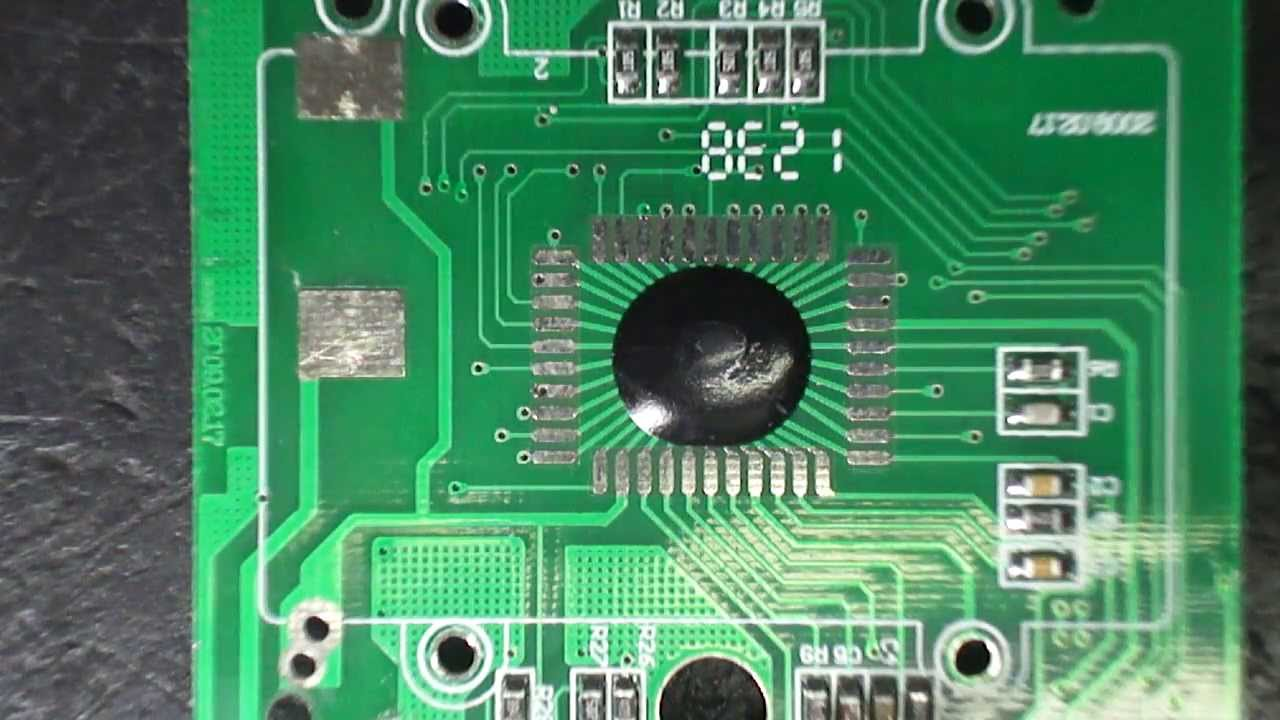
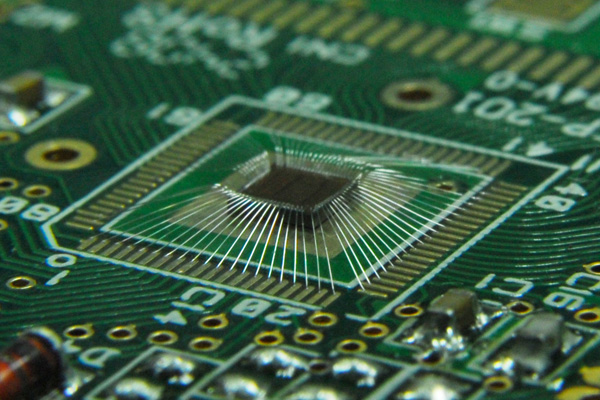
ANYHOO...
Internally those little electrets look like this:
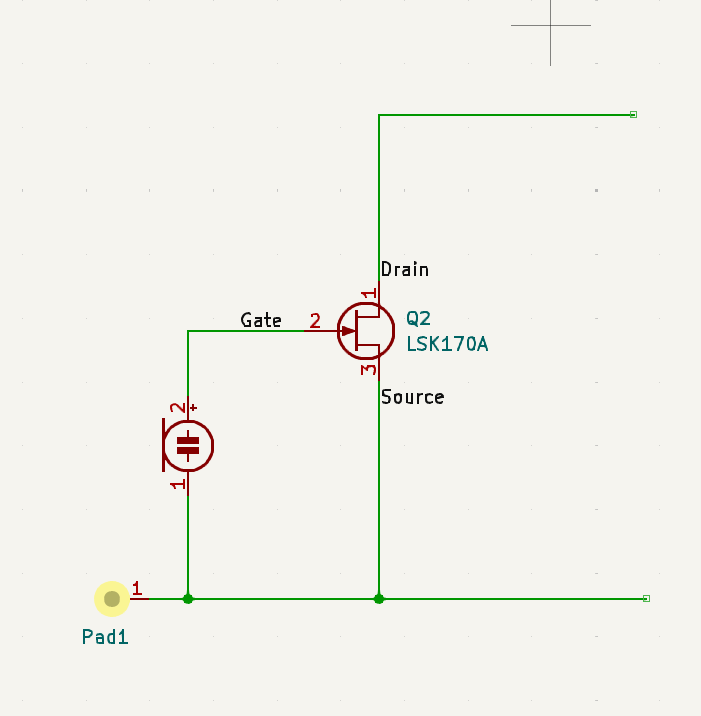
The advantage of this method is that the high impedance side of the circuit is entirely encapsulated in the case and shielded from the outside world. The JLI and others with external JFETs always require some form of Faraday cage.
It also cater for more "advanced" designs (such as source followers and Matt's original phase splitter).
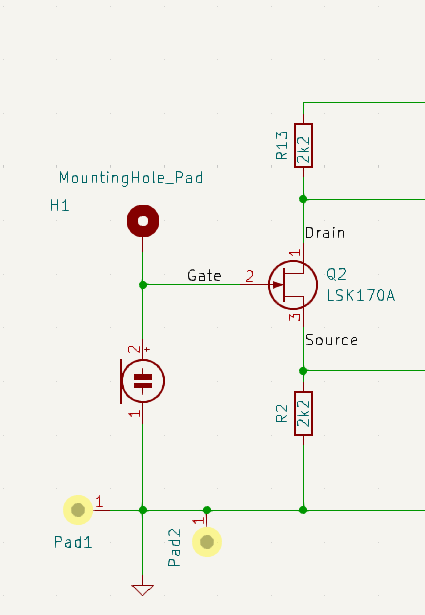
You'll see earlier versions of the mounting board which is now quite mature after multiple revisions (10+ I think now) so it can be fitted to both a 25 mm mic (per the JLI2555) or the more easily obtainable 34 mm ones. There are pros and cons to both. But these boards are so ludicrously cheap (I think about 50p a piece in large numbers) that I'll have some to give away.
Always assuming it does what I intended to; otherwise I've got a rather large lump of FP4 and solder to dispose of. And a serious butt kicking to look forward to, too.
Take everything I say with a pinch of salt, I might be wrong and it's a very *expensive* way to learn!
@marcdraco Wow what a reply! Need to digest this one more when its not this late. You seem to really know your stuff 😆
My idea for wanting to be able to connect it directly to a amp I already own, is so I can make the mic as small and simple as possible. My end goal is to see if I can DIY a mic similar to the ModMic which you can attach to your HiFi headphones (or any headphones for that matter)
Posted : 06/05/2024 7:54 pm
Gotcha, well "as it 'appens" someone asked for something similar a while back so I made some small (not minute, but very small) fully functional ones. It's not a great leap to convert those to something more like a headset.
But the problem with small (these are MEMS - micro-electromechanical system) parts with a ASIC chip (a little amp and signal conditioner) already there is that they don't appear to be available in cardioid patterns.
You can get small mics (JLI do one) that are cardioid - the giveaway are the little breather holes on the back. Some of the copies appear to have pressure gradient breathers too but I'm leery of that until I can fully test one.
We tend to see these tiny cardioid mics in those very small gooseneck like the Schoepes CCM4.
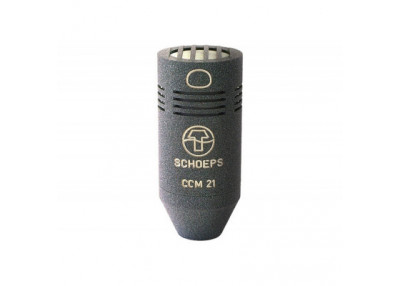
This little chap will get you a little bit of change from £1500!
You can spot a cardioid like this one at press conferences and such where the speaker doesn't want to be swamped by load of much larger dynamics like some of the classics by Sure.
The pattern for a mic like this is a cardioid with the lobe of sensitivity spreading from the front but due to pressure differences, sounds from behind are cancelled out. Sound from the speaker enters via the front (top in this pic) but sounds from off axis (people chattering, asking questions, etc.) enter via those little slots and partially cancel.
A true "shotgun" mic (super- or hyper-cardioid) can often be found with 20-30 or more slots along the pipe. This makes them very sensitive from the front. Those rather large fluffy things on poles you see sound men holding are called "balloons" are there to shield the mic from wind.
Larger variations on Matt's design even use dual output cardioids so you can flip the pattern from a switch. Handy but costly of course.
I think you'll enjoy it here.
Take everything I say with a pinch of salt, I might be wrong and it's a very *expensive* way to learn!
Posted : 06/05/2024 8:13 pm
SebTO reacted
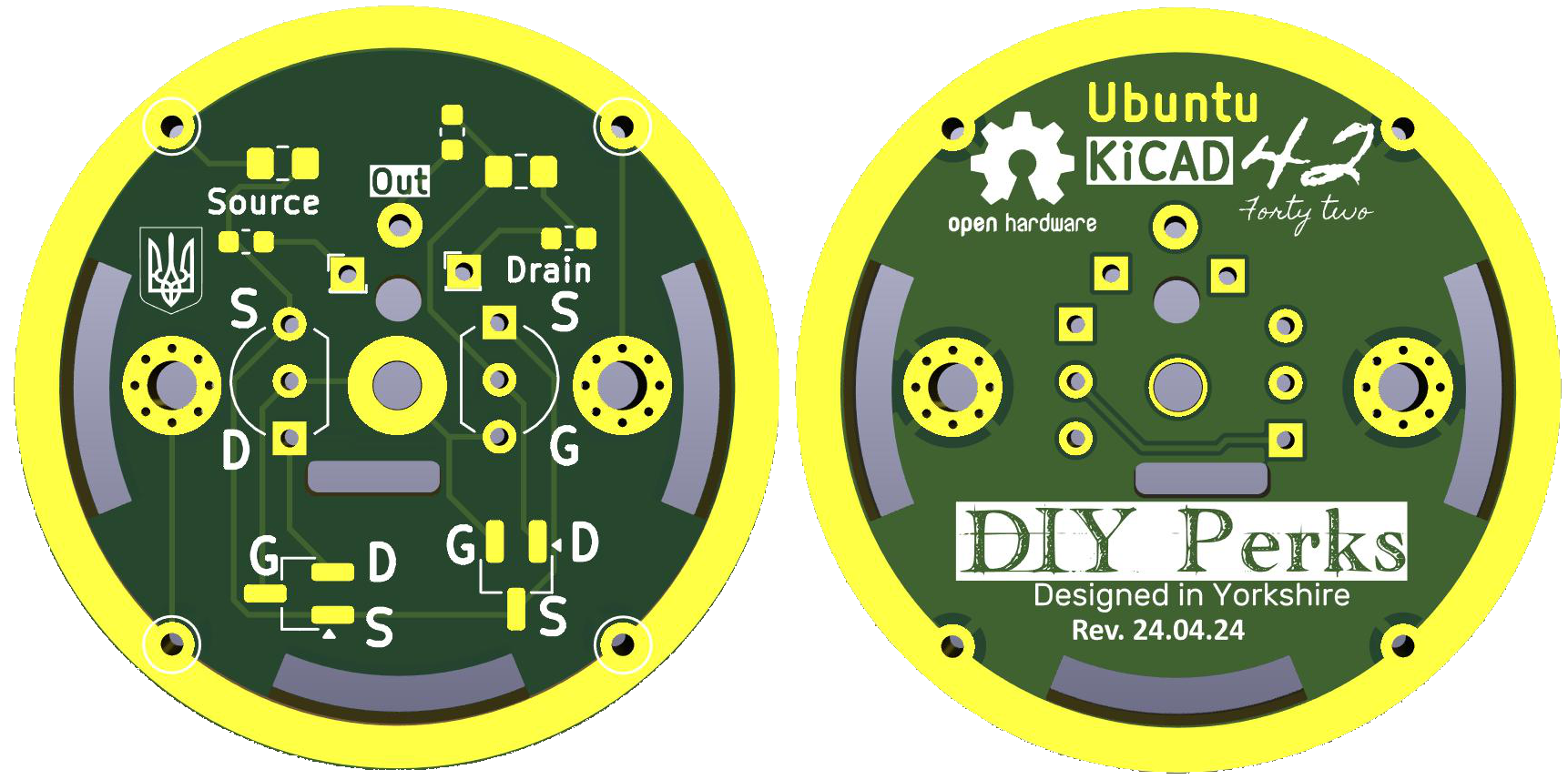
OK so here's a render of the "Ubuntu" (yes, like the Linux distro from Canonical and for the same reason it was chose by them.
I have some of these to give away so watch this space. I haven't figured out the logistics of that as yet. :/
As a bare board it can be used (some links need to be shorted) mount a wide variety of JFETs both SMD and through-hole and is mounted directly to the 25 and 34 mm electret capsules with small mounting holes for something like nylon filament or fine wires depending on the application.
Possible configurations include:
Mount only: Just a carrier and some minimal screening for the JFET. (This wiring is used for @DIYPerks original pre-amp.)
Common Source: Amplification up to around 20dB without large amounts of distortion.
Common Drain: Also known as source follower. Less sensitivity. Better distortion figure.
Differential: Like @DIYPerks but with resistors mounted at the board.
Further space can be used to mount capacitors and ferrite beads to block radio-interference but this is unlikely to be necessary as most capsules will need more screening.
Take everything I say with a pinch of salt, I might be wrong and it's a very *expensive* way to learn!
Posted : 07/05/2024 8:32 pm
PolarYetti and SebTO reacted
@marcdraco Wow very interesting. So this would work as the AMP in the video with the same parts, but instead of being on a big homemade board its on a way smaller one?
Posted : 07/05/2024 8:49 pm
This is purely a mounting system (with multiple different options). One of those is to wire the board so it acts just like a simple electret capsule that will go direct into a sound card. It's a past my bedtime so I'll try to remember to hash one together tomorrow and run it through a PC sound card. I have some other designs on the bench but they're all waiting for me to make a proper screen (or shove them inside of one).
It's an attempt at a Universal board which is why it can take four different types of JFET and the tracks are broken out so various components can be fitted at home (or at your board shop). As a mount, all you have to do is bridge where the optional components are and drop a JFET of your choice and wire as directed. Two or three wires (plus the screen) are needed depending on the configuration.
I'm testing a PCBed version of @diyperks original too at the moment, I'm short on large capacitors but they're due. Some other goodies came to, including the first half of a 5V version that doesn't need an NMA0515 or a THAT 151x Ina and still performs beautifully (with the advantage that it can be powered from 5V up to about 15V, so battery operation is quite possible.
We did try a full-blown design (at one point Matt and I looked at putting everything including the digitizer) on the masthead but the cost became prohibitive for what should be a fun summer-holiday or weekend gig.
As as result I've split this over several but linked designs that can be used piecemeal. One works at P15, one at P48 (both professional systems) and another variation on the Schoeps classic that can fit inside those cheap dollar-store/pound store 4.5v LED torches. More on those as I work through my backlog!
The carrier board (Ubuntu) is "one size fits [almost] all" but isn't a performant except when used as a pure mount with JFET and even then lacks some of the finery of my more complex designs, principally the "guard" trace that adds another layer of interference isolation.
This is my quick and dirty take on @DIYPerks' original Vero design converted to part SMD and part through hole. Being SMD doesn't add a great deal to the cost and saves a huge amount of room. All four of the large capacitors are mounted on the PCB with the Polulo breakout in a roomy board with a large grounded backplane and just 70 x 50 mm give or take. The 22uF non-polar capacitors are mounted but they're pretty small in this image. This also has a bright red LED just because why not, but otherwise everything is done according to Matt's original save for the sockets which I don't have so I've use standard 2.54mm pitch jumpers on mine. "Audio out" has two pins but for convenience but only one is required if the digitiser is wired from this.
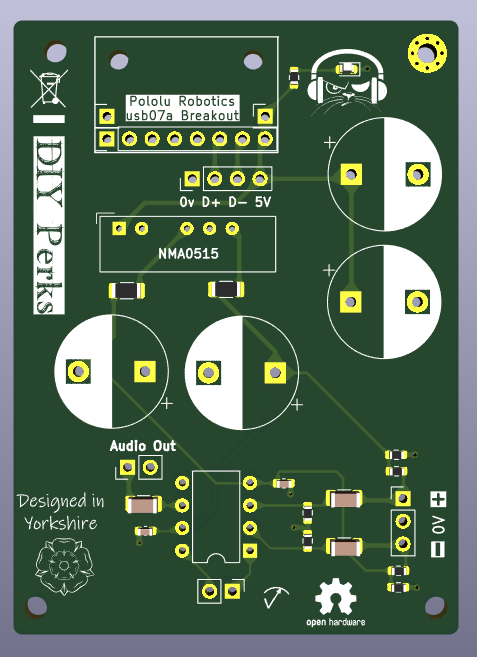
This PCB and the one above are available for anyone and the project files will be on GitHub as soon as I've cleared out all the useless caches and sweary notes I left myself.
Take everything I say with a pinch of salt, I might be wrong and it's a very *expensive* way to learn!
Posted : 07/05/2024 10:23 pm
SebTO reacted

Hi,
I nearly finished my mic, I just have to find correctly sized rubber band for fixing the capsule 🙂
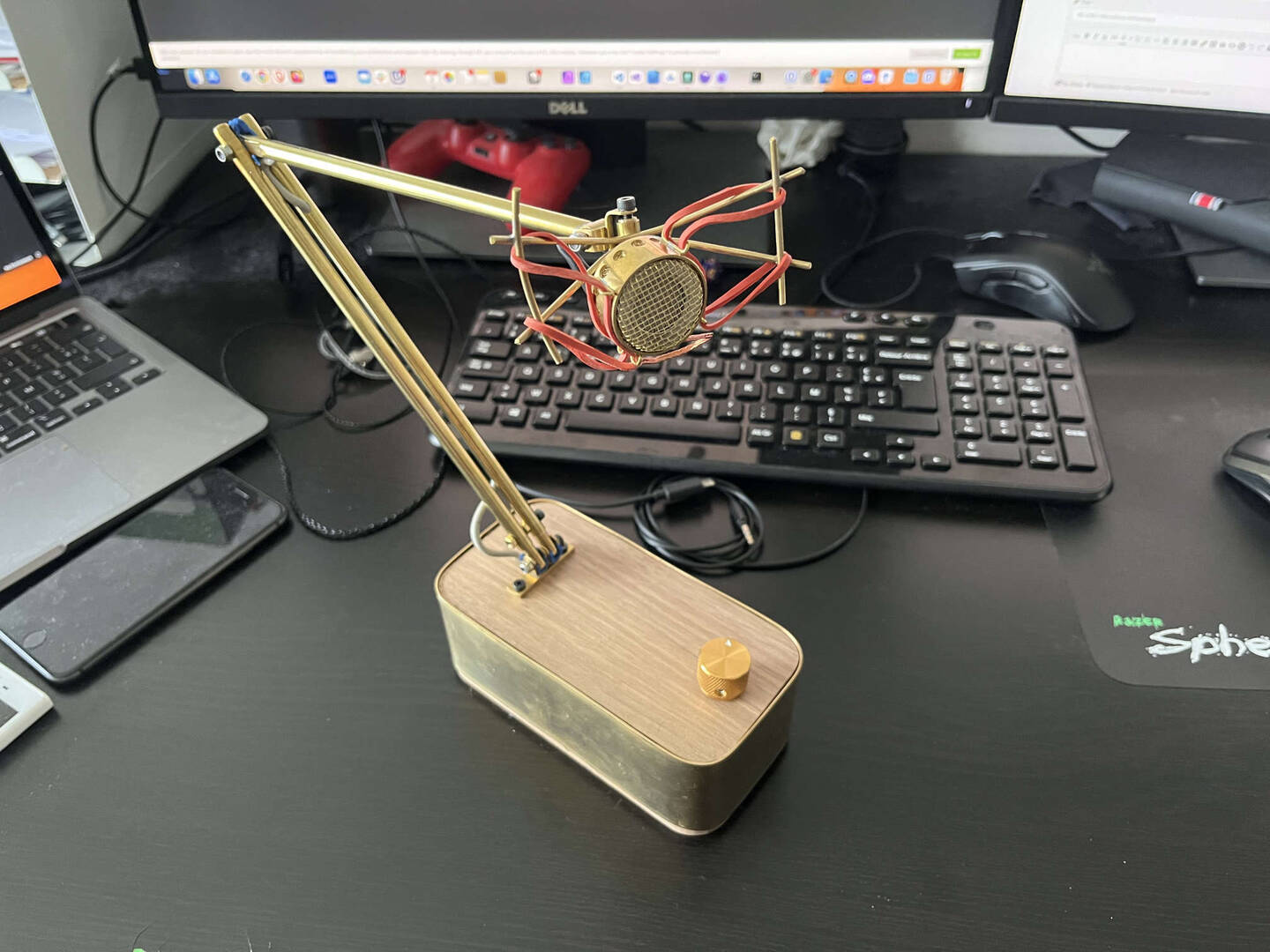
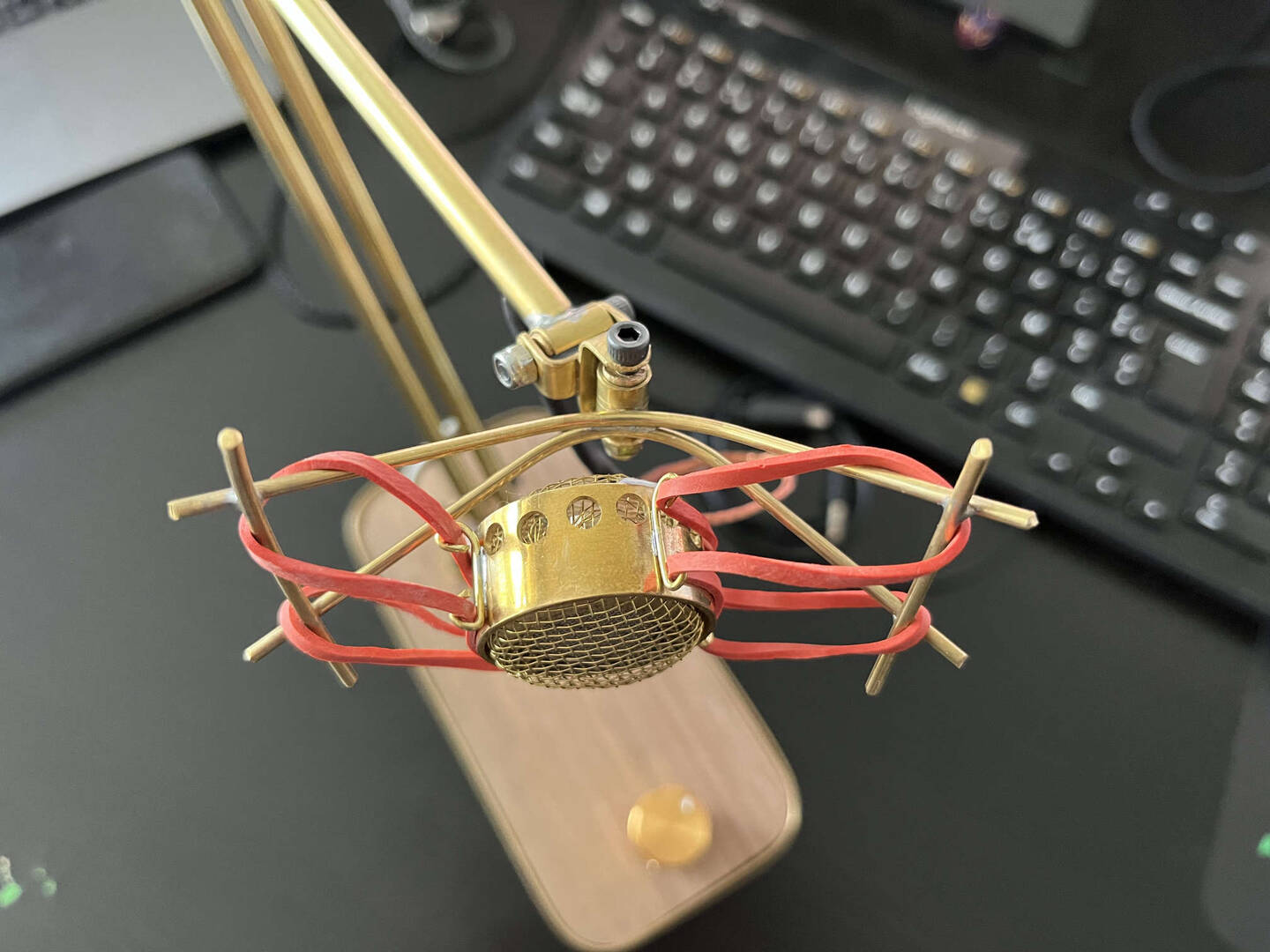
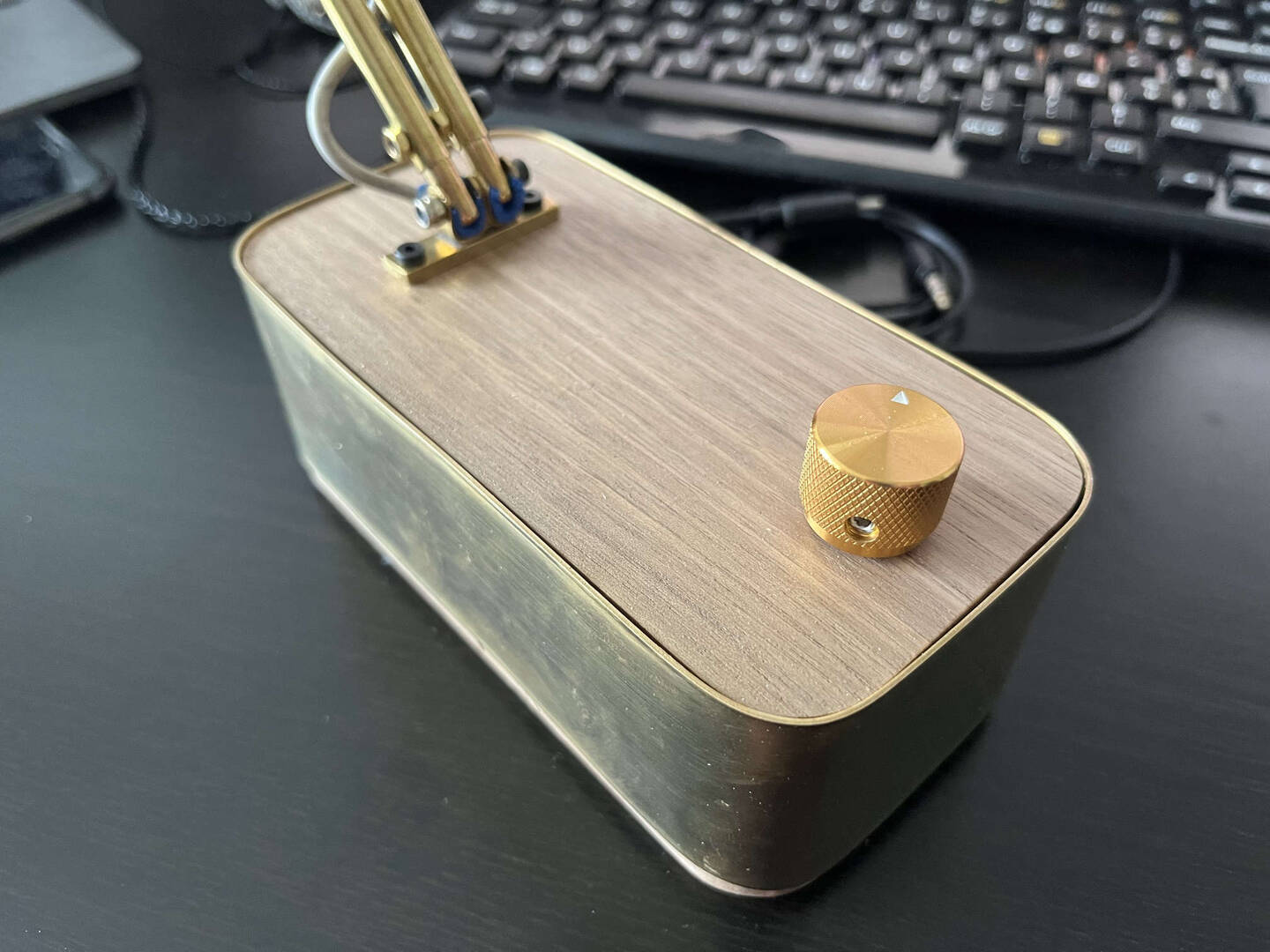
There are still some issues that can be improved in the future (i'll take a pause for now)
The articulations are not flat enough so the mic's arm has a "preferred" position and it tends to go back to this position when I try to move it. Hopefully this position is fully usable, even if I would like to change it sometime.
I tried using some blue foam called "créamousse" (I don't know what is the english equivalent) to add some friction, I works well but it is not enough.
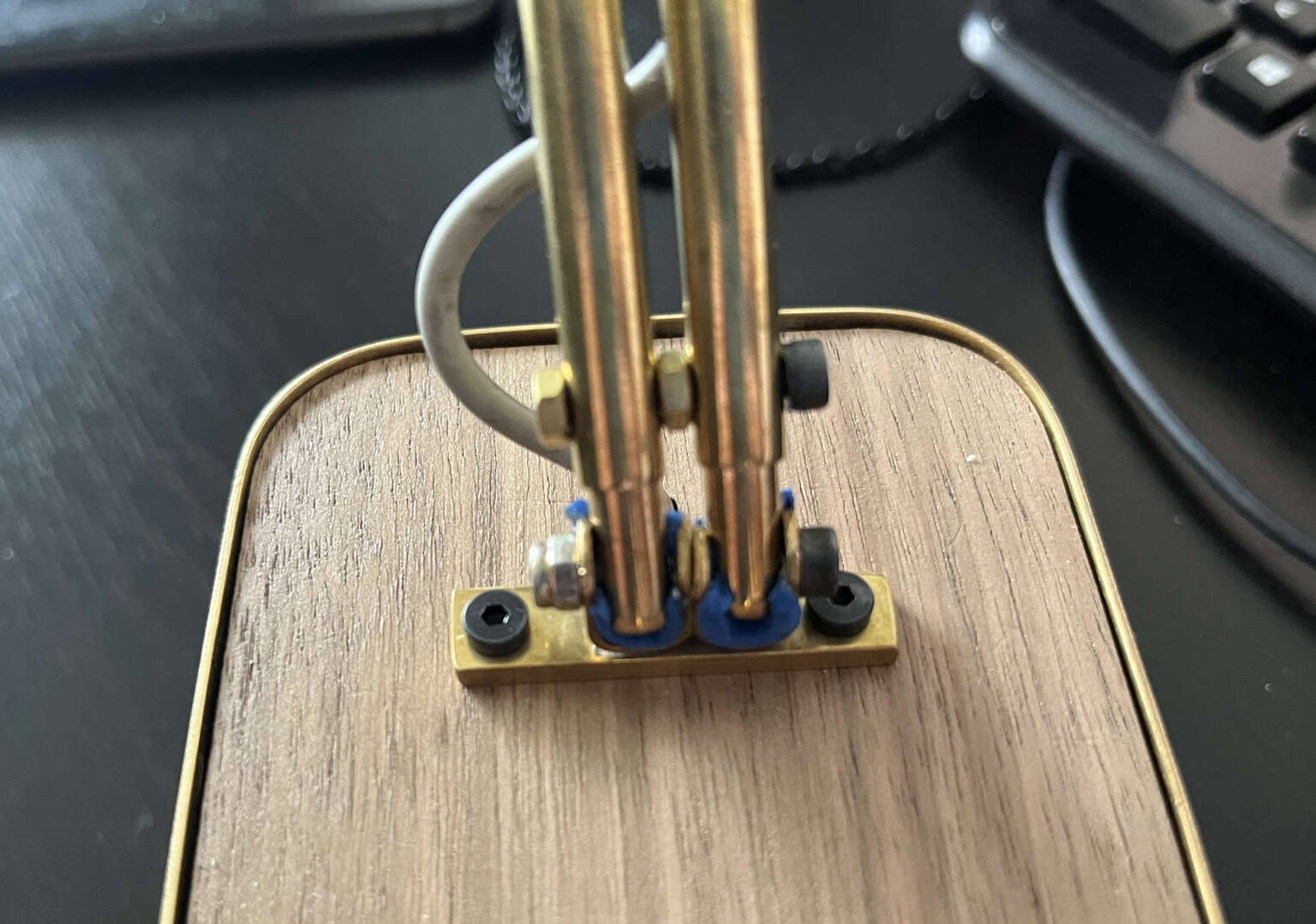
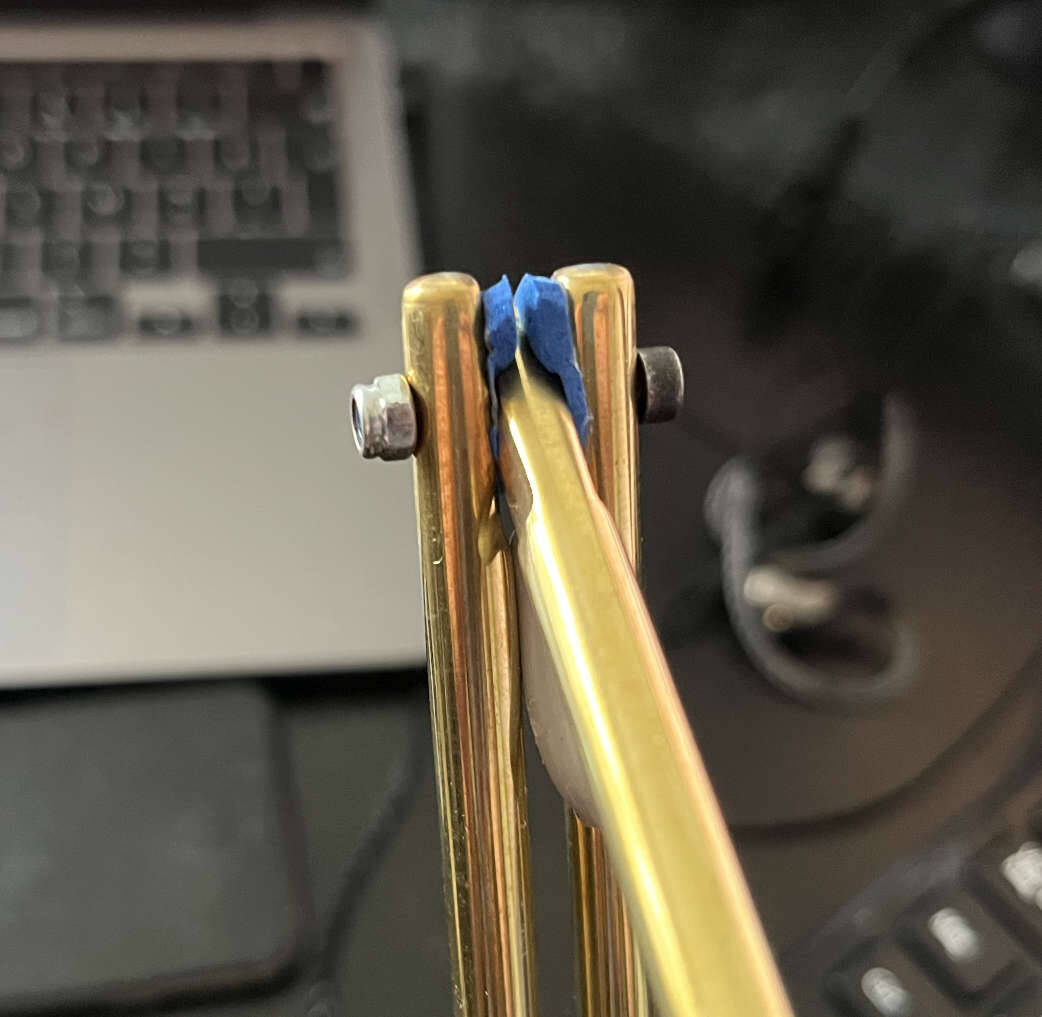
For the capsule articulation I used some rubber seal which works very well, the friction is very strong. Maybe a bit too "rigid", the hole I made in the rod is not fully centered so it also has it's preferred position. I'll try to recreate the rod with a correctly centered hole, I'm sure it would be perfect.
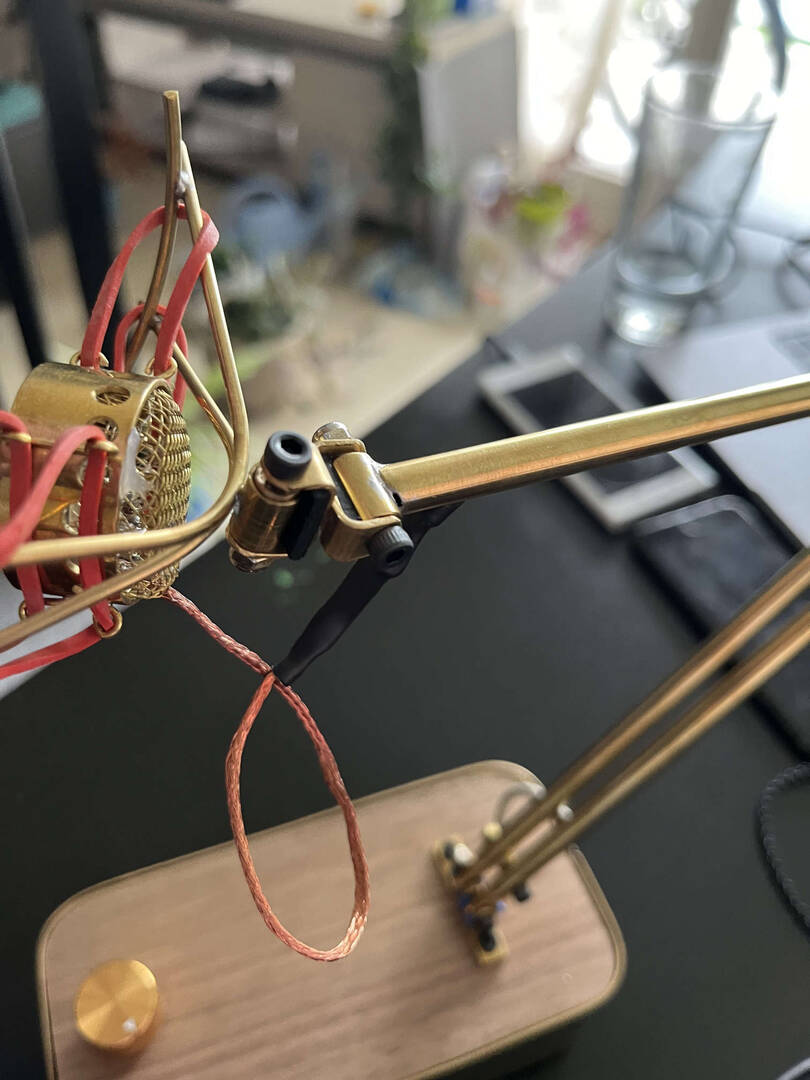
Also as you can on the last picture, the heat-shrinkable sleeve I used is too big to enter into the tube. So i'll need to improve this part too.
The resulting sound is pretty clean compared to my previous micro (a webcam). The sound is a bit too low in my opinion, but when I increase the gain, there start to be too much white noise. So I guess I'll have to learn to talk louder 🙃
Here is a result with a 40dB gain, and with some filters to remove the few white noise that was present (took me a few hours to learn using Equalizer APO + all those filter concepts, but I still have no idea if I use it correctly).
Good to see you again @ldoppea that's looking beautiful, especially that articulation.
I'm closing in on that white noise issue. I've got several machines here and different ones impress varying amounts of noise on the signal using the current V1 design. The capsule is the critical bit to get right at first and that has been a fascinating journey.
I've had a PCB made up with the original circuit so I can compare like for like and a lot of the noise I've been fighting seems to come from the supply (and some are worse than others).
I would hazard that although the the oscillators in the computer and switching power supply are all very high frequency, there's an interference that "folds back" into the audio range. That's just a guess for now though.
The THATs are very quiet indeed (I've run them on a batteries) but USB in general is anything but. Further isolation between the various parts might be order of the day.
Take everything I say with a pinch of salt, I might be wrong and it's a very *expensive* way to learn!
Posted : 08/05/2024 9:57 am
Hey! So I have a question. If I got a different JLI cardioid electret microphone like the JLI-3412 or the JLI-160A11UC680. What else would I need to have it work with a soundcard / amp with a 3.5 mm minijack or 6.3 mm jack?
Posted : 08/05/2024 3:54 pm
Hey! So I have a question. If I got a different JLI cardioid electret microphone like the JLI-3412 or the JLI-160A11UC680. What else would I need to have it work with a soundcard / amp with a 3.5 mm minijack or 6.3 mm jack?
The 34mm one will work with Matt's technique or you can use any of of the mounts I've designed. I still have to clean up my mess (notes and such) so you only have to download the artwork (or, if you want to tinker) the schematic and PCB are fully open source so have it. 😉
Ubuntu is the easiest one right now as little more than a PCB to hold the JFET.
I'm guessing here but it appears JLI put the dimensions in the part number. JLI2555 is 25mm diameter, the 3412 is 34mm which suggests that the 160A11UC680 is 16 mm diamter.)
That one has an internal FET and some noise reduction capacitors so that just needs a 2k2 resistor and a capacitor (and 1.5 DC power) to make it work with an home-made amp or it will just drop into a sound card's microphone jack - but be aware these are TRS (tip, ring, sleeve) and you'll need to make sure you connect the power the right way.
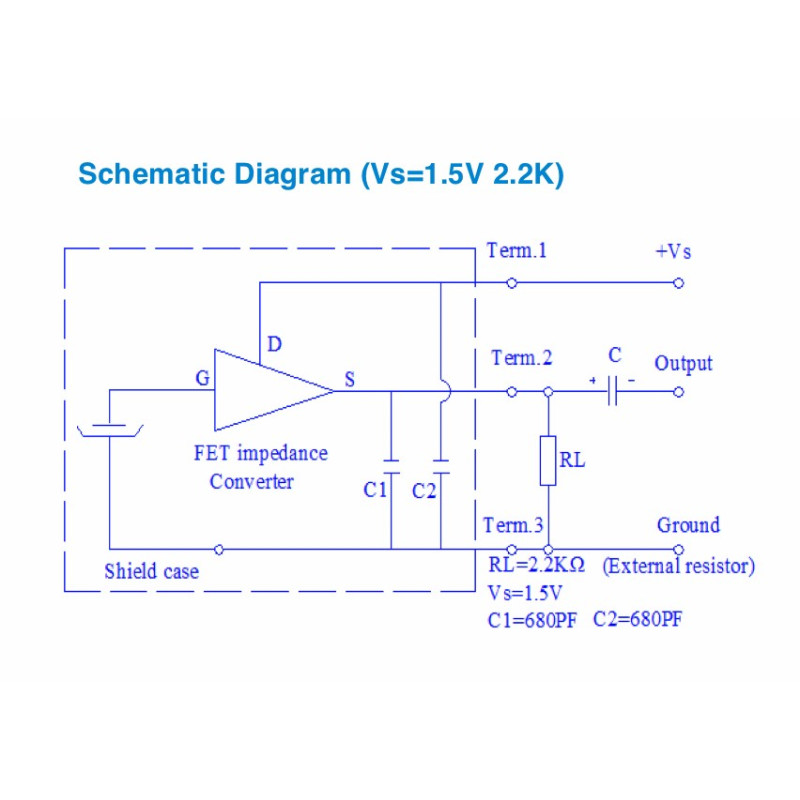
In this diagram they're configuring the mic as a source follower which has slightly less than unity gain (in some of my tests I saw it drop as low as 0.7. The advantage is the FET operates more smoothly than in common source mode. In a common source configuration you can get a modest gain of around x10 (20dB) out of the FET but there will be some measurable distortion, that's something that's best decided by listening to it.
I can't remember the exact spec offhand, from memory it's:
Sleeve: ground/0V
Tip: Signal out.
Ring: 1.5V power.
6.3 mm jacks are (usually) meant for professional audio and usually reserved for instruments but there's nothing to say they can't provide P48 phantom power. I have a capsule PCB sat on my desk waiting to have its transistors replaced so I can try that.
I meant to get them done today but I picked up a quickie project that's something I've been meaning to do so me being me, I designed a couple of quick and dirty solutions. 😉
Take everything I say with a pinch of salt, I might be wrong and it's a very *expensive* way to learn!
Posted : 08/05/2024 5:38 pm
eiriksb reacted
@eiriksb Here's a crummy photo of my PCB version of @Diyperks' schematic with the Ubuntu head. I've made the capacitor positions large enough to take a 25 V capacitor which should last longer than the 16 V ones (the headroom is a little tight for my liking)
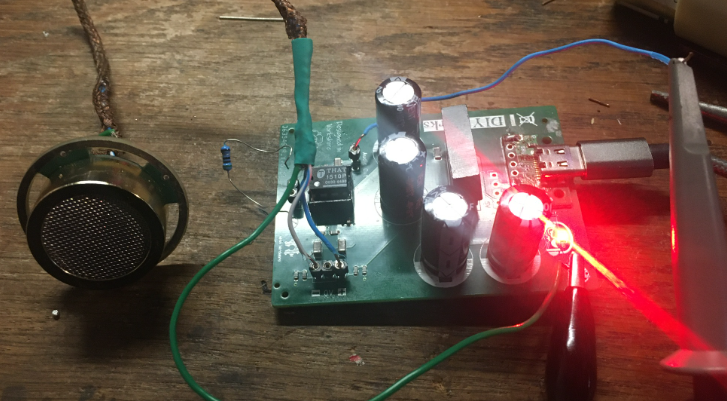
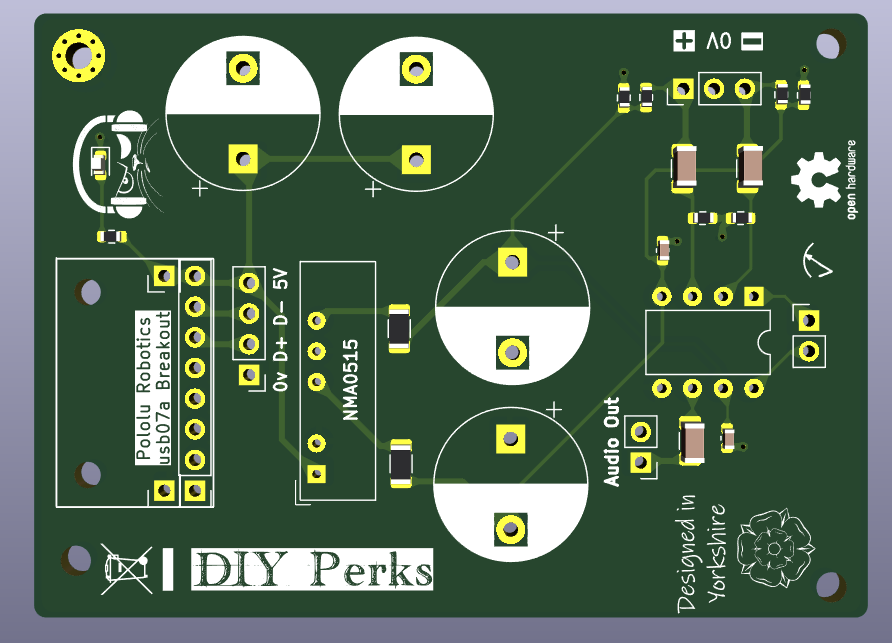
If you look at that hideous mess (it does work) you'll understand why I pass the tricky hardware design to people like @diyperks and @ldoppea
Attached at the project files for these minimalist boards. Both can be ordered from your board shop, JLCPCB have always been my go-to as the prices are unbeatable and they'll do all that tricky SMD stuff at the factory.
Take everything I say with a pinch of salt, I might be wrong and it's a very *expensive* way to learn!
Posted : 08/05/2024 8:10 pm
PolarYetti and eiriksb reacted
@marcdraco Oh the Ubuntu Board is that small? ( I thought it was part of the Microphone ) Anyhow, While looking through this I did have a little revelation. I'm assuming we are getting power through the USB C connecter, right? This would obviously make my 3.5 mm or 6.3 mm jack solution obsolete, no? Or does this not matter necessarily since my sound card would theoretically do this?
Posted : 09/05/2024 6:31 am
Original Design
Matt's original (of which this is just a "mass production" version in effect) is a three stage job.
1. JFET at the capsule.
2. THAT1512 and bits on the stripboard - the preamp & volume control.
3. A pre-made digitiser that's of quite high quality.
What I've done here is mount the USB-C breakout on the PCB so it's easier to manipulate everything but yes, everything comes from the USB.
Sound Card Option
Ubuntu can be configured for this, you just have to short some different jumpers and that's all you need. The sound card provides the all the other necessary bits and bobs. It's still a three-wire connection but in that case only one of them carries the signal so it's "unbalanced" which means it can pick up electrical noise.
Unfortunately this thread has gotten a bit long with all my blithering on (LOL) so I guess we'll all need a refresher.
I'll try to get the other capsule adaptors "heads" tested over the next couple of days but they are for the version 2 design and 48V professionally powered head too which takes offers the option of hooking up to commercial equipment like the Focusrite amps. My aim was always to offer an option to take Matt's beautiful creation into the professional space. I have a P15 (15 volt) version of this design too, for lower voltage gear, both based on a slightly tweaked version of the original Shoepes design.
Take everything I say with a pinch of salt, I might be wrong and it's a very *expensive* way to learn!
Posted : 09/05/2024 9:54 am
eiriksb reacted
@marcdraco Also another thing, I see the cable from the Ubuntu to the Amplifier still has the copper shielding like in DIY Perks video. Is this still required, does it pick up a lot of noise from the cable if I lets say wanted this to go from a headset to a amplifier with like a 2 meter long cable?
Posted : 09/05/2024 10:07 am
The screen is primarily there to exclude inductive noise coupling on the wire.
The reason is that although the JFET reduces the impedance of the capsule from 100s of MEGA ohms down to a few K ohms, that's still a very high impedance when it comes to noise rejection.
Say what?
Energy is no in the wires but in EMF (fields) around everything. Hang a piece of wire out of the window and an (albeit) tiny voltage will develop along its length. We use to call these things ariels and that's not a joke - in fact if we connect one end to the earth (literally the soil) a tiny current will flow.
When I was a kid we made radios using this (crystal sets) but since the AM bands are largely unused now there's not a lot to hear (and there are easier ways to do it).
To pick that weak signal up we need to divert it into something that won't just gobble up that little bit of energy a high impedance. This is one of those "observer effect" problems that we usually hear mentioned in quantum physics.
We have to take some of the signal away to do something with it but take too much and it's like a short circuit. The higher the input impedance of an amplifier is, the LESS energy it takes for interfering signals to get in our face.
Crystal sets use very high impedance headsets that are surprisingly efficient and would make excellent speakers if they didn't sound utterly horrendous.
Now, the mains "hum" that's running around your home is a much more powerful field that the radio signal that even your mobile phone picks up.
The capsule itself acts like a huge ariel with a very efficient high to low impedance converter there. So those tiny fields we're not even aware of get into the capsule and gum up the works. That's the "WHAT THE HELL!?" noise that comes out of an unshielded mic.
But the FET (alone) can't get the output impedance down all that far. To be fair from hundreds of megohms down to a few thousand isn't bad but the signal is still very week in the order of 100s of mV even if you scream at the thing.
The difference between voltage and current is what matters.
Voltage is just the indication of energy, but we all need to realise the energy is in the fields (I complain about this a lot because understanding this is key to solving the most tricky of noise issues).
Current is an effect caused by a changing field. We're interested in getting as much current as we can from the mic because we want the fields we create to swamp the fields that are escaping from our house wiring.
High-school physics describes that a wire moving through a magnetic field experiences a flow of current and current put through some wire forms a magnetic field.
What they don't tell you is those fields don't just hang there, they're like waves in the ocean. Our signal (even after the FET has passed it) is like a boat cutting through the water - creating waves - called fields in electromagnetism.
The FET converted a little rubber dinghy's effect on the water (barely a ripple) to something more like a small fishing boat's worth. (This isn't magic, we're putting energy in to do that remember.)
But the mains field are still represent another sizable water going craft nearby. This is easier if you've been on a lake, etc. but you'll even see it in films or just try this in the bath (LOL) waves even from a similar sized vessel still tend to make the boat rock.
In other words, we need to make our boat a whole lot bigger than the the nearby ones so we create massive ripples that swamp (see where how that term is derived now>) the other interfering signals.
We don't care about the mains. If our piffling little signal influences the mighty mains, then good luck to it.

This is the best I could get Dall-E to do sadly and I don't have time to draw it properly but the larger our fields are the less they interfere with but the bottom line is you want to be on the biggest boat possible.
Let's imagine then that we could put a wall between our boat and others nearby. This is what the screen does. Even if we're in the same size boat (the field energy is the same) we're not effected because the waves from the other boats crash into the wall.
Does that make more sense?
Take everything I say with a pinch of salt, I might be wrong and it's a very *expensive* way to learn!
Posted : 09/05/2024 12:00 pm
eiriksb reacted
@marcdraco Somewhat yes. So to keep it short (even though your description was well formulated and a good read) the noise would be to significant or does there exist of wires that can prevent this? Like if I were to get the Ubuntu board and put a JLI-2555BXZ3-GP on it. Would the, lets say a distance between the board and the amp of 2 meters, create to much noise to be usable with a normal audio cable? Or am I completely of track? ( I am currently finishing up my Bachelor degree report so I'm working on less brain cells then usual 🤣 )
Posted : 09/05/2024 12:11 pm
marcdraco reacted
Good luck with the study. I do so miss those long nights drinking and smoking weed studying.
Take everything I say with a pinch of salt, I might be wrong and it's a very *expensive* way to learn!
Posted : 09/05/2024 12:31 pm
eiriksb reacted
@eiriksb Well that was weird. I'll try to delete that post in a moment.
Simple answer is that a typical 2K2 input impedance is unlikely to be low enough to swamp the external noise, I think Matt used 3k9 per leg on his.
That said you can wire Ubuntu as a simple FET carrier and wire it direct to a sound card. Such mics always use a screened cable (usually lapped screen which is poorer than a braid) and that's enough to stop the majority. Mains is fields are "referred" to earth so they tend to go down the shield. I suspect this may an with laptops because they are invariable fully isolated from mains earth whereas desktops are not. (I'll have to dig a tower out to try this.)
TL;DR - a couple of meters of simple screened stereo cable will work fine with Matt's original design or a super-simple one that's wired as a desktop mic to the sound card.
Note that you'll still need a brass mesh around the capsule as that's all exposed to random electrical fields.
Take everything I say with a pinch of salt, I might be wrong and it's a very *expensive* way to learn!
Posted : 09/05/2024 12:41 pm
eiriksb reacted
Let's make things simpler (mainly because I've already done most of the work) I present Minerva - a customised version of the Ubuntu mentioned earlier in this thread, which is a near universal adaptor but does require some potentially fiddly soldering. Ubuntu is a more advanced carrier for general designs, Minerva (below) is designed specifically to improve the performance of the V1 design.
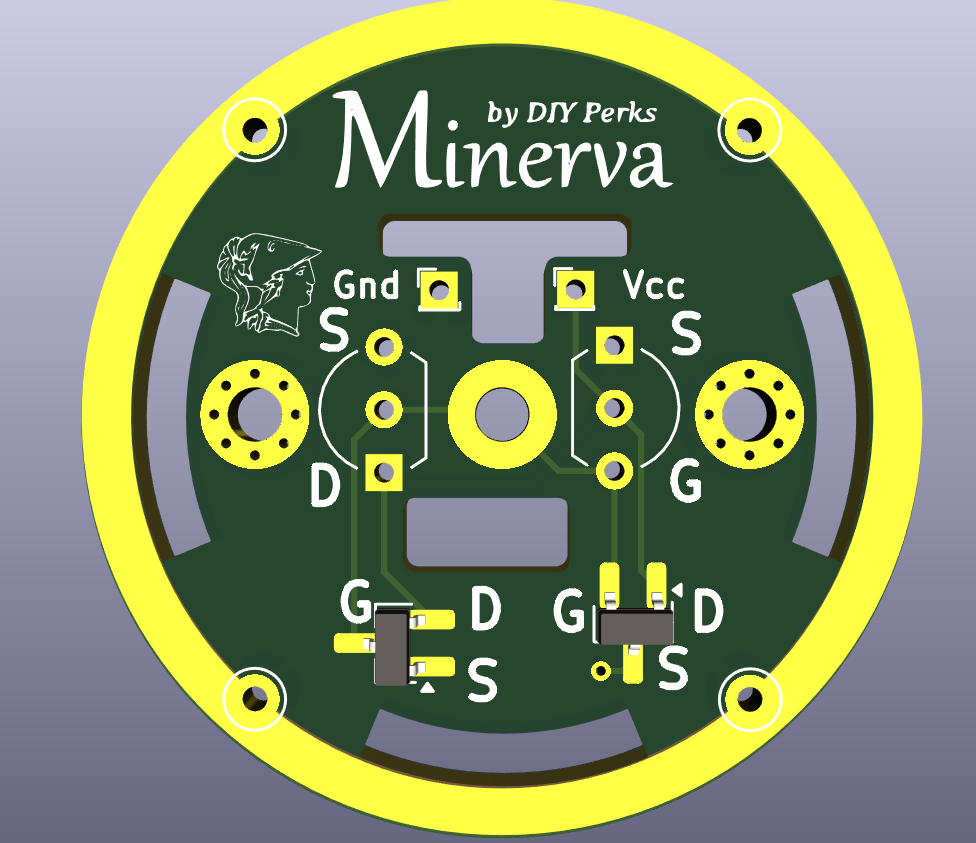
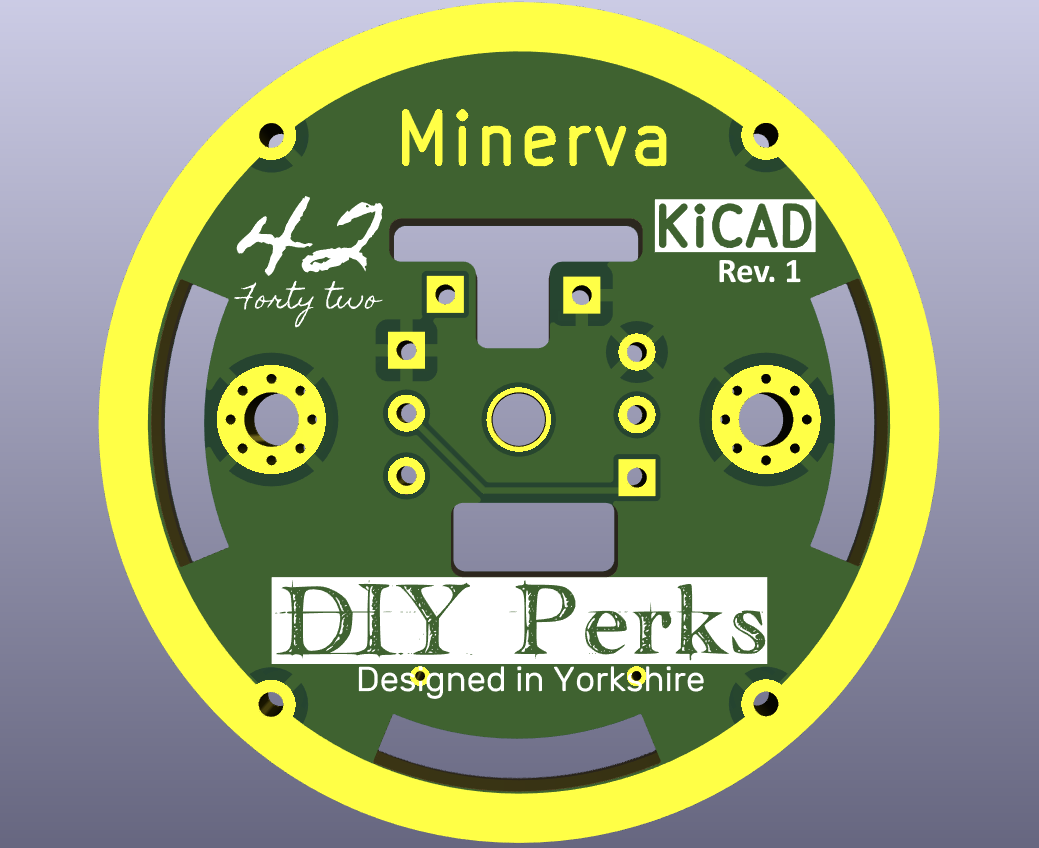
This is a 34mm carrier also designed to take the smaller 25mm JLI capsule as recommended by DIY Perks (Matt) and I can heartily recommend to. It makes a mockery of the cheap Chinese copies available on eBay and is without doubt the better choice.
Minerva does three things easy that are are difficult with the original but crucially it works with the original Veroboard/stripboard (or the PCB I've designed for that).
- Increases the sensitivity at the capsule end (20 dB or better).
- Takes any of a selection of different JFETs making it less likely users will make a mistake here.
- Significantly reduces FET distortion at high sound pressures from 14% to 3% (in simulation) over the original design.
While the more complex designs offer further improvements in distortion, etc. this is the one I would recommend for anyone who is making this excellent project for the first time.
This is the project in KiCAD 8 format. KiCAD is free and you can get a plugin from Aisler PCB which will allow you to prepare everything in a single click. Aisler does have an offer on right now that will reduce the price if you order parts from their partner. JLCPCB and the others in the Far East will be much cheaper but the quality may not be as good. (I've had boards from both and I know which I prefer but I'm budget limited).
If you want to check out with Aisler without all that faffing around with KiCad, I've provided a direct links to relevant artwork at Aisler all ready to check out.
Minerva: https://aisler.net/p/EAJRTQVI
Ubuntu: https://aisler.net/p/FTOQLHVP
Michelle https://aisler.net/p/VMJCLWJM (Matt's original design as a mixed mode PCB)
Currently (unless you have a coupon) the Ubuntu and Minvera boards works out at about 4 euros a piece - with standard production (8 days) and shipping to the UK from, I assume, Germany without tracking.
Michelle works out at about 12 euros per board (minimum order 3) but you might get a better price by selecting the appropriate parts from their supplier.
Faster production, faster delivery and better specifications (ENIG vs. HASL - gold vs. nasty solder if you prefer) and ENIG does look better if you can see it, but it's unlikely to make any significant improvement.
Aisler is opening in the UK so that will help of course.
Take everything I say with a pinch of salt, I might be wrong and it's a very *expensive* way to learn!
Posted : 12/05/2024 12:58 pm
@marcdraco Wow! This is really cool! What parts are needed with it, other than the mic and the
2N4416?
Posted : 12/05/2024 1:22 pm
Minerva and Ubuntu are only need the FET. Now I should point out that due to spotty supplies of the 2N4416 I didn't design the layout for that particular transistor. If you haven't already ordered that part, the LSK170A offers far better performance and comes in a TO-92 epoxy case that drops right in there.
If you have got your 4416, it will drop into the Minerva and Ubuntu boards via the holes on the right-hand edge with the tab pointing out and it would look a little like this mockup I've done in Affinity Photo.
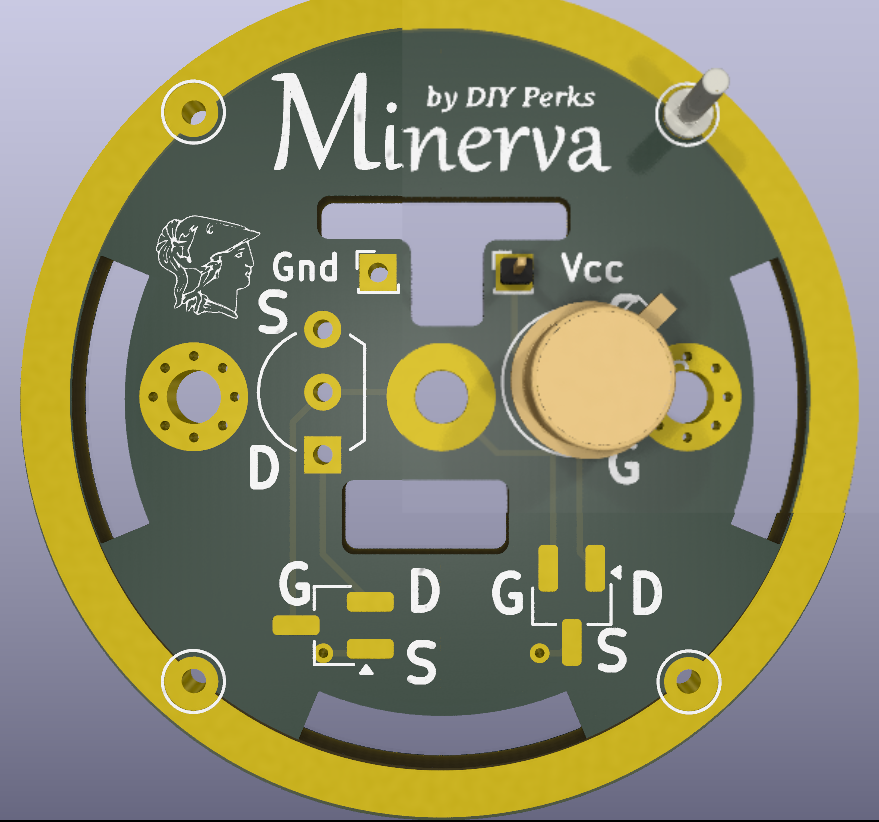
Minerva is better for the DIY Perks application as it's simpler, but you only need the board and a JFET of your choice. The spare "leg" on the SN4416 can either be cut or connected to ground.
Michelle (a hybrid take on the original Vero design) jumps a couple of hoops to get the best of both worlds but SMD soldering can be a bit hairy so these are better left to the factories to do. JLC are your more cost effective bet for that to be honest. Particularly if you're OK to wait a few weeks. The BOM should be available with the KiCAD project above, but if Matt is amenable, we'll find a way to "sticky" the important boards that are ready for use in the wild.
Varee (the working one... man did I drop the ball right on my foot there) is currently under test but showing surprising promise even with half of the power cut and a transistor just sorta hanging there. Grounding that (it's meant for +15 phantom) tends to make it complain a, but in a later revision I split the dual PNP device into two separate transistors so one can be safely removed. (This also allows me to test a fully P48 compatible version of Varee using transistors that I can't source in China (at least, not quickly).
Take everything I say with a pinch of salt, I might be wrong and it's a very *expensive* way to learn!
Posted : 12/05/2024 5:01 pm
@marcdraco Have not ordered anything yet no. But I might order the Minerva Board from Aisler with that LSK170A. Do you know where to get the LSK170A cheap? I cant seem to find it on the cheap sites like Aliexpress like I could the 2N4416. Also how difficult would you say the project is to do on a soldering level? Have not touched a soldering iron in years haha.
Posted : 12/05/2024 5:14 pm
So sorry @eiriksb, I completely missed your reply.
LSK170s are in good supply. I get mine from eBay but they should be easily available. There is also the 2SK208 (cheaper but slightly poorer, but you'd have one heck of an ear to tell). Both are available in SMD or through-hole - but I'd strongly recommend the TO92 versions.
I found this listing from a Chinese supplier so it's likely available in your local eBay. These should do the job, but you have more choice with Minerva. Check out the spec sheets for any N-channel JFET you find and look for applications like "condenser microphone". I've had this thing work with all manner of random JFETs but it's better to use ones the manufacturer specifically intended for audio work.
"10pcs 2SK170-BL K170 2SK170BL FET N-Ch TO-92 Transistor N Channel"
I've done more designs for these heads than I could fit on a large dinner plate - 🙂 but that informed how to make them easier to solder for people like me who are a little "wobbly".
The pins are spread out a little to make it easier to solder and the solder resist is pretty good these days so even if you do make a little bridge, it's easily removed with some de-soldering braid or a sucker.
A temperature controlled iron is preferable.
I've found that turned IC sockets - you can get strips of them - work quite well for testing (Aisler will only do a minimum of three boards) so you could use one to make sure everything is going according to plan: this is the sort of thing I'm using.
2.54mm Single Row Turned Pin IC Socket
For best results, the transistor should be pushed most of the way into the board prior to final soldering.
One thing I can't stress enough though: it's important to clip the excess off before you solder the socket(s). I know this seems bonkers but you don't need (nor want) a huge lump of solder sitting in the chamber at the back as it might short to ground or even damage the element.
The stripboard version of the project is very well done as with all of Matt's stuff but the blasted stuff is a nightmare to use for the best of us. Lack of solder resist means solder goes everywhere when you're not looking and the cheaper stuff flooding the market is very thin with even thinner copper foil. The PCB version at Aisler is superior and has space for that adaptor if you want to use it but not that cheap sadly.
I just finished the first proper V2 design but it'll be a couple of weeks before that comes back. I'm going see how practical a through-hole version it is but it's a more complex board with added functions.
Take everything I say with a pinch of salt, I might be wrong and it's a very *expensive* way to learn!
Posted : 15/05/2024 11:19 am
@marcdraco Thank you for providing that search term, I actually did end up ordering a few of the Minerva of JLCPCB for like 4$ including shipping, so we will see how that turns out. And the only LSK170 components i found when googling was some really expensive ones that were like 16$ a pop. I have yet to order the microphone and the LSK170s, and whatever else I would need. But nonetheless I will buy the other parts at some later time when I've moved places haha.
Posted : 15/05/2024 1:16 pm
$16 - that's nuts! JLC are pretty good, I have to say.
I've got a better board over there at the moment. I was with the last batch but I made a last-minute change and then wished I hadn't. That was an expensive mistake.
Are you in the states? I can give you a better idea of where to order from if I know where in world you are - but $16 a piece is daylight robbery. They're taking your eyes out and then coming back for the sockets!
I've done the V2 main board too but I've made a lot of concessions to keep costs low. I would hazard a guess that it may even be cheaper to get an SMD one made, but we'll see. Through hole is easier to work with while I'm still testing out my ideas.
Don't forget there are other versions of the 170. Toshiba did the original 2SK170 but they quit and it's produced by Interfet now I believe under the LSK170 label with improved specs.
Toshiba still produce the 2SK208 which is a decent alternative.
I'm led to believe (and on paper it looks good) that the J113 should work. It's classed as a switching transistor but it has all the characteristics of a JFET like low voltage noise and super-high input impedance.
Take everything I say with a pinch of salt, I might be wrong and it's a very *expensive* way to learn!
Posted : 15/05/2024 1:45 pm
@marcdraco So Im currently in one of the top 3 most expensive places to live and breath in Europe, Norway. But I am moving far over seas soon (Australia)
And while I thought i looked up the right 2SK170 I think the reason it was so expensive was simply that I looked up the wrong thing 😬
Surprisingly its very cheap to get the 2SK170s down under from China. Even the Microphone itself ordered from micbooster.com is cheaper to ship from the UK to AU then getting it shipped to Norway. So I'll wait on ordering more stuff till I'm back there.
Posted : 15/05/2024 1:57 pm